Helios — Distributed Tiling to PMTiles
A four-notebook series that takes one San Francisco bounding box and turns it into self-contained PMTiles archives — one per data modality — then shows how to shard a layer into a multi-archive mosaic for web-scale delivery, using GeoBrix on Databricks.
The notebooks follow a solar site-selection narrative: identify candidate rooftops (vector, NB01), overlay an aerial basemap for visual validation (raster, NB02), and layer terrain-derived slope, aspect, and hillshade to score each candidate by sun exposure (elevation, NB03). A final notebook re-publishes the vector layer as a distributed, sharded PMTiles mosaic — many archives plus a catalog and manifest — for web-scale delivery (NB04). The single-archive outputs feed a single plot_pmtiles / plot_cog viewer, giving a single-browser-tab deliverable with no tile server.
This series is an on-ramp to Databricks-native spatial: NB01 uses the built-in st_area / st_centroid and h3_longlatash3 functions directly on the WKB column for roof metrics and H3 density; NB03 bins slope and aspect into H3 cells via gbx_rst_h3_rastertogridavg and joins them with native Databricks SQL to produce a solar_score — no format conversion required at any step.
notebooks/examples/helios — download the folder and import config_nb.ipynb and the four numbered notebooks into your Databricks workspace to run.
The series uses the lightweight tier — pure Python/PySpark bindings (databricks.labs.gbx.pyrx, databricks.labs.gbx.pyvx) plus the geobrix[light_env6,stac,vizx,overture] wheel, installed by config_nb — so it runs on Serverless with no JAR. Visualization helpers come from databricks.labs.gbx.vizx. To run it on the heavyweight tier instead, flip the commented option-2 in config_nb.ipynb (rasterx) and attach the GeoBrix JAR + GDAL init script to a classic x86 cluster. Spark-conf tuning is routed through a set_conf_safe() helper that no-ops on Serverless (where runtime config mutation is disallowed) and applies on classic clusters. See Execution Tiers.
plot_pmtiles (from gbx.vizx) renders a .pmtiles archive directly in the notebook by embedding the archive as base64 in a self-contained MapLibre GL JS page (FileSource; in a Databricks notebook an archive over ~4–5 MB — after the cell-output cap and displayHTML's ~2–3× inflation — falls back to a static thumbnail). plot_cog renders a Cloud-Optimized GeoTIFF over a contextily basemap as a static matplotlib figure. See the PMTiles function reference for the archive aggregator and writer.
The notebooks ship with INTERACTIVE_PLOTS = False so the committed .ipynb renders fast, GitHub-compatible static maps. Set INTERACTIVE_PLOTS = True in config_nb or in a cell right after %run ./config_nb for interactive MapLibre multi-layer maps.
Notebooks at a glance
01 — Vector Engine (MVT)
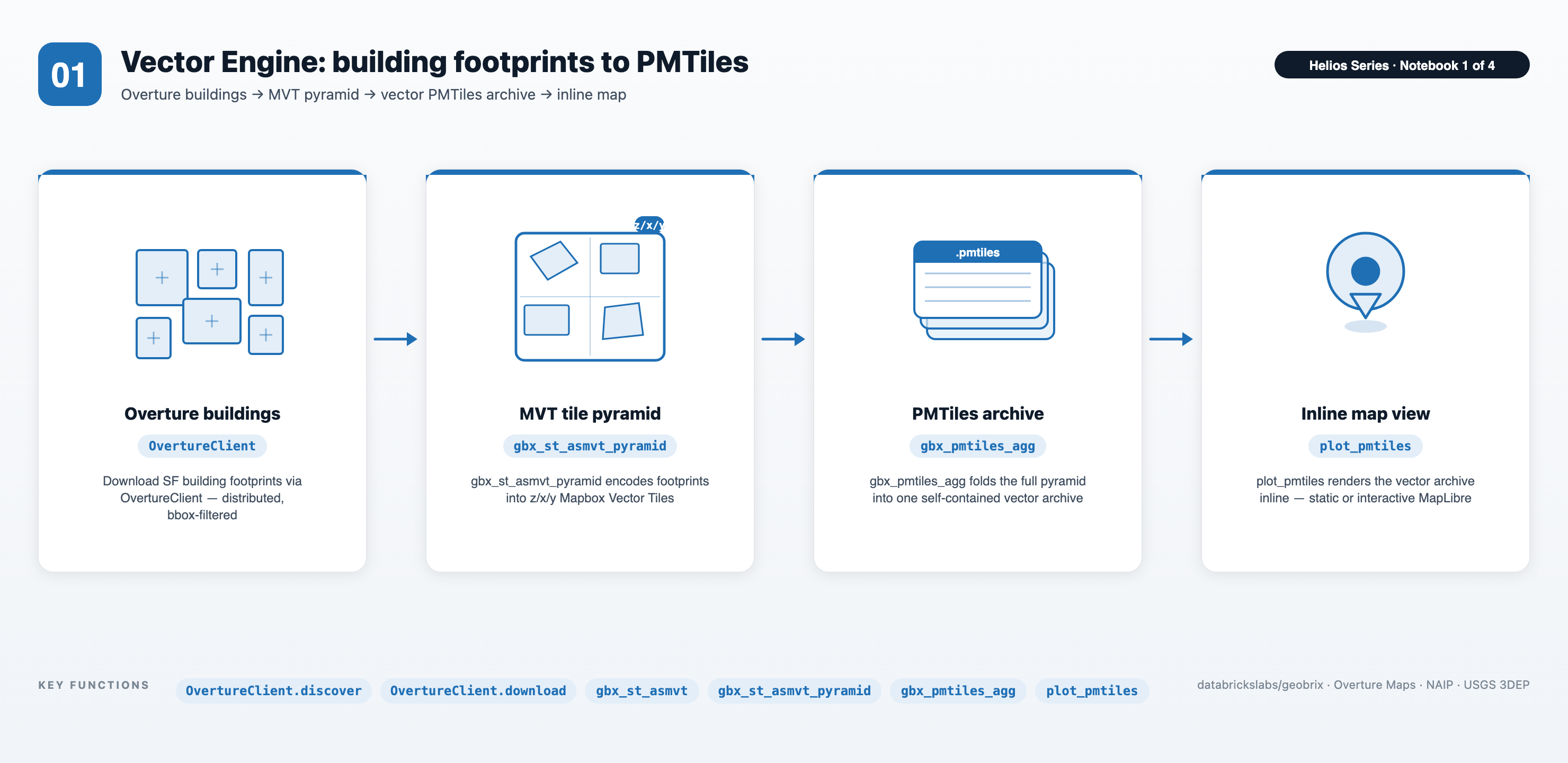
- Distributed MVT encoding —
gbx_st_asmvt+gbx_st_asmvt_pyramidfans out tile generation across the cluster in parallel, producing a full zoom-range MVT pyramid without driver-side loops or single-node bottlenecks. - Databricks-native spatial composition — built-in
st_area/st_centroidcompute per-building roof area and centroid directly on the WKB column;h3_longlatash3bins centroids into H3 cells for roof-density scoring. These native functions compose cleanly with GeoBrix MVT encoding — no format conversion required. - Single-archive delivery —
gbx_pmtiles_aggmerges the distributed tile output into onesf_buildings.pmtilesarchive on the Volume;plot_pmtiles(fromgbx.vizx) renders it inline.
02 — Visual Basemap (XYZ)
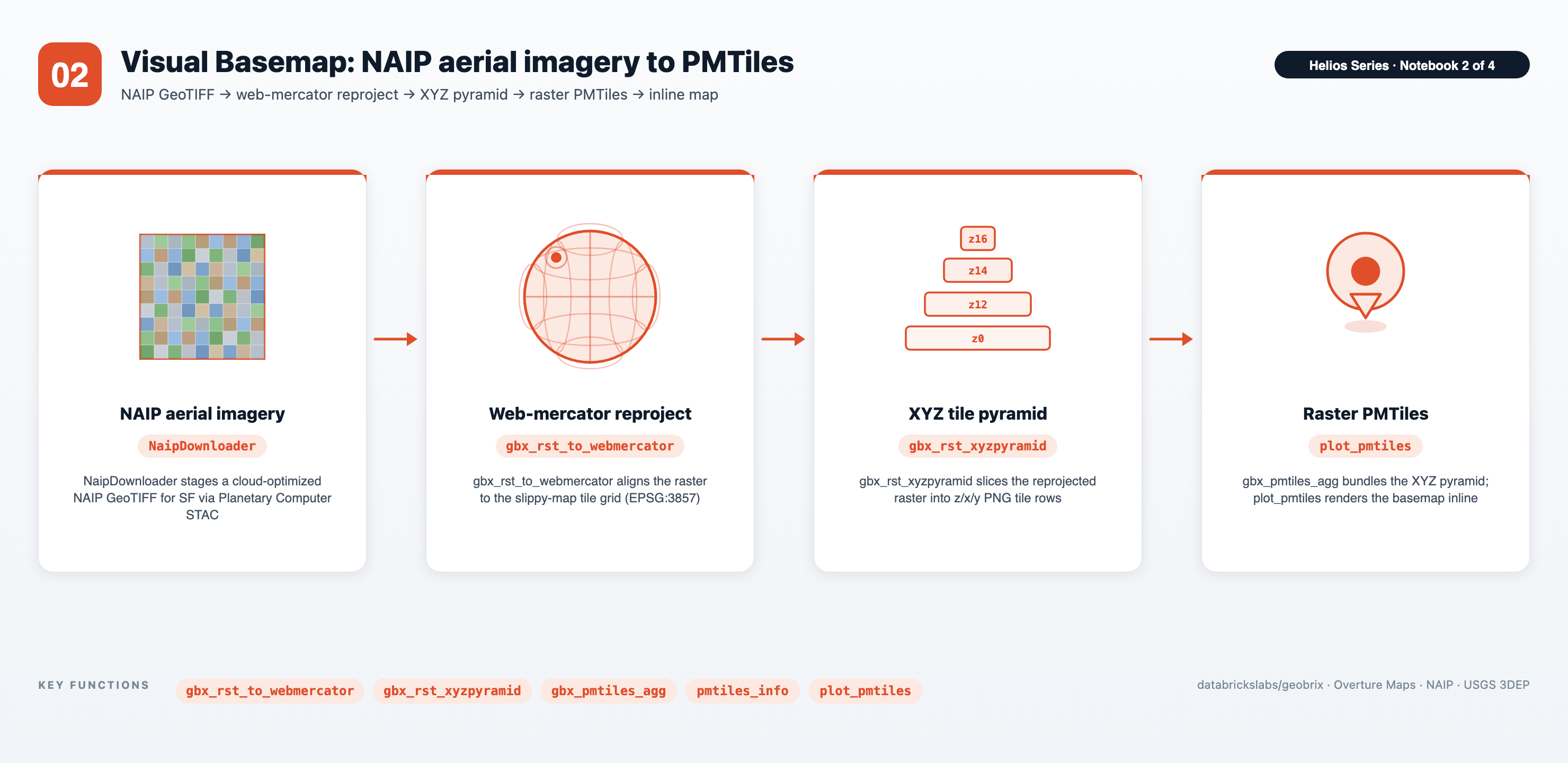
- Distributed Web Mercator reprojection —
gbx_rst_to_webmercatorreprojects each NAIP scene across the cluster to the standard slippy-map CRS, scaling linearly with tile count rather than running serially on the driver. - Full-resolution XYZ pyramid —
gbx_rst_xyzpyramidgenerates all zoom levels in a single distributed pass, matching the zoom range of the vector layer in NB01. - Raster PMTiles —
gbx_pmtiles_aggwrites the XYZ tile set intosf_naip.pmtiles;plot_pmtilesrenders it inline. WithINTERACTIVE_PLOTS = True,plot_interactivelayers the aerial basemap under the NB01 building footprints in a single MapLibre map (buildings layer degrades gracefully if NB01 has not run).
03 — Analytical Core (COG + STAC)
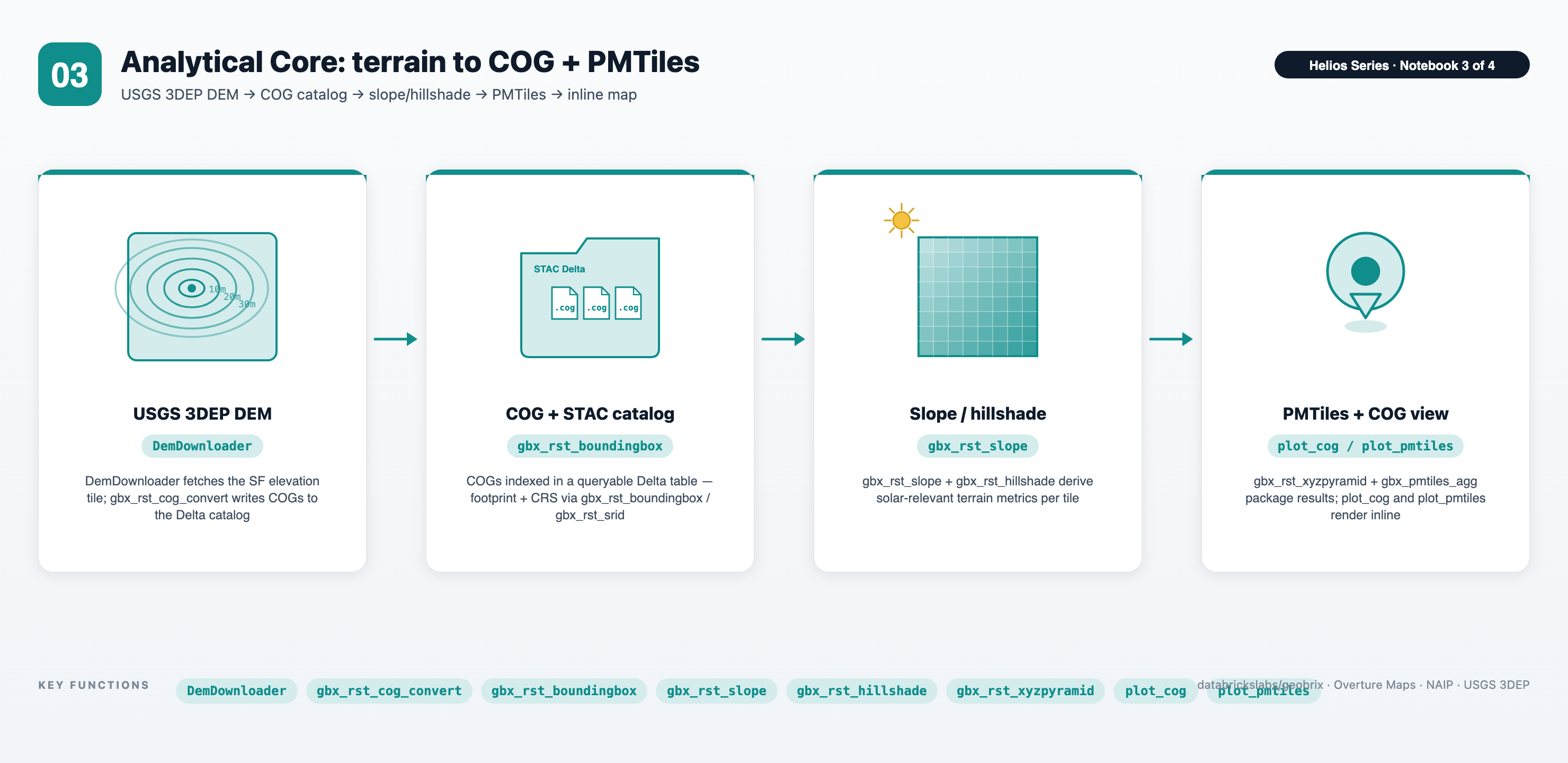
DemDownloader→ COG + STAC Delta catalog — thegbx.sampleDemDownloaderstages a 3DEP DEM (windowed to the AOI), thengbx_rst_cog_convertconverts it to a Cloud-Optimized GeoTIFF in a distributed pass; the resulting COG paths are written to a managed STAC Delta table for incremental updates and downstream notebook access.- Terrain analytics at scale —
gbx_rst_slope,gbx_rst_aspect, andgbx_rst_hillshadederive terrain layers in parallel across all DEM tiles;gbx_rst_xyzpyramid+gbx_pmtiles_aggpackage the hillshade intosf_hillshade.pmtiles. WithINTERACTIVE_PLOTS = True,plot_interactivelayers the hillshade and the NB01 building footprints as PMTiles and the H3solar_scoreas a grid layer — all in one MapLibre map. - Databricks-native solar scoring —
gbx_rst_h3_rastertogridavgbins slope and aspect rasters into H3 cells; the resulting per-cell values are joined and scored with native Databricks SQL expressions to produce asolar_scorecolumn;h3_centeraswkbreconstructs geometry for map rendering — all without leaving the warehouse.
04 — Distributed Sharding & Mosaic
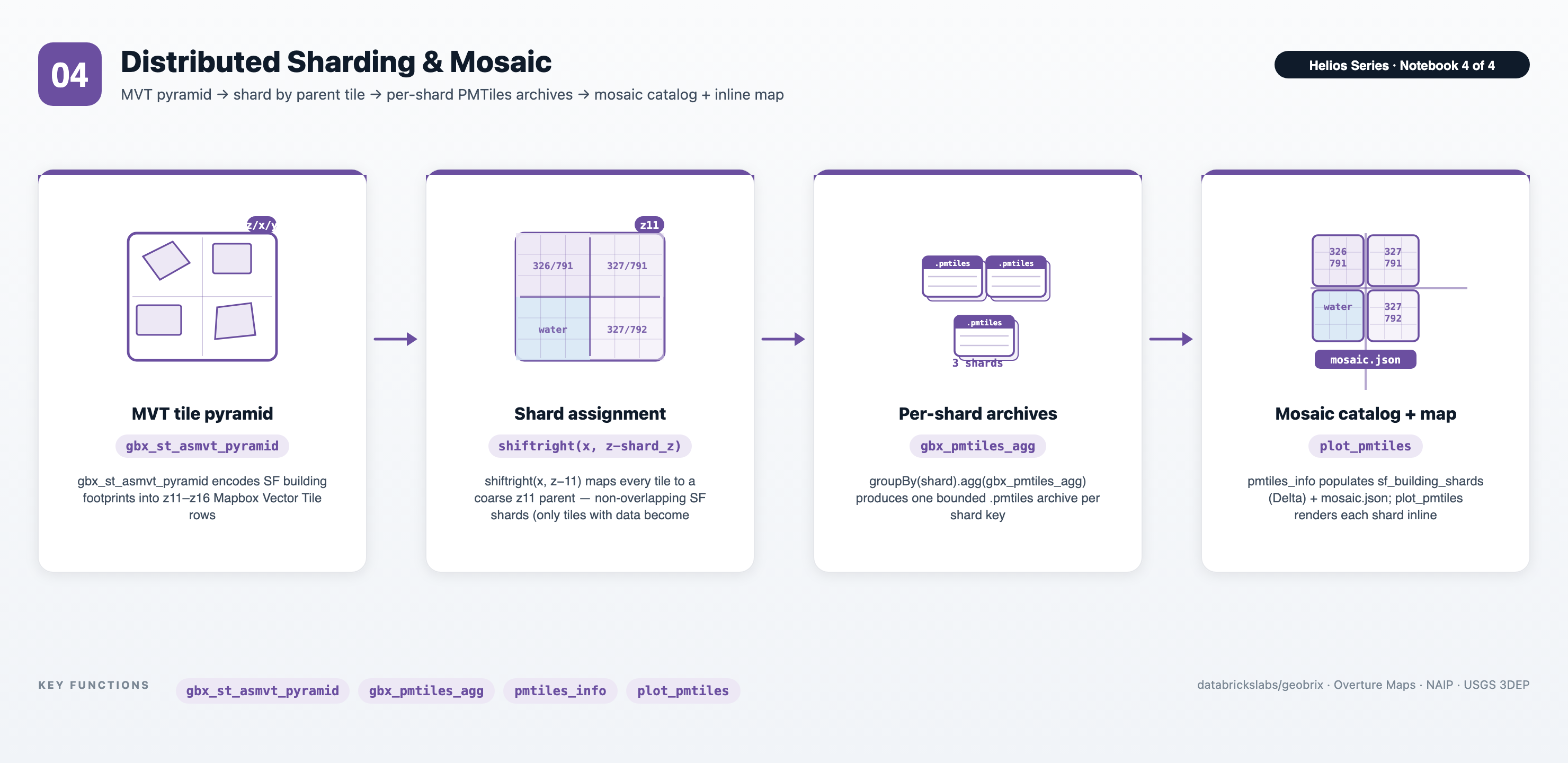
- Spatial sharding into parallel work units — each pyramid tile is assigned to a coarse parent tile (z11) via
shiftright(x, z-11), thengroupBy(shard).agg(gbx_pmtiles_agg(...))fans archive packing out across the cluster — one.pmtilesper shard instead of one monolithic file. The SF AOI spans four z11 parent tiles, but only the three containing buildings produce an archive (the SW tile is open water) — shards form only where there is data. - Shard catalog + mosaic manifest — a
sf_building_shardsDelta table maps each shard key to its archive path and bounds (pmtiles_info), and amosaic.jsonmanifest lets a client discover and assemble the shards with no tile server. - Web-scale delivery pattern — buffering the source query while keeping output tiles non-overlapping across shards keeps boundaries clean and avoids double-rendering; the mosaic pattern scales a single AOI into the per-file size range that object stores and CDNs serve efficiently.
Files
| File | Purpose |
|---|---|
config_nb.ipynb | Shared setup (%run ./config_nb from every main notebook). Installs the geobrix[light_env6,stac,vizx,overture] wheel (2-step: --no-deps first, then with extras), selects the tier (option-1 pyrx/pyvx default / option-2 heavyweight), registers functions and light readers/writers, imports visualization helpers (plot_pmtiles, plot_cog, pmtiles_info), sets catalog_name / schema_name, creates the /Volumes/<cat>/<schema>/data/helios ETL tree, instantiates OvertureClient, and exposes FORCE_REBUILD and INTERACTIVE_PLOTS toggles. |
01. Vector Engine (MVT).ipynb | Loads SF building footprints via OvertureClient, computes roof area and H3 roof density with Databricks built-in ST/H3 functions, encodes MVT tiles with gbx_st_asmvt + gbx_st_asmvt_pyramid, and packages the result into sf_buildings.pmtiles with gbx_pmtiles_agg. |
02. Visual Basemap (XYZ).ipynb | Downloads NAIP aerial imagery for the SF AOI via NaipDownloader, reprojects to Web Mercator with gbx_rst_to_webmercator, generates an XYZ tile pyramid with gbx_rst_xyzpyramid, and writes sf_naip.pmtiles with gbx_pmtiles_agg. |
03. Analytical Core (COG + STAC).ipynb | Downloads a 3DEP DEM via DemDownloader, converts it to a COG with gbx_rst_cog_convert, builds a STAC Delta catalog, derives slope/aspect/hillshade, packages sf_hillshade.pmtiles, and computes a per-H3-cell solar_score with gbx_rst_h3_rastertogridavg + native Databricks SQL. |
04. Distributed Sharding & Mosaic.ipynb | Re-publishes the SF buildings vector layer as a multi-archive PMTiles mosaic: assigns each pyramid tile to a coarse parent shard (z11), packs one .pmtiles per shard with groupBy(shard).agg(gbx_pmtiles_agg), and writes a sf_building_shards Delta catalog + mosaic.json manifest (bounds via pmtiles_info) for client-side mosaic assembly. |
Prerequisites
- Databricks Runtime 17.3 LTS / 18 LTS, or Serverless (Scala 2.13 / Spark 4 / Python 3.12). The lightweight default runs on Serverless (set Environment to version 6); the heavyweight option requires a classic x86 cluster.
- GeoBrix 0.5.0.
config_nb.ipynb%pip-installsgeobrix[light_env6,stac,vizx,overture]from a staged Volume wheel using the 2-step pattern (force-reinstall--no-depsfirst, then with the extras). For the heavyweight option, flip option-2 inconfig_nb.ipynband attach the GeoBrix JAR + GDAL init script to the cluster. - Unity Catalog. Edit
config_nb.ipynbto setcatalog_nameandschema_name. A Volume nameddatamust already exist under<catalog>/<schema>— the notebooks create sub-directories inside it but will not create the Volume itself. - Network access. NB01 reads Overture Maps via
OvertureClient; NB02 fetches NAIP viaNaipDownloaderand NB03 fetches 3DEP viaDemDownloader, both from Planetary Computer STAC (online-only — no offline fallback). Classic cluster outbound internet is sufficient; Serverless has it by default.
Run order
- Open
config_nb.ipynb, setcatalog_name/schema_name, and verify the Volume exists. - Run notebooks in numeric order: 01 → 02 → 03 → 04. Each notebook starts with
%run ./config_nbso the shared state is re-established every time. NB04 reuses the building footprints from NB01, so run NB01 first (ifoverture_buildings_metais absent, NB04 re-fetches them from Overture).
Each notebook is safe to re-run — outputs are written with skip-guards so already-built files are not re-downloaded or re-tiled. Set FORCE_REBUILD = True in a cell right after %run ./config_nb to force a full rebuild of that notebook's outputs.
Data flow
San Francisco AOI (one bbox, reused across the series)
        │
  ┌─────┴───────────────┬─────────────────────────────┐
  ▼                     ▼                             ▼
Overture buildings    NAIP aerial (helper)         USGS 3DEP DEM (helper)
(OvertureClient)       │                             │
  │                    ▼ gbx_rst_to_webmercator       ▼ gbx_rst_cog_convert
  ▼ gbx_st_asmvt        │                             │   → COGs + STAC Delta
    + st_asmvt_pyramid  ▼ gbx_rst_xyzpyramid          ▼ slope/aspect/hillshade
  │                    │                             ▼ gbx_rst_xyzpyramid
  ▼ gbx_pmtiles_agg     ▼ gbx_pmtiles_agg             ▼ gbx_pmtiles_agg
sf_buildings.pmtiles   sf_naip.pmtiles              sf_hillshade.pmtiles
  │                     │                             │
  └─────────────────────┴──────────────┬──────────────┘
                                        ▼
                          plot_pmtiles / plot_cog (inline)
                            → solar site-selection view
Key GeoBrix / Databricks functions shown
- GeoBrix VectorX (
pyvx/ SQL):gbx_st_asmvt,gbx_st_asmvt_pyramid— distributed MVT tile generation and pyramid fan-out. - GeoBrix RasterX (
pyrx/ SQL):gbx_rst_to_webmercator,gbx_rst_xyzpyramid,gbx_rst_cog_convert,gbx_rst_slope,gbx_rst_aspect,gbx_rst_hillshade,gbx_rst_h3_rastertogridavg. - GeoBrix PMTiles (
pyrx/pyvx/ SQL):gbx_pmtiles_agg— aggregate tile bytes into a single archive, or grouped asgroupBy(shard).agg(gbx_pmtiles_agg)for a sharded multi-archive mosaic (NB04);pmtiles_info— per-archive bounds for the shard catalog; PMTiles Writer (.write.format("pmtiles_gbx")) — for larger pyramids. - GeoBrix sample downloaders (
stac/overtureextras):OvertureClient.discover/download/read(building footprints, NB01);NaipDownloader(NAIP, NB02) andDemDownloader(3DEP, NB03), both wrappingStacClient(distributed STAC search / download / repair). - GeoBrix VizX:
plot_pmtiles,plot_cog,pmtiles_info— inline PMTiles / COG rendering without a tile server. - Databricks built-in ST / H3 (on-ramp to native):
st_area,st_centroid(roof metrics, NB01);h3_longlatash3(roof density, NB01);h3_centeraswkb(H3 solar-score geometry, NB03).
Gotchas
- PMTiles is driver-side only.
gbx_pmtiles_aggproduces the archive via a distributed reduce but the final file lands on the driver Volume path — it cannot be read back viaspark.read. Usepmtiles_info/plot_pmtilesfor inspection. plot_pmtilesbase64 size guard. The inline embed is bounded by the notebook cell-output cap (~10 MB default, 20 MB max), anddisplayHTMLinflates the payload ~2–3× — so an archive over ~4–5 MB falls back to a static thumbnail. Scope the AOI/zoom range, useinteractive_fit="downzoom", or stream from anhttps://URL if the archive exceeds the ceiling.- Overture cloud-path vs. HTTP-href.
OvertureClientfirst tries a direct cloud-storage path; if that is not reachable from the cluster network it falls back to an HTTP href. Classic clusters with S3 VPC endpoints reach the cloud path; Serverless always reaches the HTTP href. - NAIP and 3DEP network reachability. Both sources require outbound internet access via Planetary Computer and have no offline fallback — NB02 (
NaipDownloader) and NB03 (DemDownloader) skip or error if the endpoint is unreachable. - Repartition by column on Serverless. A number-only
repartition(N)is AQE-coalesced on Serverless. Always repartition by a data column (e.g.,repartition(N, "tile_x")) before distributed UDF calls. - Wheel install is a 2-step pattern.
config_nbinstalls the wheel with--no-depsfirst (to force fresh bytes), then reinstalls withgeobrix[light_env6,stac,vizx,overture](to pull extras). A bare single-step--no-depsinstall drops the extras and causesModuleNotFoundErrorat import.