H3 Rasterize — DEM Elevation Contours to a Multi-Band H3 Raster Stack
A DEM extra in the Wireless Coverage series. The main notebooks build elevation surfaces from a raw LiDAR point cloud; this one takes the complementary path — a ready-made 10 m seamless DEM — through the full raster→H3 pipeline. It stands alone: no LiDAR required.
An end-to-end example showing how to convert USGS elevation data into a pixel-aligned, multi-band H3 raster stack using GeoBrix RasterX and the gbx.vizx helpers — with H3 indexing done entirely via Databricks built-in product functions.
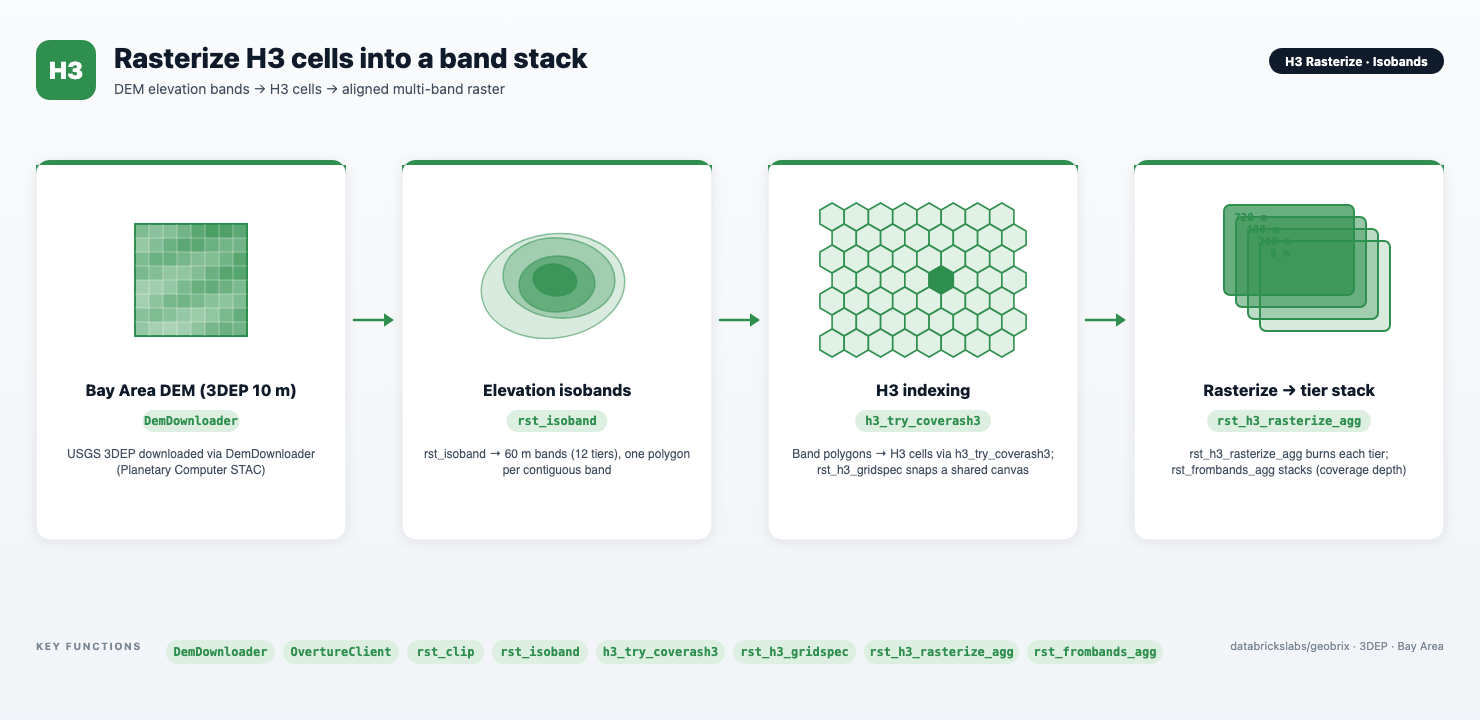
The notebook works over the San Francisco Bay Area: it downloads the USGS 3DEP seamless (10 m) DEM via DemDownloader() (Planetary Computer STAC) and stages the tiles to a Unity Catalog Volume, then downloads an Overture Maps base/water layer via OvertureClient to build a land multipolygon. The raster_gbx reader with tileSize=512 splits each GeoTIFF into 512×512-px virtual tiles (bytes-free path + window, the memory-efficient default), one Spark row per tile. The seamless product is delivered in EPSG:4326, so no reprojection is needed. rst_clip masks each tile to the land polygon (cutline_all_touched=True), setting Bay and Pacific pixels to NoData at the source — essential over a water-heavy AOI. rst_isoband then extracts twelve 60 m elevation bands (0–720 m) as distributed Spark columns, and the Databricks product H3 function h3_try_coverash3 indexes each band at H3 resolution 9. The pipeline computes a shared pixel canvas with rst_h3_gridspec, burns each band with rst_h3_rasterize_agg, and assembles the multi-band GeoTIFF with rst_frombands_agg. cells_as_gdf dissolves per-group polygons on Spark via the Databricks product st_union_agg before bringing them to the driver. A coverage-depth composite rendered by plot_raster closes the loop.
notebooks/examples/h3-rasterize — download h3_rasterize_isobands.ipynb and import it into your Databricks workspace to run.
geobrix[light_env5,stac,vizx,overture])The notebook uses the lightweight tier — pure Python/PySpark bindings (databricks.labs.gbx.pyrx) plus the geobrix[light_env5,stac,vizx,overture] wheel — so it runs on Serverless environment 5 with no JAR or GDAL init script. The per-tier rasterize result is materialized into a session-scoped temporary table (CREATE TEMP TABLE) so that the stacking step reads cached bytes instead of recomputing the burn. Session temp tables require Serverless or DBR 18.1+; they are not supported on dedicated / single-user clusters. See Execution Tiers for the trade-offs between lightweight and heavyweight.
Files
| File | Purpose |
|---|---|
h3_rasterize_isobands.ipynb | The full pipeline: DEM download and staging, isoband extraction, product-H3 indexing, shared grid spec, per-band rasterize, band stacking, and visualization. |
README.md | Setup instructions, requirements, and a summary of each pipeline step. |
Prerequisites
- Databricks Runtime 17.3 LTS / 18.1+ or Serverless (Spark 4 / Python 3.12). Lightweight default runs on Serverless. Session temp tables (Step 4) require Serverless or DBR 18.1+; they are not available on dedicated / single-user clusters.
- GeoBrix (version 0.5.2). The
%pip installcell installs thegeobrix[light_env5,stac,vizx,overture]wheel, which pulls inrasterio,matplotlib,geopandas,mapclassify(visualization), planetary-computer STAC client (stac), and Overture Maps helpers (overture). No JAR or GDAL init script is required. - Unity Catalog Volumes:
DemDownloader()stages the USGS 3DEP seamless (10 m) GeoTIFFs to/Volumes/geospatial_docs/geobrix/sample-data/geobrix-examples/sf/elevation-3dep/dem_10m;OvertureClientstages the Overture water layer to.../sf/overture-water-bay. UpdateDEM_DIRandLAND_DIRif your Volume layout differs. The Volume root must already exist; staging creates sub-directories automatically. - Wheel path: update the
%pip installcell to point at your stagedgeobrix-0.5.2-py3-none-any.whlif its Volume path differs from the default. - Databricks product H3:
h3_try_coverash3is a built-in Databricks function available on DBR 16.3+ / Serverless, accessed via the product Python bindings (from pyspark.databricks.sql import functions as DBF) — no extra install is needed.
Run order
- Install and restart — the
%pip installcell installsgeobrix[light_env5,stac,vizx,overture]and is followed immediately by%restart_python; run cells in order without skipping the restart. - Imports and registration — imports
pyrx,pygx,gbx.vizxhelpers, and callsrx.register(spark)+gx.register(spark)+register(spark)to install SQL UDFs. - Download DEM and land mask —
DemDownloader().download(…)fetches USGS 3DEP seamless (10 m) tiles via Planetary Computer STAC and stages them (idempotent);OvertureClientfetches Overture Mapsbase/waterfeatures and builds a land multipolygon by subtracting water from the AOI box. - Steps 1–3 (Spark) — the
raster_gbxreader withtileSize=512splits the DEM into virtual tiles (already EPSG:4326 — no reprojection);rst_clipmasks each tile to the land polygon;rst_isobandextracts twelve 60 m elevation bands;h3_try_coverash3indexes each band at H3 res 9 (Databricks product function, accepts WKB directly);rst_h3_gridspeccomputes the shared canvas. - Steps 4–5 (Spark) —
rst_h3_rasterize_aggburns each tier onto the shared canvas and materializes results into a session-scoped temp table;rst_frombands_aggassembles the multi-band stack.
Data flow
DemDownloader()  →  USGS 3DEP seamless (10 m)  (Planetary Computer STAC → UC Volume, EPSG:4326)
OvertureClient   →  base/water features → land multipolygon (EPSG:4326)
        │
        ▼  raster_gbx reader (tileSize=512)  →  virtual tiles (bytes-free path + window, distributed)
        │
        ▼  rst_clip (land polygon, cutline_all_touched=True)  (Spark, distributed)
Land-clipped virtual tiles  (Bay/Pacific → NoData)
        │
        ▼  rst_isoband  (60 m breaks: 0, 60, … 720 m)  (Spark, distributed)
Elevation isobands  (12 polygon bands, WKB output)
        │
        ▼  h3_try_coverash3 @ H3 res 9  (Databricks product H3)
(band_level, cellid) DataFrame
        │
        ▼  rx.rst_h3_gridspec (Spark)
Shared grid spec  (xmin/ymin/xmax/ymax/width/height, single canvas for all bands)
        │
        ▼  rx.rst_h3_rasterize_agg grouped by tier (Spark) → TEMP TABLE
Per-tier presence tiles  (12 single-band tiles, NoData = not covered)
        │
        ▼  rx.rst_frombands_agg ordered by tier (Spark)
Multi-band GeoTIFF stack  (1 tile, 12 bands, EPSG:4326)
        │
        ▼  plot_raster(composite="depth") + plot_mask_layers / cells_as_gdf (dissolve via product st_union_agg) / grid_as_gdf
Coverage-depth composite + per-band footprint overlays
Key GeoBrix / Databricks functions shown
DemDownloader()— the default downloader selects the USGS 3DEP seamless product;.download(bbox, path, resolution="finest")queries the Planetary Computer STAC for the finest seamless tier (10 m) intersecting the bounding box and writes GeoTIFFs to a UC Volume (idempotent). The seamless product is delivered in EPSG:4326. See DEM downloader.OvertureClient— fetches Overture Maps features for an AOI;.discover(bbox, themes=["base"])+.download(assets, path)+.read(path, theme, type)retrieve and parsebase/watergeometries. The union subtracted from the AOI box yields a land multipolygon used as therst_clipcutline.raster_gbxreader withtileSize— thespark.read.format("raster_gbx").option("tileSize","512").load(path)call splits each GeoTIFF into 512×512-px virtual tiles: bytes-free structs (path + window) read lazily. One Spark row per tile; the DEM is processed in parallel across executors.rst_clip— masks each tile to a vector cutline (WKB polygon), setting all pixels outside the cutline to NoData.cutline_all_touched=Truekeeps pixels the boundary touches;clip_crsdefaults to the raster CRS (here EPSG:4326, matching the seamless DEM and the land cutline). See RasterX functions.rst_isoband— distributed Spark column that extracts isoband polygons (WKB) from a raster tile at a given set of break values; feeds the product-H3 indexing step directly. See RasterX functions.h3_try_coverash3— Databricks built-in H3 function, accessed via the product Python bindings (from pyspark.databricks.sql import functions as DBF; available DBR 16.3+ / Serverless, tested on Serverless env 5). Returns all H3 cells that overlap the polygon — solid, gap-free bands. Accepts WKB BINARY geometry directly — noST_GeomFromWKBneeded. Theh3_try_*prefix returnsNULLinstead of raising on invalid input.rst_h3_gridspec— computes a pixel-snapped bounding box and pixel dimensions spanning all H3 cells across all band levels; used without a grouping column here to produce a single shared canvas. See H3 Grid.rst_h3_rasterize_agg— aggregator that burns a group's H3 cells onto the shared canvas (supplied explicitly viaxmin/ymin/xmax/ymax/width/heightcolumns), producing a single-band presence mask per tier. See H3 Grid.rst_frombands_agg— aggregator that assembles per-tier single-band tiles into one multi-band GeoTIFF, ordered by a user-suppliedband_indexcolumn.gbx.vizxhelpers (Visualization API):plot_mask_layers— overlays two or more named binary masks on a single figure, each in a distinct colour with a legend, for side-by-side tier coverage comparison.plot_raster(composite="depth")— renders the stacked tile as a coverage-depth heatmap: per-pixel count of tiers that cover that location, transparent where no tier covers.grid_as_gdf— converts thegridstruct fromrst_h3_gridspecinto a single-row GeoDataFrame for map overlays.cells_as_gdf— converts a(cellid, ...)DataFrame into a GeoDataFrame; withdissolve_by=anddissolve_engine="product"it dissolves per-group polygons on Spark via the Databricks productst_union_aggbefore bringing merged footprints to the driver.
Gotchas
- Land clip is load-bearing over water. Two-thirds of the Bay Area AOI is land; the rest is Bay and Pacific. Without the Overture land cutline the flat water surface floods the lowest elevation band with millions of H3 cells.
rst_clipmasks the water to NoData at the source sorst_isobandnever emits water bands. - Match the top break to the terrain.
rst_isobandbands only the intervals between consecutive breaks — pixels above the highest break are dropped (they become holes). The Bay Area reaches ≈685 m, so the breaks run to 720 m; if you retarget the AOI, raise the top break above the DEM's maximum or the peaks disappear from the stack. - Session temp table requires Serverless or DBR 18.1+: the notebook materializes per-tier tiles with
CREATE OR REPLACE TEMP TABLE(via a temp view bridge) to avoid recomputing the burn in the stacking step. On Serverless.cache()/.persist()are unavailable; a session temp table is the idiomatic alternative. This syntax is not supported on dedicated or single-user clusters — if you must run there, remove the temp-table step and pass the tier tiles directly intorst_frombands_agg(at the cost of recomputing the rasterize). - Product H3 takes WKB, not
GEOMETRY:h3_try_coverash3accepts WKB (binary) geometry — exactly whatrst_isobandproduces. Do not convert to the native DatabricksGEOMETRYtype before passing to this function; it requires WKB input. - Virtual tiles are read directly by compute: the
raster_gbxreader emits bytes-free path + window structs;rst_clipandrst_isobandread each tile's pixels on the executor, so no raster bytes are shipped from the driver.rst_isobandand the product H3 functions run as distributed Spark columns — no driver-side loop is needed. For a production pipeline ingesting many DEM tiles, load them all withspark.read.format("raster_gbx").option("tileSize","512").load(path)and pass the whole DataFrame through; the pipeline scales without modification. - Shared canvas is required for stacking: all per-tier tiles passed to
rst_frombands_aggmust have identical pixel dimensions (width × height) and spatial extent. Broadcasting thexmin/ymin/xmax/ymax/width/heightliterals fromrst_h3_gridspecto every row before grouping ensures this. Mismatched extents produce a corrupt or truncated stack. - Volume write is serverless-safe:
DemDownloader()stages AOI-windowed 3DEP GeoTIFFs andOvertureClientstages Overture Parquet files directly to Unity Catalog Volume paths using sequential I/O — noseekand no unbounded in-memory buffering. Both operations are idempotent and safe on Serverless compute.