Functions Overview
GeoBrix provides four specialized packages for different spatial processing needs. All packages expose Scala, Python, and SQL APIs backed by the same Spark columnar expressions.
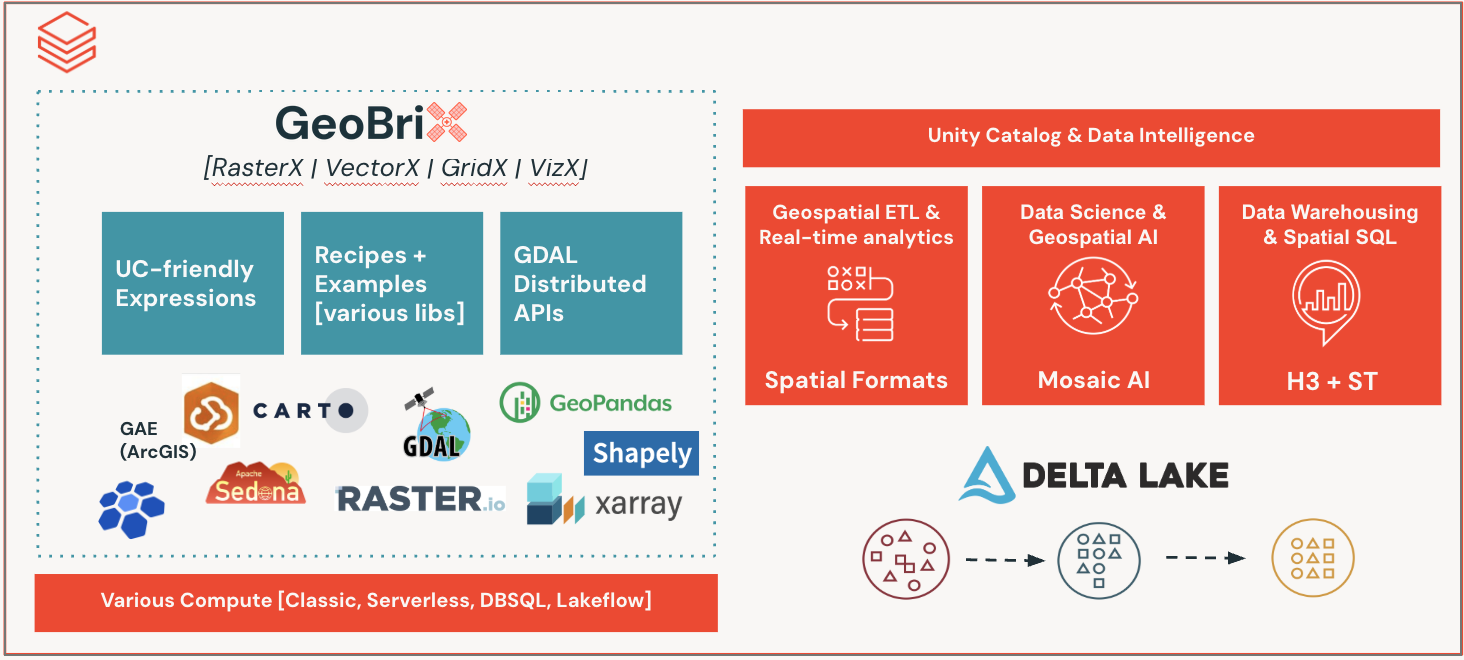
Available Packages

Full-spectrum raster processing for Databricks — successor to Mosaic raster, plus terrain analysis, spectral indices, tile publishing, vector↔raster bridging, and memory-safe large-raster processing (virtual tiles + a COG-preparation lane).
- Process GeoTIFF and other GDAL-supported raster formats
- Raster algebra, transformations, clipping, reprojection
- Metadata extraction, band operations, NoData handling
- Resample, IDW interpolation, build overviews
- Terrain analysis (slope, aspect, hillshade, TRI, TPI, roughness, color-relief)
- Spectral indices (EVI, SAVI, NDWI, NBR, NDVI, plus a generic dispatcher)
- Vector↔raster bridge (
rasterize/polygonize) - Web-mercator XYZ tile output (
to_webmercator,tilexyz,xyzpyramid) - Grid aggregations to H3 or CARTO quadbin v0 cells
- COG output, proximity, contour, viewshed
- Virtual tiles — bytes-free windowed reads for multi-gigabyte rasters; COG-preparation lane (
file_gbx+cog_gbx) and VRT mosaics

Spatial indexing across multiple discrete-global-grid systems: BNG (British National Grid) for Great Britain workloads, CARTO quadbin v0 for web-mercator-aligned analytics, and custom user-defined grids — pairing with the product's native H3 for global hex.
- British National Grid (BNG) — 21 functions covering cell math, kring/kloop, polyfill, tessellation, aggregators, and generators
- CARTO Quadbin v0 — 9 functions (
pointascell,aswkb,centroid,resolution,polyfill,kring,tessellate,cellunion,distance); cell IDs are 64-bit Long, aligned with the web-mercator XYZ tile grid - Custom user-defined grids — define a regional or equal-area grid and get cell math, polyfill, and tessellation on it
- Cell area calculations, k-ring / k-loop neighborhoods, geometry-to-cell tessellation

Augments the product's native ST_* functions with vector-tile encoding, TIN surface modeling, authority-string CRS transforms, antimeridian handling, and distributed-shapely geometry validity, cleaning, and coverage-validity — plus legacy-geometry migration.
- Mapbox Vector Tile (MVT) encoding via
st_asmvtaggregator +st_asmvt_pyramidgenerator (composes withpmtiles_aggfor end-to-end publishing) - TIN surface modeling —
st_triangulate,st_interpolateelevationbbox,st_interpolateelevationgeom(constrained-Delaunay triangulation and grid elevation interpolation from Z-valued points) - CRS strings —
st_crs/st_setcrs/st_transformcrsread, stamp, and reproject by authority-string CRS (ESRI codes, WKT, PROJ4 — not just an EPSG integer) - Geometry validity & cleaning (lightweight) —
st_makevalid,st_explainvalidity, and topology-safe cleaning (st_simplifypreservetopology,st_removerepeatedpoints,st_reduceprecision,st_node,st_snap) - Coverage validity (lightweight) —
st_coverageisvalid,st_coverageinvalidedges,coverage_simplify - Antimeridian handling (lightweight) —
st_shiftlongitude,st_wrapx,st_split - Legacy Mosaic geometry conversion (migrate without installing Mosaic)
- OGR-based reader data sources (Shapefile, GeoJSON, GeoPackage, FileGDB)

Tier-agnostic visualization helpers for inspecting GeoBrix outputs in a notebook — render rasters and mosaics, and turn Spark geometry / H3-cell / grid DataFrames into GeoPandas for static & interactive maps. Python-only, no SQL functions.
- Raster plotting (
plot_raster/plot_file) with auto-decimation and percentile stretch, including coverage-depth and mask-layer composites for multi-band presence stacks - VRT mosaic rendering (
plot_mosaic) — a whole mini-COG mosaic (from thecog_gbxvrtMosaicwriter) as one memory-safe image, with a bbox viewport and optional h3 cell overlay - Multi-layer compositor (
plot_static/plot_interactive) and PMTiles/COG viewers (plot_pmtiles,plot_cog,pmtiles_info) - Spark DataFrame → GeoPandas adapters (
as_gdf/cells_as_gdf/grid_as_gdf) for.plot()/.explore()maps
PMTiles
Container format for serving raster (PNG / JPEG / WebP) or vector (MVT) tile pyramids from a single static file via HTTP range requests. Native Scala v3 encoder — no GDAL/OGR dependency.
gbx_pmtiles_aggUDAF — aggregator returning aBINARYPMTile blob; fits tilesets up to ~100 MiB tile payload / 2 GiB cell limit.write.format("pmtiles").save(path)DataSource — streams larger pyramids via a partitioned commit protocol- Auto-detects
tile_typefrom magic bytes (PNG / JPEG / WebP / otherwise MVT) - Composes with
gbx_rst_xyzpyramid(raster) andgbx_st_asmvt_pyramid(vector) upstream
STAC
Helpers for discovering and loading imagery from SpatioTemporal Asset Catalog (STAC) APIs (such as the Microsoft Planetary Computer) directly into GeoBrix raster workflows.
Package Comparison
| Feature | RasterX | GridX | VectorX | PMTiles | VizX |
|---|---|---|---|---|---|
| Primary Use | Raster processing | Discrete global grids | Vector encoding + legacy | Tile pyramid packaging | Notebook visualization |
| Product Gap | Full gap-filling | Specialized grids (BNG, quadbin) | Vector-tile encoding, legacy migration | Net-new | Supporting layer |
| GDAL Required | Yes | No | Yes (readers + MVT) | No | No |
| Output Format | Tile (struct) + arrays | Cell IDs (Long / String) + WKB | BINARY (MVT bytes), WKB | BINARY (PMTile blob) or file | Matplotlib figure / GeoDataFrame |
| Spark Surface | 129 SQL functions | 41 SQL functions | 21 SQL functions + DataSources | 1 UDAF + 1 DataSource | Python only (no SQL) |
Choosing the Right Package
Use RasterX when: working with satellite imagery, DEMs, or aerial photography; performing terrain analysis, spectral indices, or per-pixel transforms; aggregating raster pixels to H3 or quadbin cells; bridging vector geometries to/from rasters; generating web-mercator XYZ tiles.
Use GridX when: working with British National Grid data; indexing global data into web-mercator-aligned quadbin cells; needing cell math (area, k-ring, polyfill, tessellation); building grid-aware aggregations or join keys.
Use VectorX when: encoding features as Mapbox Vector Tiles; generating per-tile MVT layers; building TIN surfaces / interpolating elevation from Z-valued points; handling CRS by authority string or normalizing antimeridian-crossing geometries; repairing, cleaning, or coverage-validating geometry (lightweight); reading vector formats (Shapefile, GeoJSON, GeoPackage, FileGDB); migrating from DBLabs Mosaic.
Use PMTiles when: publishing a tile pyramid (raster or vector) as a single static file; serving from S3/ABFS/GCS without a tile server; aggregating (z, x, y, bytes) rows into a deployable map.
Use VizX when: inspecting GeoBrix raster tiles or files in a notebook (single-band, RGB, coverage-depth, or mask-layer composites); turning Spark geometry / H3-cell / gridspec DataFrames into GeoPandas for .plot() / .explore() maps. VizX is a Python-only supporting layer for visualization, not a spatial-processing package.
Function Naming Convention
All GeoBrix SQL functions use the gbx_ prefix:
| Package | Prefix | Example |
|---|---|---|
| RasterX | gbx_rst_ | gbx_rst_boundingbox |
| GridX/BNG | gbx_bng_ | gbx_bng_cellarea |
| GridX/Quadbin | gbx_quadbin_ | gbx_quadbin_pointascell |
| VectorX | gbx_st_ | gbx_st_asmvt |
| PMTiles | gbx_pmtiles_ | gbx_pmtiles_agg |
The gbx_ prefix distinguishes GeoBrix functions from Databricks built-in st_* functions.
Registration
Before using GeoBrix functions in Python or SQL, register them with the Spark session.
Register all packages
# Register all packages
from databricks.labs.gbx.rasterx import functions as rx
from databricks.labs.gbx.gridx.bng import functions as bx
from databricks.labs.gbx.vectorx.jts.legacy import functions as vx

rx.register(spark)
bx.register(spark)
vx.register(spark)
Register selectively
GeoBrix raster functions come in two execution tiers; this example uses the heavyweight tier. See Choosing an Execution Tier.
# Only register RasterX
from databricks.labs.gbx.rasterx import functions as rx
rx.register(spark)
Scala
import com.databricks.labs.gbx.rasterx.{functions => rx}
import com.databricks.labs.gbx.gridx.bng.{functions => bx}
import com.databricks.labs.gbx.vectorx.jts.legacy.{functions => vx}

// Register each package
rx.register(spark)
bx.register(spark)
vx.register(spark)
RasterX, GridX, and VectorX functions registered (gbx_rst_*, gbx_bng_*, gbx_st_*).
SQL
SQL functions are registered via Python or Scala. Once registered, they are available in any SQL context:
-- No registration needed in SQL
-- Functions are available after Python/Scala registration

SHOW FUNCTIONS LIKE 'gbx_*';
+--------------------+
|function            |
+--------------------+
|gbx_rst_asformat    |
|gbx_rst_avg         |
|gbx_rst_bandmetadata|
+--------------------+
API Languages
GeoBrix provides the same functionality across three languages — SQL, Python, and Scala. See Language Bindings for the registration and import patterns each surface uses, and the one-line lightweight-vs-heavyweight raster swap.
Scalar values vs lit(...) wrapping
In 0.3.0, plain scalars are accepted across Python, Scala, and SQL bindings — no f.lit(...) wrapping required for non-string values.
Python — wrappers accept Column or scalar (bool/int/float/bytes); non-string scalars are auto-wrapped with f.lit(...). Strings still follow pyspark's column-reference convention (bare string ≈ f.col(name)); wrap in f.lit("...") to pass a string literal.
# ✅ Before 0.3.0 — required f.lit for every value
rx.rst_clip("tile", "geom", f.lit(True))
rx.rst_transform("tile", f.lit(4326))
bx.bng_pointascell("pt", f.lit(1))
bx.bng_pointascell("pt", f.lit("1km"))

# ✅ 0.3.0 — scalars accepted directly
rx.rst_clip("tile", "geom", True)
rx.rst_transform("tile", 4326)
bx.bng_pointascell("pt", 1)
bx.bng_pointascell("pt", f.lit("1km"))   # string literal — still wrap in f.lit
Scala — typed overloads added for Boolean / Int / Double / String value parameters. Column args (e.g. geometry, tile) still take Column.
// ✅ 0.3.0 — scalar overloads resolve without lit(...)
rst_clip(col("tile"), col("geom"), cutlineAllTouched = true)
rst_transform(col("tile"), 4326)
bng_pointascell(col("pt"), 1)
bng_pointascell(col("pt"), "1km")
SQL — values are already natively accepted by Spark SQL; no change needed:
SELECT gbx_rst_clip(tile, geom, true) FROM ...;
SELECT gbx_bng_pointascell(pt, 1) FROM ...;
SELECT gbx_bng_pointascell(pt, '1km') FROM ...;
When you still need f.lit(...) in Python:
- String literals:
rx.rst_fromfile(f.lit("/path/to.tif"), f.lit("GTiff"))— a bare string is treated as a column reference. - Nulls / explicit typing: e.g.
f.lit(None).cast("double").