Tile Structure
Understanding the internal structure of GeoBrix tiles is essential for advanced use cases like custom UDFs, direct data manipulation, and performance optimization.
Overview
In GeoBrix, a tile is not a simple binary column—it's a structured type (struct) that represents a raster dataset along with its metadata, grid-cell information, and — when the tile is a bytes-free reference — the source path, window, and clip/CRS provenance. The same struct is shared by both execution tiers.
Tile Schema
A tile has the following structure:
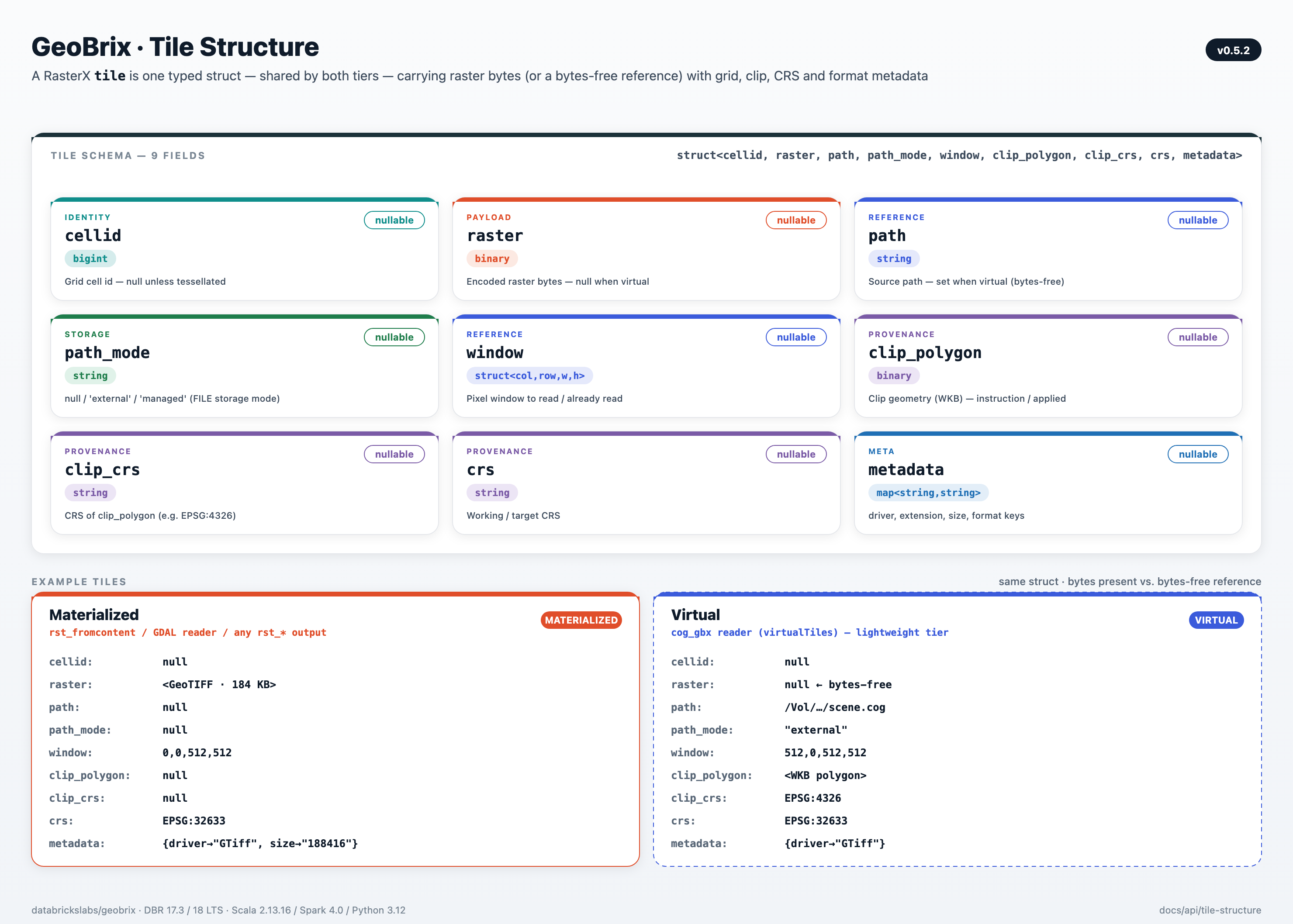
struct<
  cellid: bigint,                                -- Grid cell ID (nullable)
  raster: binary,                                -- Raster bytes (NULL when virtual)
  path: string,                                  -- Source path (set when virtual)
  path_mode: string,                             -- Storage mode: null, 'external', or 'managed'
  window: struct<col_off,row_off,width,height>,  -- Pixel window
  clip_polygon: binary,                          -- Optional clip geometry (WKB)
  clip_crs: string,                              -- CRS for clip_polygon
  crs: string,                                   -- Working/target CRS
  metadata: map<string,string>                   -- Driver, extension, size, etc.
>
A tile is materialized when raster carries the encoded bytes (the common case, and the only form the heavyweight tier consumes). A tile is virtual when raster is NULL and path + window are set — a bytes-free reference that materializes pixels on demand (a lightweight-tier capability). For the full virtual/materialized model, see Virtual Tiles.
Field Descriptions
| Field | Type | Nullable | Description |
|---|---|---|---|
cellid | bigint (Long) | Yes | Grid cell identifier for tessellated rasters. null for non-tessellated rasters. |
raster | binary | Yes | Encoded raster bytes when materialized; null when the tile is virtual (bytes-free). |
path | string | Yes | Source path for a virtual tile; null for a materialized tile. |
path_mode | string | Yes | Storage mode for a virtual tile. null = materialized (raster bytes present) or plain FUSE-path virtual. "external" = FILE EXTERNAL virtual tile. "managed" = FILE MANAGED virtual tile (governed lifecycle). |
window | struct<col_off,row_off,width,height> | Yes | The pixel window (offset + size). On a virtual tile it is the window to read; on a materialized tile it is provenance of the window already extracted. |
clip_polygon | binary | Yes | Optional clip geometry (WKB). Instruction on a virtual tile; applied-provenance on a materialized tile. |
clip_crs | string | Yes | CRS for clip_polygon (e.g. "EPSG:4326"). |
crs | string | Yes | Working/target CRS. |
metadata | map<string,string> | Yes | Key-value map containing driver name, file extension, size, and other metadata. |
On a materialized tile, window / clip_polygon / clip_crs / crs are provenance — a record of what was already applied to produce the bytes. On a virtual tile they are instructions — pending operations applied when the tile is read. See Virtual Tiles.
Working with Tiles
Accessing Tile Fields
Use dot notation to access tile struct fields:
Python:
from pyspark.sql import functions as f
from databricks.labs.gbx.rasterx import functions as rx

df = spark.read.format("gdal").load(SAMPLE_NYC_RASTERS)

# Access individual fields
df.select(
    f.col("tile.cellid"),
    f.col("tile.raster"),
    f.col("tile.metadata"),
    f.col("tile.metadata.driver")
)
+------+--------+------------------+-------+
|cellid|raster  |metadata          |driver |
+------+--------+------------------+-------+
|null  |[BINARY]|{driver=GTiff,...}|GTiff  |
+------+--------+------------------+-------+
Scala:
import org.apache.spark.sql.functions._
import com.databricks.labs.gbx.rasterx.{functions => rx}

val df = spark.read.format("gdal").load("/Volumes/main/default/geobrix_samples/geobrix-examples/nyc/sentinel2/nyc_sentinel2_red.tif")

// Access individual fields
df.select(
  col("tile.cellid"),
  col("tile.raster"),
  col("tile.metadata"),
  col("tile.metadata.driver")
).show()
+------+--------+------------------+-------+
|cellid|raster  |metadata          |driver |
+------+--------+------------------+-------+
|null  |[BINARY]|{driver=GTiff,...}|GTiff  |
+------+--------+------------------+-------+
SQL:
SELECT
    tile.cellid,
    tile.raster,
    tile.metadata,
    tile.metadata['driver'] as driver
FROM gdal.`{SAMPLE_NYC_RASTER}`;
+------+--------+------------------+-------+
|cellid|raster  |metadata          |driver |
+------+--------+------------------+-------+
|null  |[BINARY]|{driver=GTiff,...}|GTiff  |
+------+--------+------------------+-------+
Filtering by Metadata
Filter tiles based on driver or other metadata:
df = spark.read.format("gdal").load(SAMPLE_NYC_RASTERS)

# Filter by driver
gtiff_only = df.filter(f.col("tile.metadata.driver") == "GTiff")

# Filter by file extension
tif_files = df.filter(f.col("tile.metadata.extension") == ".tif")
Filtered DataFrame (e.g. driver = GTiff or extension = .tif).
Access individual metadata keys from a tile:
df = spark.read.format("gdal").load(SAMPLE_NYC_RASTERS)

metadata_df = df.select(
    f.col("tile.metadata").alias("metadata"),
    f.col("tile.metadata.driver").alias("driver"),
    f.col("tile.metadata.extension").alias("extension"),
    f.col("tile.metadata.size").alias("size")
)
+------------------+-------+----------+------+
|metadata          |driver |extension |size  |
+------------------+-------+----------+------+
|{driver=GTiff,...}|GTiff  |.tif      |...   |
+------------------+-------+----------+------+
Using Tiles in Custom UDFs
Access tile components for custom processing:
from pyspark.sql.functions import udf
from pyspark.sql.types import IntegerType

@udf(IntegerType())
def get_raster_size(raster_binary, metadata):
    """Get size of raster data"""
    if metadata and "size" in metadata:
        return int(metadata["size"])
    elif raster_binary:
        return len(raster_binary)
    return 0

df = spark.read.format("gdal").load(SAMPLE_NYC_RASTERS)
df_with_size = df.withColumn(
    "data_size",
    get_raster_size(f.col("tile.raster"), f.col("tile.metadata"))
)
+----+---------+
|path|data_size|
+----+---------+
|... |12345678 |
+----+---------+
Materialized vs Virtual: path and raster
A virtual tile has tile.raster = null and tile.path set to the source file path. A materialized tile is the opposite — tile.raster carries the encoded bytes and tile.path is null. Check both fields to classify a tile at runtime:
from databricks.labs.gbx.pyrx import functions as pyrx

# Light-tier rst_fromfile returns a VIRTUAL tile by default:
# raster=null, path set to the source path.
virtual_df = spark.range(1).select(
    pyrx.rst_fromfile(f.lit(SAMPLE_NYC_RASTER), f.lit("GTiff")).alias("tile")
).select(
    f.col("tile.path").alias("path"),          # non-null: source file path
    f.col("tile.raster").isNull().alias("is_virtual"),  # True: bytes-free
)
# Returns: path=/Volumes/.../nyc_sentinel2_red.tif, is_virtual=true

# Materialized tile: binaryFile reader + rst_fromcontent embeds bytes.
# tile.raster holds the encoded GeoTIFF; tile.path is null.
materialized_df = (
    spark.read.format("binaryFile").load(SAMPLE_NYC_RASTER)
    .select(
        rx.rst_fromcontent(f.col("content"), f.lit("GTiff")).alias("tile")
    )
    .select(
        f.col("tile.path").isNull().alias("path_null"),    # True: no source path
        f.col("tile.raster").isNull().alias("is_virtual"), # False: bytes present
    )
)
Virtual tile — raster null, path set:
+-----------------------------------------------------+----------+
|path                                                 |is_virtual|
+-----------------------------------------------------+----------+
|/Volumes/main/.../nyc_sentinel2_red.tif              |true      |
+-----------------------------------------------------+----------+

Materialized tile — raster bytes present, path null:
+---------+----------+
|path_null|is_virtual|
+---------+----------+
|true     |false     |
+---------+----------+
Tile Storage Mode
tile.path_mode records the storage model used by a virtual tile's backing data. It is null for both materialized tiles and plain FUSE-path virtual tiles. Use tile.raster is null (or check tile.path) to distinguish those two cases. The field carries "external" for FILE EXTERNAL tiles and "managed" for FILE MANAGED tiles (governed lifecycle via Delta):
from databricks.labs.gbx.pyrx import functions as pyrx

# Virtual tile (plain FUSE path) — raster null, path set, path_mode null
virtual_df = spark.range(1).select(
    pyrx.rst_fromfile(f.lit(SAMPLE_NYC_RASTER), f.lit("GTiff")).alias("tile")
).select(
    f.col("tile.path_mode").alias("path_mode"),          # null (plain FUSE virtual)
    f.col("tile.raster").isNull().alias("is_virtual"),   # True
    f.col("tile.path").isNull().alias("path_null"),      # False
)
# Returns: path_mode=null, is_virtual=true, path_null=false

# Materialized tile — raster bytes present, path null, path_mode null
materialized_df = (
    spark.read.format("binaryFile").load(SAMPLE_NYC_RASTER)
    .select(
        rx.rst_fromcontent(f.col("content"), f.lit("GTiff")).alias("tile")
    )
    .select(
        f.col("tile.path_mode").alias("path_mode"),          # null (materialized)
        f.col("tile.raster").isNull().alias("is_virtual"),   # False
        f.col("tile.path").isNull().alias("path_null"),      # True
    )
)
Virtual tile (plain FUSE) — path_mode null, raster null:
+---------+----------+---------+
|path_mode|is_virtual|path_null|
+---------+----------+---------+
|null     |true      |false    |
+---------+----------+---------+

Materialized tile — path_mode null, raster bytes present:
+---------+----------+---------+
|path_mode|is_virtual|path_null|
+---------+----------+---------+
|null     |false     |true     |
+---------+----------+---------+
(path_mode is "external" for FILE EXTERNAL tiles, "managed" for FILE MANAGED tiles)
When tile.raster contains binary data, use it with rasterio or GDAL:
from rasterio.io import MemoryFile
from pyspark.sql.functions import udf
from pyspark.sql.types import DoubleType

@udf(DoubleType())
def compute_mean_from_tile(raster_binary):
    """Compute mean from binary raster data"""
    import numpy as np

    if raster_binary is None:
        return None

    # Convert to bytes if needed
    tile_data = bytes(raster_binary)

    # Open with rasterio
    with MemoryFile(tile_data) as memfile:
        with memfile.open() as src:
            data = src.read(1)
            return float(np.mean(data))

# Use with tiles from content or GDAL reader (sample data)
df = spark.read.format("gdal").load(SAMPLE_NYC_RASTER)
stats_df = df.withColumn(
    "mean_value",
    compute_mean_from_tile(f.col("tile.raster"))
)
+----+----------+
|path|mean_value|
+----+----------+
|... |0.42      |
+----+----------+
Comparing rst_fromfile vs rst_fromcontent
rst_fromfile takes a path and returns a virtual tile in the light tier (bytes-free by default; pass materialize=True to force bytes). rst_fromcontent always returns a materialized tile — it takes bytes you already have (e.g. from spark.read.format("binaryFile")) and embeds them directly.
To enumerate paths from a Volume directory and decode each one in a single pipeline, compose
gbx_file_read with rst_fromfile — see GBX Common Functions.
from databricks.labs.gbx.pyrx import functions as pyrx

# Light-tier rst_fromfile: VIRTUAL tile (raster=null, path set)
fromfile_tile = spark.range(1).select(
    pyrx.rst_fromfile(f.lit(SAMPLE_NYC_RASTER), f.lit("GTiff")).alias("tile")
)

fromfile_tile.select(
    f.col("tile.raster").isNull().alias("raster_null"),  # True: virtual tile
    f.col("tile.path").isNull().alias("path_null"),      # False: path set
).show()
# +-----------+---------+
# |raster_null|path_null|
# +-----------+---------+
# |true       |false    |
# +-----------+---------+

# rst_fromcontent takes bytes you already have in a column (e.g. from binaryFile)
fromcontent_tile = spark.read.format("binaryFile").load(SAMPLE_NYC_RASTER).select(
    pyrx.rst_fromcontent(f.col("content"), f.lit("GTiff")).alias("tile")
)

fromcontent_tile.select(
    f.col("tile.raster").isNull().alias("raster_null"),  # False: bytes present
    f.col("tile.path").isNull().alias("path_null"),      # True: no source path
).show()
rst_fromfile (light tier) — VIRTUAL tile:
+-----------+---------+
|raster_null|path_null|
+-----------+---------+
|true       |false    |
+-----------+---------+

rst_fromcontent — MATERIALIZED tile (bytes embedded):
+-----------+---------+
|raster_null|path_null|
+-----------+---------+
|false      |true     |
+-----------+---------+
Tessellated vs Non-Tessellated Tiles
Non-Tessellated Tiles
Created by constructors (rst_fromfile, rst_fromcontent) or readers:
df = spark.read.format("gdal").load(SAMPLE_NYC_RASTER)

df.select(
    f.col("tile.cellid"),      # null
    f.col("tile.raster"),      # binary data
    f.col("tile.metadata")     # {driver: "GTiff", ...}
).show()
+----+--------+------------------+
|cellid|raster |metadata         |
+----+--------+------------------+
|null|[BINARY]|{driver=GTiff,...}|
+----+--------+------------------+
Characteristics:
cellidisnull- Represents entire raster or a tile from tiling operations
- Suitable for processing complete rasters
Tessellated Tiles
Created by rst_h3_tessellate:
from databricks.labs.gbx.rasterx import functions as rx

df = spark.read.format("gdal").load(SAMPLE_NYC_RASTER).select(
    f.explode(rx.rst_h3_tessellate(f.col("tile"), f.lit(7))).alias("tile")
)

df.select(
    f.col("tile.cellid"),      # H3 cell ID (e.g., 604189641255419903)
    f.col("tile.raster"),      # binary data (clipped to cell)
    f.col("tile.metadata")     # {driver: "GTiff", gridSystem: "h3", width: "...", ...}
).show()
+-------------------+--------+------------------+
|cellid             |raster  |metadata          |
+-------------------+--------+------------------+
|604189641255419903 |[BINARY]|{RASTERX_CELL_ID..|
+-------------------+--------+------------------+
Characteristics:
cellidcontains the grid cell id (H3, quadbin, or BNG depending on the tessellate function used)tile.metadata["gridSystem"]names the DGGS:"h3","quadbin", or"bng"- Raster is clipped to the cell's bounds
- Enables equi-joins with any DGGS-indexed table via
cellid+gridSystemfor unambiguous matching
Next Steps
- Virtual Tiles - The virtual↔materialized model over this struct
- Raster Functions - Functions that work with tiles
- Custom UDFs - Build custom tile processing
- Library Integration - Use tiles with rasterio/xarray