RasterX

For the complete list of RasterX functions with parameters and examples, see the RasterX Function Reference.
RasterX is GeoBrix's raster data processing package, providing comprehensive tools for working with raster datasets such as satellite imagery, elevation models, and other gridded spatial data.
Overview
RasterX is a refactor and improvement of Mosaic raster functions. Since Databricks product does not (yet) support anything built-in specifically for raster processing, RasterX provides a "fully" gap-filling capability for raster operations on the Databricks platform.
Key Features
- GDAL-Powered: Leverages GDAL for robust raster format support
- Distributed Processing: Built on Spark for scalable raster operations
- Multiple Format Support: GeoTIFF, NetCDF, and other GDAL-supported formats
- Metadata Extraction: Comprehensive raster metadata access
- Raster Operations: Clipping, resampling, transformations
- Band Operations: Multi-band raster support
Function Categories
RasterX exposes 65 SQL functions (registered as gbx_rst_*; available in Python and Scala as rst_*) across six categories — overview below, full reference on the RasterX Function Reference page.
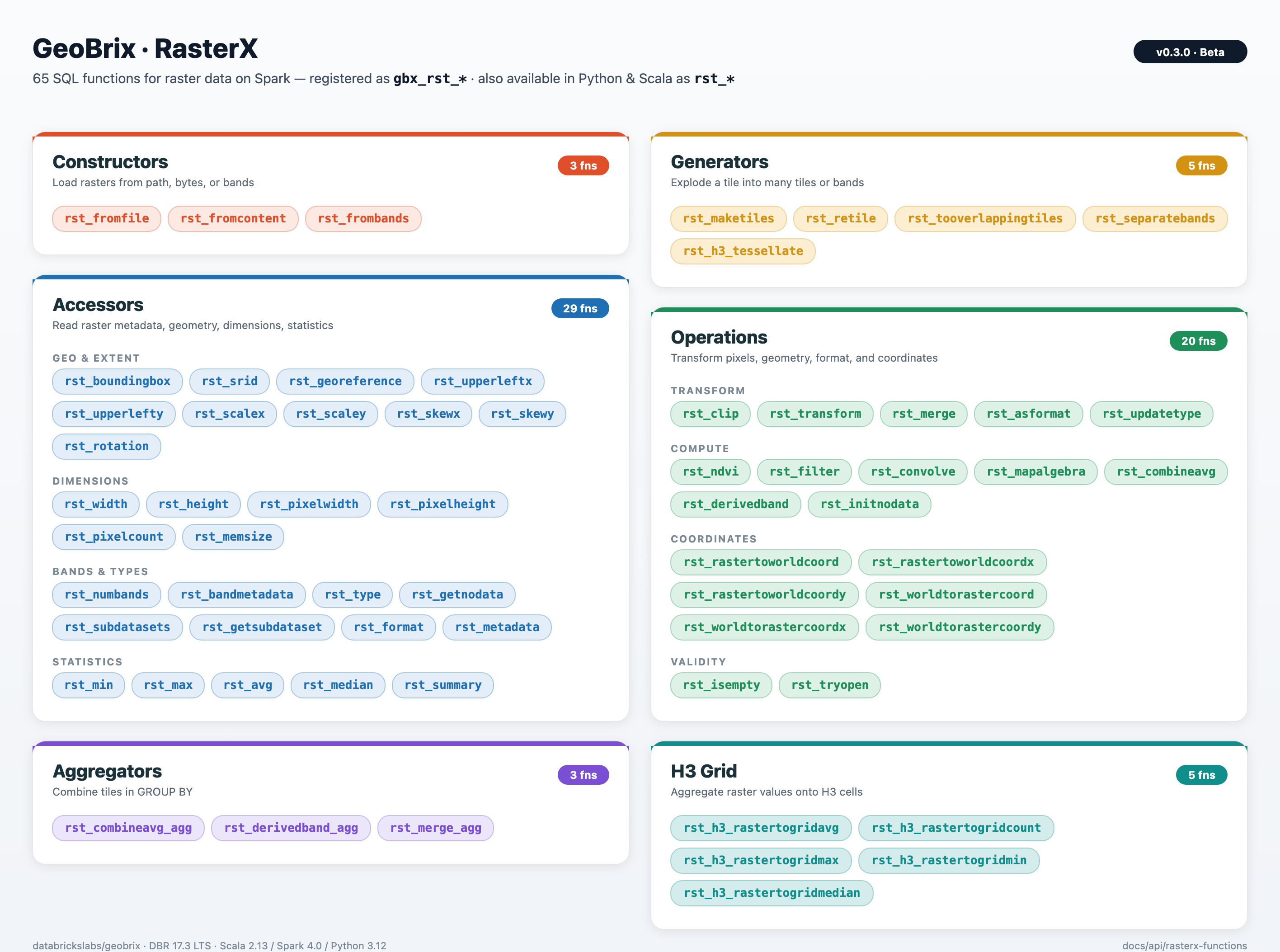
Accessors
Functions to access raster properties and metadata:
gbx_rst_boundingbox- Bounding box of the rastergbx_rst_width- Raster width in pixelsgbx_rst_height- Raster height in pixelsgbx_rst_numbands- Number of bandsgbx_rst_metadata- Raster metadata mapgbx_rst_srid- Spatial reference identifiergbx_rst_georeference- Georeference parametersgbx_rst_pixelwidth,gbx_rst_pixelheight- Pixel sizegbx_rst_upperleftx,gbx_rst_upperlefty- Upper-left cornergbx_rst_scalex,gbx_rst_scaley,gbx_rst_rotation,gbx_rst_skewx,gbx_rst_skewy- Geotransform componentsgbx_rst_format- Raster format (e.g. GTiff)gbx_rst_getnodata- NoData valuegbx_rst_bandmetadata- Band metadatagbx_rst_avg,gbx_rst_min,gbx_rst_max,gbx_rst_median- Pixel statisticsgbx_rst_pixelcount- Number of pixelsgbx_rst_memsize- Approximate memory sizegbx_rst_type- Raster data typegbx_rst_summary- Summary statisticsgbx_rst_subdatasets- Subdataset names (e.g. NetCDF/GRIB)gbx_rst_getsubdataset- Open a subdataset by name
Constructors
gbx_rst_fromfile- Load raster from file pathgbx_rst_fromcontent- Create raster from binary contentgbx_rst_frombands- Build raster from band expressions
Transformations and operations
gbx_rst_clip- Clip raster by geometrygbx_rst_transform- Reproject to a target CRSgbx_rst_merge- Merge multiple rastersgbx_rst_combineavg- Average multiple rasters (same extent)gbx_rst_asformat- Write to a different format (e.g. COG)gbx_rst_convolve- Convolution filtergbx_rst_filter- Custom filter expressiongbx_rst_mapalgebra- Map algebra expressiongbx_rst_derivedband- Derive band via Python UDFgbx_rst_ndvi- NDVI from red/NIR bandsgbx_rst_dtmfromgeoms- Rasterize geometries to DTMgbx_rst_initnodata- Initialize NoDatagbx_rst_updatetype- Change raster data typegbx_rst_isempty- Test if raster is emptygbx_rst_tryopen- Open raster or return NULL on failuregbx_rst_rastertoworldcoord,gbx_rst_rastertoworldcoordx,gbx_rst_rastertoworldcoordy- Pixel to world coordinatesgbx_rst_worldtorastercoord,gbx_rst_worldtorastercoordx,gbx_rst_worldtorastercoordy- World to pixel coordinates
Generators
gbx_rst_separatebands- Explode multi-band raster into rows per bandgbx_rst_retile- Retile rasters to a given tile sizegbx_rst_maketiles- Build tiles from grid specgbx_rst_tooverlappingtiles- Overlapping tile gridgbx_rst_h3_tessellate- Tessellate raster into H3 cells
H3 grid aggregation
gbx_rst_h3_rastertogridavg- Average raster values per H3 cellgbx_rst_h3_rastertogridcount- Pixel count per H3 cellgbx_rst_h3_rastertogridmax,gbx_rst_h3_rastertogridmin,gbx_rst_h3_rastertogridmedian- Min/max/median per H3 cell
Aggregations
gbx_rst_combineavg_agg- Average multiple rasters (aggregate)gbx_rst_merge_agg- Merge rasters with aggregationgbx_rst_derivedband_agg- Derived band aggregate
Tile payload
Every RasterX function returns a tile whose raster field is a self-contained, in-memory raster (GTiff by default) — safe to serialize between Spark stages and executors, persist to Delta, hand off to rasterio / gdal, or write back out via the gdal writer. The bytes are never an XML reference to a per-executor /vsimem/ tempfile or to a path that only exists on the producing node.
Functions that internally build via an intermediate VRT — gbx_rst_merge, gbx_rst_merge_agg, gbx_rst_frombands, gbx_rst_combineavg, gbx_rst_combineavg_agg, gbx_rst_derivedband, gbx_rst_derivedband_agg — materialize the result to GTiff before returning, so downstream stages on different executors see real raster bytes. Inspect a tile's payload format from tile.metadata.driver; for any of the functions above, it will read GTiff (not VRT). See Beta Release Notes for the v0.3.0 correctness fix that introduced this invariant.
VRT Python pixel functions
gbx_rst_combineavg, gbx_rst_combineavg_agg, gbx_rst_derivedband, and gbx_rst_derivedband_agg evaluate a Python expression on each pixel via GDAL's VRT Python pixel-function API. That API is gated behind the GDAL config option GDAL_VRT_ENABLE_PYTHON, which GeoBrix sets to NO at executor startup (see Security § Restrict GDAL drivers). When you call one of the four functions above, GeoBrix flips the option to YES for the duration of that call only — via the internal GDALManager.withVrtPython bracket — and restores NO immediately on return. You don't need to set anything on the cluster or in your notebook to use the built-in functions.
When you need to enable it yourself
If you're invoking the GDAL Python bindings (from osgeo import gdal) directly — outside the built-in RasterX functions — and you read a VRT that declares a <PixelFunctionLanguage>Python</...> band, you'll get an empty/null read unless you enable the option in the same process. Pick one of:
Python — programmatic, scoped to your read. Recommended in all cases. Mirrors what GeoBrix does internally, works for both driver-side pyspark.sql calls and inside mapPartitions / mapInPandas UDFs that load VRT-with-pyfunc via osgeo.gdal, and survives interleaving with GeoBrix built-in calls (each GeoBrix call resets the option to NO on exit, so re-set it on every read):
from osgeo import gdal

gdal.SetConfigOption("GDAL_VRT_ENABLE_PYTHON", "YES")
try:
    ds = gdal.Open("/path/to/your/vrt-with-pixel-function.vrt")
    arr = ds.GetRasterBand(1).ReadAsArray()
    ds = None
finally:
    gdal.SetConfigOption("GDAL_VRT_ENABLE_PYTHON", "NO")
Cluster env var — for Python-worker processes only. Setting spark.executorEnv.GDAL_VRT_ENABLE_PYTHON YES on the cluster works for Python UDF workers (a separate process from the JVM, where GDAL initializes from env vars). It does not help JVM-side reads — GeoBrix calls gdal.SetConfigOption("GDAL_VRT_ENABLE_PYTHON", "NO") at executor JVM startup, and SetConfigOption takes precedence over the env var. Prefer the programmatic form above unless you have a strong reason to globally enable.
Scala / JVM code. If you're writing custom Spark expressions that consume Python-pixel VRTs, wrap the read/translate in the same helper GeoBrix uses internally — it refcounts the option so concurrent tasks on the same executor JVM compose safely:
import com.databricks.labs.gbx.rasterx.gdal.GDALManager

val result = GDALManager.withVrtPython {
    val ds = org.gdal.gdal.gdal.Open(vrtPath)
    // ... GDAL reads / translates here see the Python pixel function ...
    ds
}
Trusted-modules variant
GDAL also accepts GDAL_VRT_ENABLE_PYTHON=TRUSTED_MODULES plus a GDAL_VRT_PYTHON_TRUSTED_MODULES allowlist if you want pixel-function code restricted to specific Python module prefixes. GeoBrix uses the plain YES form because the pixel-function source is constructed in-process from trusted (geobrix-generated) strings, never from user-supplied VRT XML on disk. If your custom code path reads VRTs whose <PixelFunctionCode> originates from less-trusted sources, switch to the TRUSTED_MODULES form and allowlist only what you intend to load.
Usage Examples
Python/PySpark
from databricks.labs.gbx.rasterx import functions as rx

# Sample data path (see Sample Data guide; use your Volume path if different)
raster_path = SAMPLE_RASTER_PATH

rx.register(spark)

raster_df = spark.read.format("gdal").load(raster_path)

metadata_df = raster_df.select(
    "source",
    rx.rst_width("tile").alias("width"),
    rx.rst_height("tile").alias("height"),
    rx.rst_numbands("tile").alias("bands"),
    rx.rst_srid("tile").alias("srid"),
)
metadata_df.show()
+--------------------+-----+------+-----+----+
|source              |width|height|bands|srid|
+--------------------+-----+------+-----+----+
|.../nyc_sentinel2...|10980|10980 |1    |4326|
+--------------------+-----+------+-----+----+
Scala
import com.databricks.labs.gbx.rasterx.{functions => rx}
import org.apache.spark.sql.functions._

// Register functions
rx.register(spark)

// Read raster files (sample data path; see Sample Data guide)
val rasterPath = "/Volumes/main/default/geobrix_samples/geobrix-examples/nyc/sentinel2/nyc_sentinel2_red.tif"
val rasterDf = spark.read.format("gdal").load(rasterPath)

// Get metadata
val metadataDf = rasterDf.select(
  col("path"),
  rx.rst_width(col("tile")).alias("width"),
  rx.rst_height(col("tile")).alias("height"),
  rx.rst_numbands(col("tile")).alias("num_bands")
)

metadataDf.show()
+--------------------+-----+------+----------+
|path                |width|height|num_bands |
+--------------------+-----+------+----------+
|.../nyc_sentinel2...|10980|10980 |1         |
+--------------------+-----+------+----------+
SQL
-- Register functions first in Python/Scala notebook
-- Then use in SQL

-- Read raster data (sample data path; see Sample Data guide)
CREATE OR REPLACE TEMP VIEW rasters AS
SELECT * FROM gdal.`{SAMPLE_RASTER_PATH}`;

-- Extract metadata
SELECT
    path,
    gbx_rst_width(tile) as width,
    gbx_rst_height(tile) as height,
    gbx_rst_numbands(tile) as num_bands,
    gbx_rst_srid(tile) as srid
FROM rasters;
+--------------------+-----+------+----------+----+
|path                |width|height|num_bands |srid|
+--------------------+-----+------+----------+----+
|.../nyc_sentinel2...|10980|10980 |1         |4326|
+--------------------+-----+------+----------+----+