EO Series — End-to-End STAC to Gridded Rasters
An end-to-end Earth Observation (EO) example series built on GeoBrix's RasterX functions, Databricks built-in Spatial SQL functions, and Microsoft Planetary Computer as the STAC source.
The four main notebooks move from vector area-of-interest → STAC discovery → band download → gridded (H3) raster tables → multi-band stacking and clipping. Sentinel-2 L2A over Alaska is used as the working dataset (scoped to a single county — Ketchikan, GEOID=2130 — to fit Planetary Computer free-tier limits).
notebooks/examples/eo-series — download the folder and import config_nb.ipynb and the four numbered notebooks into your Databricks workspace to run.
The series uses the lightweight tier — pure Python/PySpark bindings (databricks.labs.gbx.pyrx) plus the geobrix[light_env6,stac,vizx] wheel, installed by config_nb — so it runs on Serverless with no JAR. Visualization helpers come from databricks.labs.gbx.vizx. To run it on the heavyweight tier instead, flip the commented option-2 in config_nb.ipynb (databricks.labs.gbx.rasterx) and attach the GeoBrix JAR + GDAL init script to a classic x86 cluster. Spark-conf tuning is routed through a set_conf_safe() helper that no-ops on Serverless (where runtime config mutation is disallowed) and applies on classic clusters. See Execution Tiers.
Downloads are throttled on the Planetary Computer free tier. Notebooks use StacClient — which re-signs URLs on every retry attempt, validates each file with a rasterio read, and publishes to the Volume only when the file is valid. Calling client.repair("band_b02") re-downloads any files that failed validation without re-running the full download pass.
Notebooks at a glance
01 — Discover EO imagery via STAC
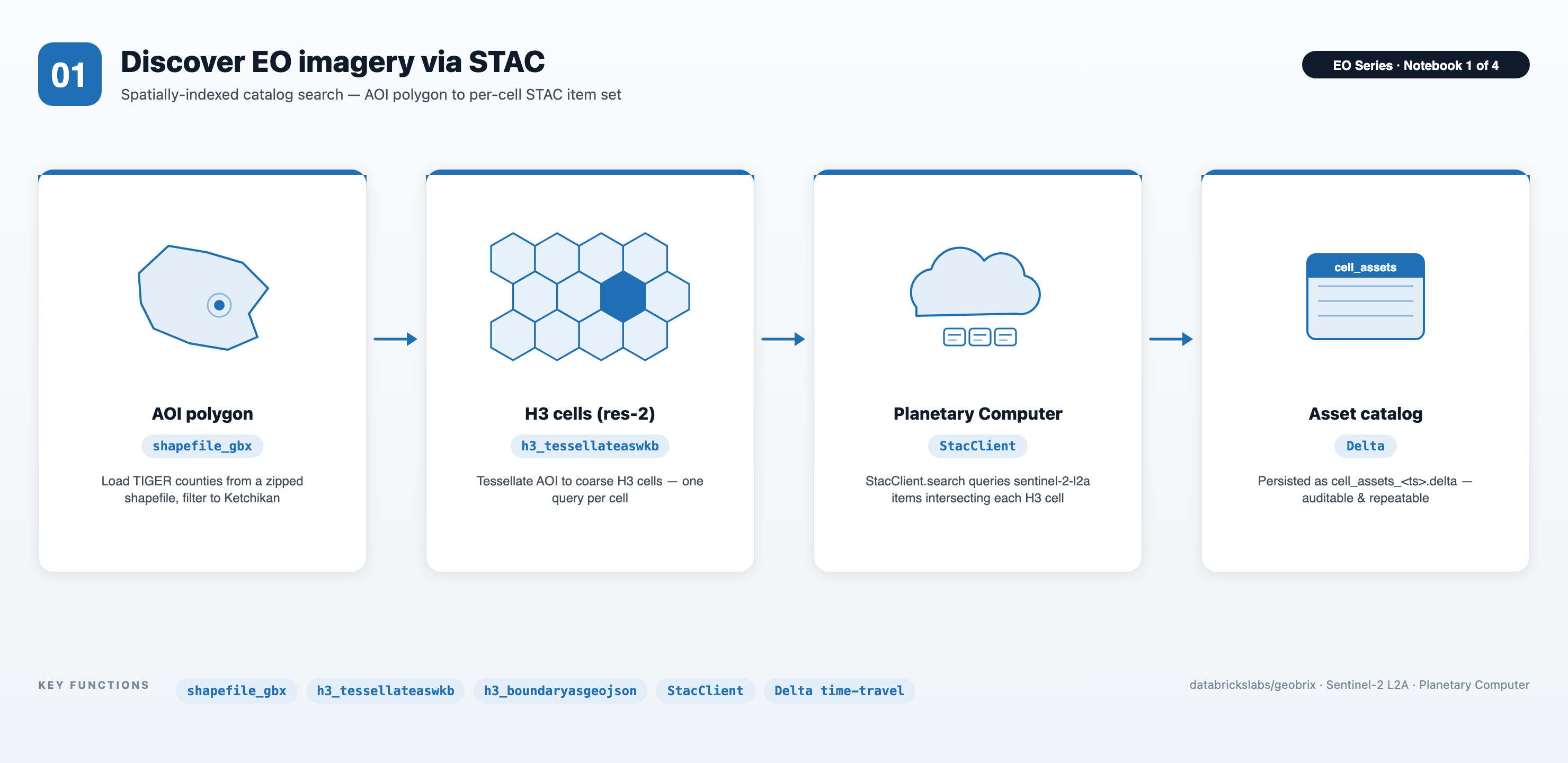
- Distributed STAC search via
StacClient— tessellate any AOI polygon to H3 res-2 cells and callstac_client.search(df_cells, geojson_col="geojson", collections=["sentinel-2-l2a"], ...), which fans out one search task per cell across the cluster. Results arrive flat: one row per(cell, item, asset), pre-keyed to the grid you'll join on later. - Shapefile I/O without unzipping — the
shapefile_gbxreader pulls TIGER counties straight from a.zipblob in the Volume; no scratch-disk shuffling required. - Persisted, time-travel-friendly catalog — search results are written to a timestamped Delta directory, giving an auditable handoff into notebook 02.
02 — Resilient band download and repair
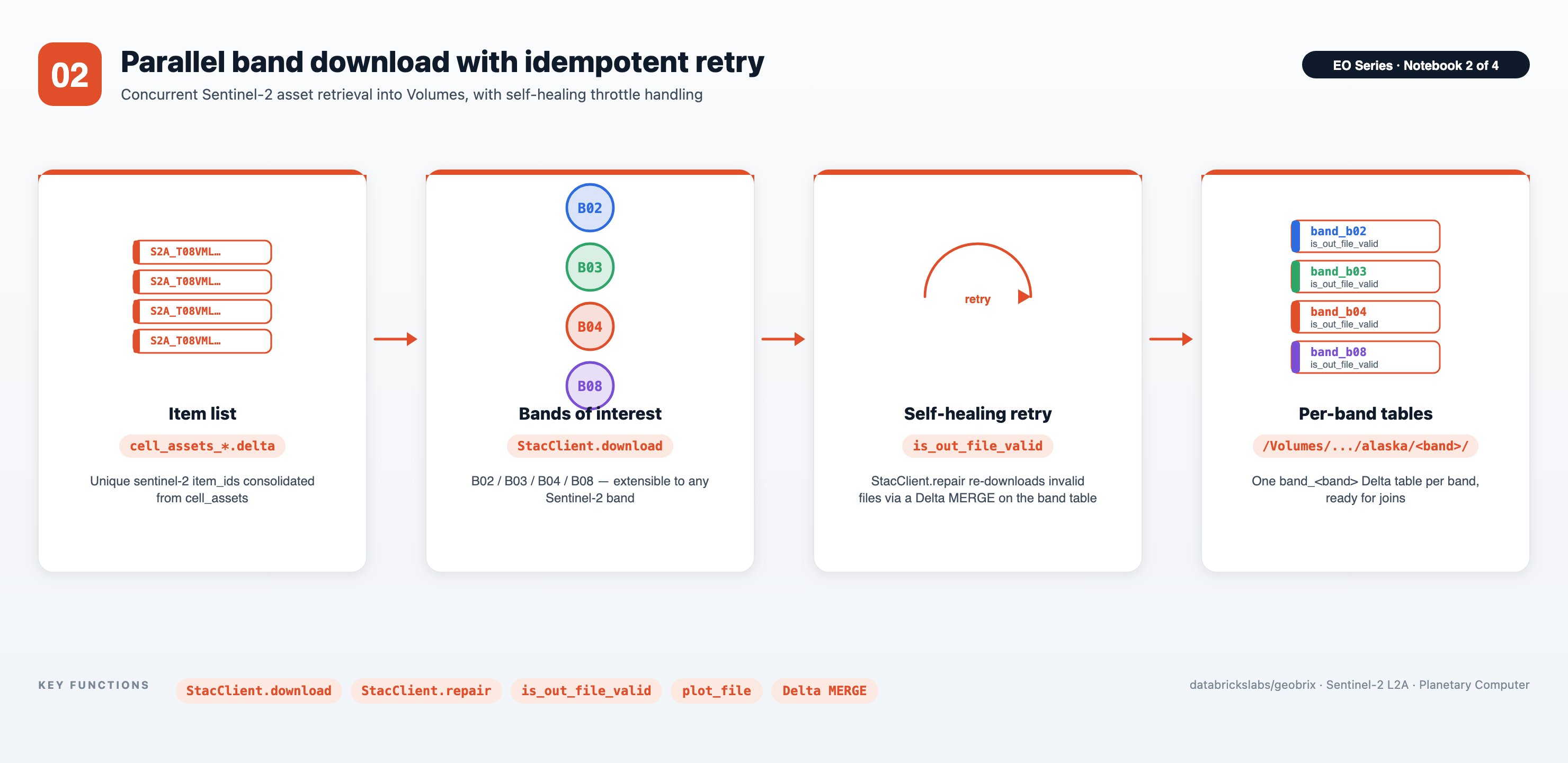
- Distributed download via
StacClient—stac_client.download(band_rows, out_dir, asset_names=[band], ...)fans out one task per unique(item_id, asset_name), writing each GeoTIFF to a Volume and returningout_file_path,out_file_sz, andis_out_file_validper file. - Resilient and self-healing — the client re-signs URLs on every retry, validates each file with a rasterio window read (rejecting throttled error bodies and truncated files), and publishes to the Volume only when the file passes. Calling
stac_client.repair("band_b02")re-downloads invalid rows and merges the results back via Delta MERGE. - Cleanly bounded scope — only the bands you ask for (B02 / B03 / B04 / B08 by default) are pulled; the same flow extends to any other Sentinel-2 band.
03 — Tessellate rasters to H3 cells
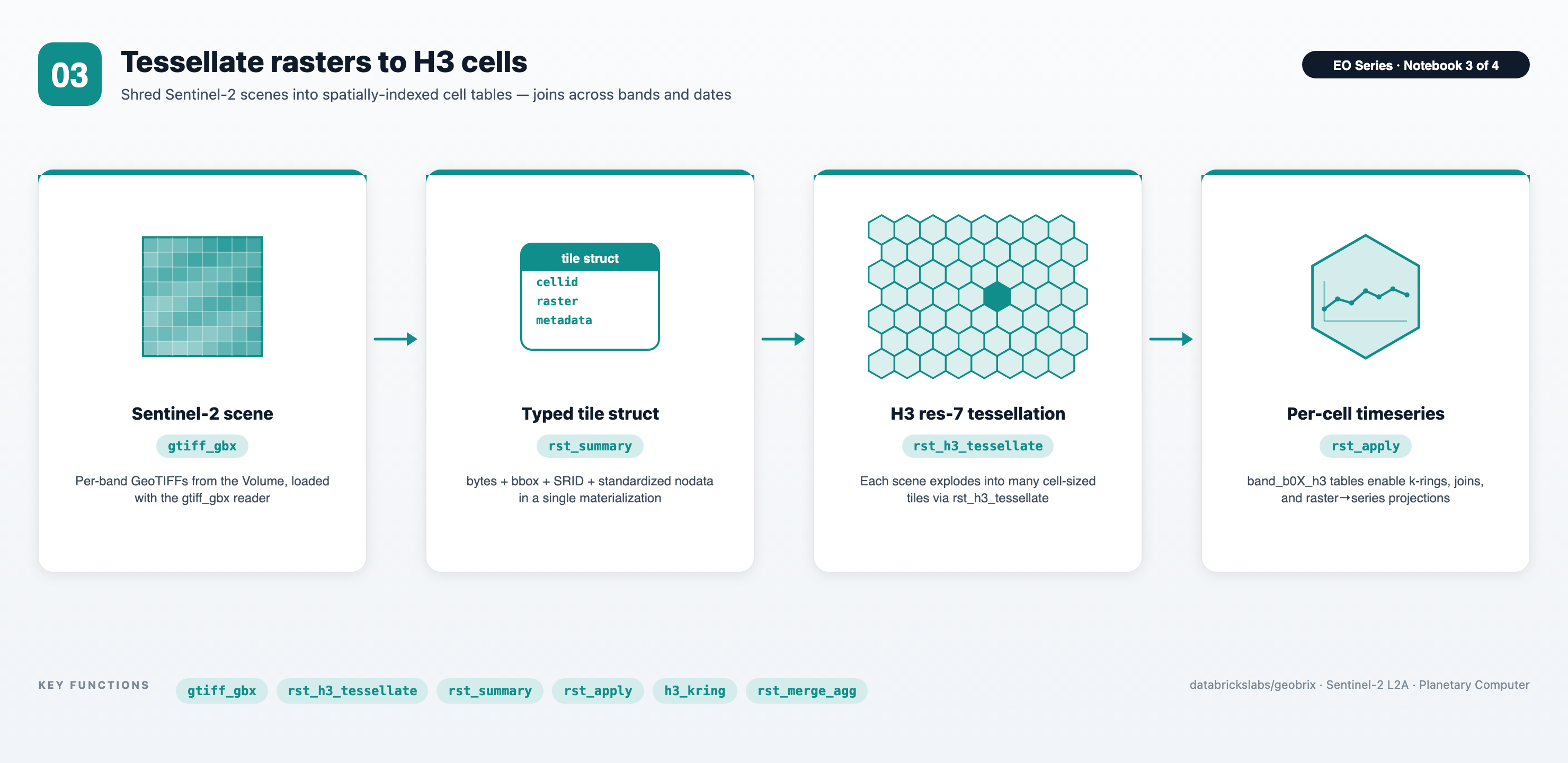
- Virtual-tile ingestion — bytes-free. The
gtiff_gbxreader loads each Sentinel-2 scene as virtual tiles: with.option("tileSize", "2048,2048")a 5490×5490 scene fans into ~9 windows, and each tile row carries a sourcepath+ pixelwindowinstead of raster bytes — soband_b0X_tileis a table of lightweight references (tile.rasterisnull;tile.path/tile.windowset), no pixels in Delta.rst_initnodatarecords a pending nodata instruction andrst_srid/rst_boundingboxanswer from the header, all without materializing. - Spatial-indexed raster tables (the materialization cut-over) —
rst_h3_tessellateshreds each scene into H3 resolution-7 cells, producingband_b0X_h3Delta tables that join cleanly across bands and dates. This is where the virtual tiles materialize: each window's pixels are read once, at tessellation. - Raster analytics from SQL/PySpark —
rst_summaryfor per-tile stats,h3_kring+rst_merge_aggfor spatial neighborhoods, and therst_applyescape-hatch for raster-to-timeseries projection — no driver-side rasterio loops.
04 — Band Stacking + Clipping
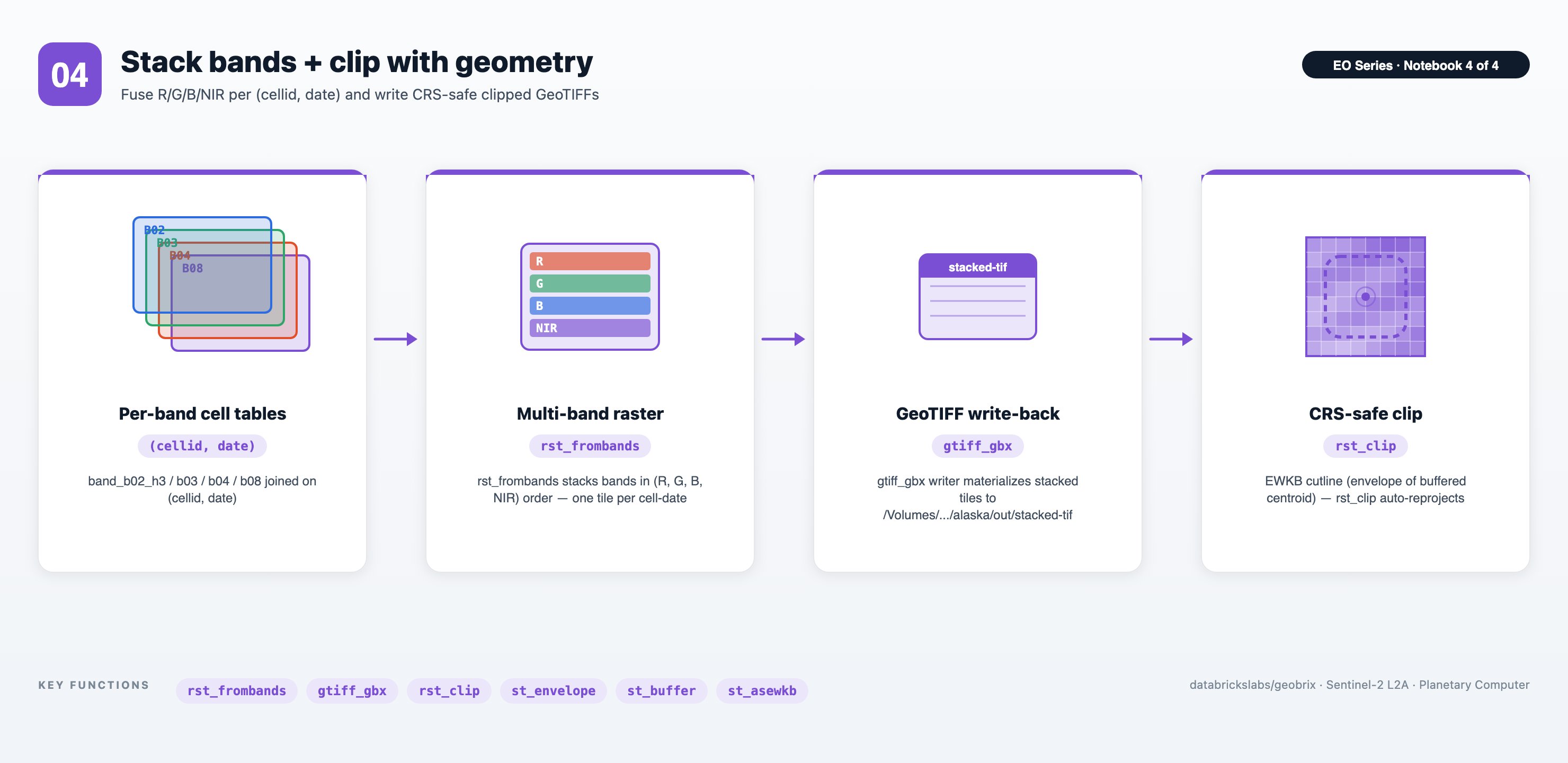
- Multi-band assembly from grid joins — joins
band_b02_h3/b03/b04/b08on(cellid, date), thenrst_frombandsproduces a single 4-band (R, G, B, NIR) tile per cell-date. - Round-trip GeoTIFF writes — the
gtiffwriter (nameCol,mode("append"),option("ext", "tif")) materializes the stacked rasters back to disk in a Volume, ready for downstream tools. - CRS-safe geometry clipping — clip cutlines built from
st_envelope/st_bufferare passed as EWKB with embedded SRID, andrst_clipreprojects automatically — no per-tile CRS bookkeeping.
Files
| File | Purpose |
|---|---|
config_nb.ipynb | Shared setup (%run ./config_nb from every main notebook). Installs the geobrix[light_env6,stac,vizx] wheel + EO deps, selects the tier (option-1 pyrx default / option-2 rasterx), registers functions + light readers/writers, imports the visualization helpers from databricks.labs.gbx.vizx (plot_raster, plot_file, as_gdf, cells_as_gdf) and the pyrx escape-hatches (rst_apply, tile_to_numpy), sets Unity Catalog catalog_name / schema_name, creates the /Volumes/<cat>/<schema>/data/alaska ETL tree, exposes the FORCE_REBUILD toggle and the Serverless-safe set_conf_safe() helper, instantiates stac_client = StacClient(), and defines tiling helpers (finalize_tiled_band_tbl, gen_tessellate_tiled_band). |
01. Search STACs.ipynb | Loads the TIGER US Counties shapefile via the shapefile_gbx reader, filters to Ketchikan, tessellates into H3 resolution-2 cells, converts each cell to GeoJSON, and calls stac_client.search(df_cells, geojson_col="geojson", collections=["sentinel-2-l2a"], ...) to fan out per-cell queries to Planetary Computer. Writes the resulting STAC asset metadata — one row per (cell, item, asset) — to a timestamped Delta directory (cell_assets_<ts>.delta). |
02. Download STACs.ipynb | Reads cell_assets_*.delta and calls stac_client.download(band_rows, out_dir, asset_names=[band], ...) for each band. Creates one band_<band> Delta table per band with item_id, band_name, date, out_file_path, out_file_sz, and is_out_file_valid columns. Calls stac_client.repair("band_<band>") to re-download and merge any files that failed read-validation. |
03. Gridded EO Data.ipynb | For each band, reads via the gtiff_gbx reader in virtual-tile mode (tileSize) into a bytes-free band_<band>_tile (path+window references, plus size, bbox, srid, and a pending nodata instruction — no pixels in Delta), then tessellates each tile to H3 resolution 7 into band_<band>_h3, materializing pixels at the tessellation cut-over. Demonstrates rst_summary, bounding-box reprojection, h3_kring with rst_merge_agg, and raster → timeseries projection via the rst_apply escape-hatch. |
04. Band Stacking + Clipping.ipynb | Joins the four band_<band>_h3 tables on (cellid, date), stacks bands in (R, G, B, NIR) order with rst_frombands into the band_stack table, writes multi-band TIFs back out via the gtiff writer (nameCol-driven filenames), and demonstrates per-tile clipping with rst_clip using a centroid-envelope buffer built from Databricks built-in ST functions. |
Prerequisites
- Databricks Runtime 17.3 LTS / 18 LTS, or Serverless (Scala 2.13 / Spark 4 / Python 3.12). The lightweight default runs on Serverless; the heavyweight tweak needs a classic x86 cluster.
- GeoBrix (version 0.5.1).
config_nb.ipynb%pip-installs thegeobrix[light_env6,stac,vizx]wheel — pure-Python bindings + rasterio + the STAC client dependencies (pystac-client,planetary-computer,tenacity,requests) + the visualization extras (matplotlib,geopandas,mapclassify) — nothing is assumed pre-staged. For the heavyweight tweak, flip option-2 (rasterx) inconfig_nb.ipynband attach the GeoBrix JAR + GDAL init script to the cluster. - Unity Catalog: edit
config_nb.ipynbto setcatalog_nameandschema_nameto your own locations. A Volume nameddatamust already exist under<catalog>/<schema>. The notebooks create a schema if missing but will not create the Volume for you. - Compute sizing: the lightweight default runs on Serverless. On classic clusters, the captured heavyweight runs used AWS
m5d.xlarge(2–16 workers) for search/download andr6id.2xlarge(20 workers) for raster processing; anx86instance is required for the GDAL natives. For a single county a much smaller cluster is sufficient.
Run order
- Open
config_nb.ipynb, setcatalog_name/schema_name, and verify the Volume exists. - Run notebooks in numeric order: 01 → 02 → 03 → 04. Each notebook starts with
%run ./config_nbso the shared state is re-established every time.
Each notebook is safe to re-run — Delta tables use do_overwrite=False / do_append=False by default, and StacClient.download skips assets whose files already exist and passed read-validation. To force a full rebuild of a notebook's outputs (re-run every step regardless of existing tables/files), set FORCE_REBUILD = True in a cell right after %run ./config_nb; it feeds the existing do_overwrite / skip-guards.
Data flow
TIGER shapefile (shapefile_gbx reader)
        │
        ▼  Ketchikan polygon → H3 res-2 cells → GeoJSON
STAC search (Planetary Computer, sentinel-2-l2a)
        │
        ▼  cell_assets_<ts>.delta      (nb 01)
Per-band asset download
        │
        ▼  band_b02, band_b03, band_b04, band_b08  (nb 02)
gtiff read + tile metadata
        │
        ▼  band_b0X_tile                (nb 03)
H3 tessellation @ resolution 7
        │
        ▼  band_b0X_h3                  (nb 03)
Join on (cellid, date) + rst_frombands
        │
        ▼  band_stack                   (nb 04)
gtiff writer → stacked TIFs + rst_clip
        │
        ▼  /Volumes/.../alaska/out/stacked-tif
Key GeoBrix / Databricks functions shown
- GeoBrix STAC (
StacClient):search,download,repair— distributed STAC catalog search, resilient validated download, and Delta MERGE repair. - GeoBrix RasterX (
rx.rst_*):rst_h3_tessellate,rst_h3_tessellateexplode,rst_memsize,rst_initnodata,rst_boundingbox,rst_srid,rst_tryopen,rst_summary,rst_metadata,rst_numbands,rst_frombands,rst_fromcontent,rst_merge_agg(aggregator),rst_clip,rst_isempty. - GeoBrix readers/writers:
shapefile_gbx(zipped shapefiles without unzipping),gtiff_gbx(GeoTIFF reader + writer; the writer takes an exact(source, tile)schema withnameColfor deterministic filenames),binaryFile→rst_fromcontentpattern. - Databricks built-in ST / H3 (
DBF.*):st_geomfromwkt,st_transform,st_buffer,st_simplify,st_astext,st_asgeojson,st_aswkb,st_asewkb,st_centroid,st_envelope,h3_tessellateaswkb,h3_boundaryasgeojson,h3_boundaryaswkt,h3_toparent,h3_kring.
Gotchas
- Antimeridian: Alaska straddles the 180° meridian, so interactive map renderings can show results on both sides of the map.
- SRID awareness: Sentinel-2 tiles arrive in UTM zones (e.g.
32608,32609), not EPSG:4326 — reproject bboxes before plotting on a web map. - Free-tier auth-failure payloads: Planetary Computer returns a ~550-byte XML error body when SAS tokens expire or rate limits hit.
StacClient.downloadvalidates each file with a rasterio window read, so these truncated/error responses are caught and markedis_out_file_valid = false. Callstac_client.repair("band_b02")to re-download and merge the repaired rows. - Shuffle partitioning (Serverless-guarded):
StacClient.searchandStacClient.downloadcontrol parallelism viapartitions=; for your own steps useDataFrame.repartition(N, "col")— hash by a column, since on Serverless a number-onlyrepartition(N)(round-robin) is coalesced by AQE back toward one partition (= serial). Any Spark-conf tuning in the notebooks goes throughset_conf_safe(), which no-ops on Serverless (runtime Spark-conf mutation is disallowed there) and applies on classic clusters. - Prefer EWKB for
rst_clipcutlines: notebook 04 usesDBF.st_asewkb(DBF.st_envelope("buffer"))so the cutline's SRID travels with the bytes intorst_clip. Plain WKB (no SRID) is assumed to already be in the raster's CRS and is not reprojected; EWKB (or EWKT) with a valid SRID triggers reprojection when it differs from the raster CRS. Usest_asewkb/st_asewktfor robust, CRS-agnostic clipping. - Scalar booleans pass through directly:
rx.rst_clip("tile", "clip_wkb", True)accepts a bare PythonTruefor thecutToCutlineflag — noF.lit(True)wrapping needed.