Lakeflow SDP
Lakeflow Spark Declarative Pipelines (SDP) run tables
as a pipeline. You declare each table and what it reads, and every update brings them up to date
in order. GeoBrix runs inside a pipeline at the Python level, and both pipeline routes,
Auto Loader ingestion (declare_ingest) and the
Lakeflow connector, are pipeline source files. This page covers what they
share: the pipeline environment, Serverless notes, the SDP building blocks GeoBrix uses, and
deploying a pipeline as code.
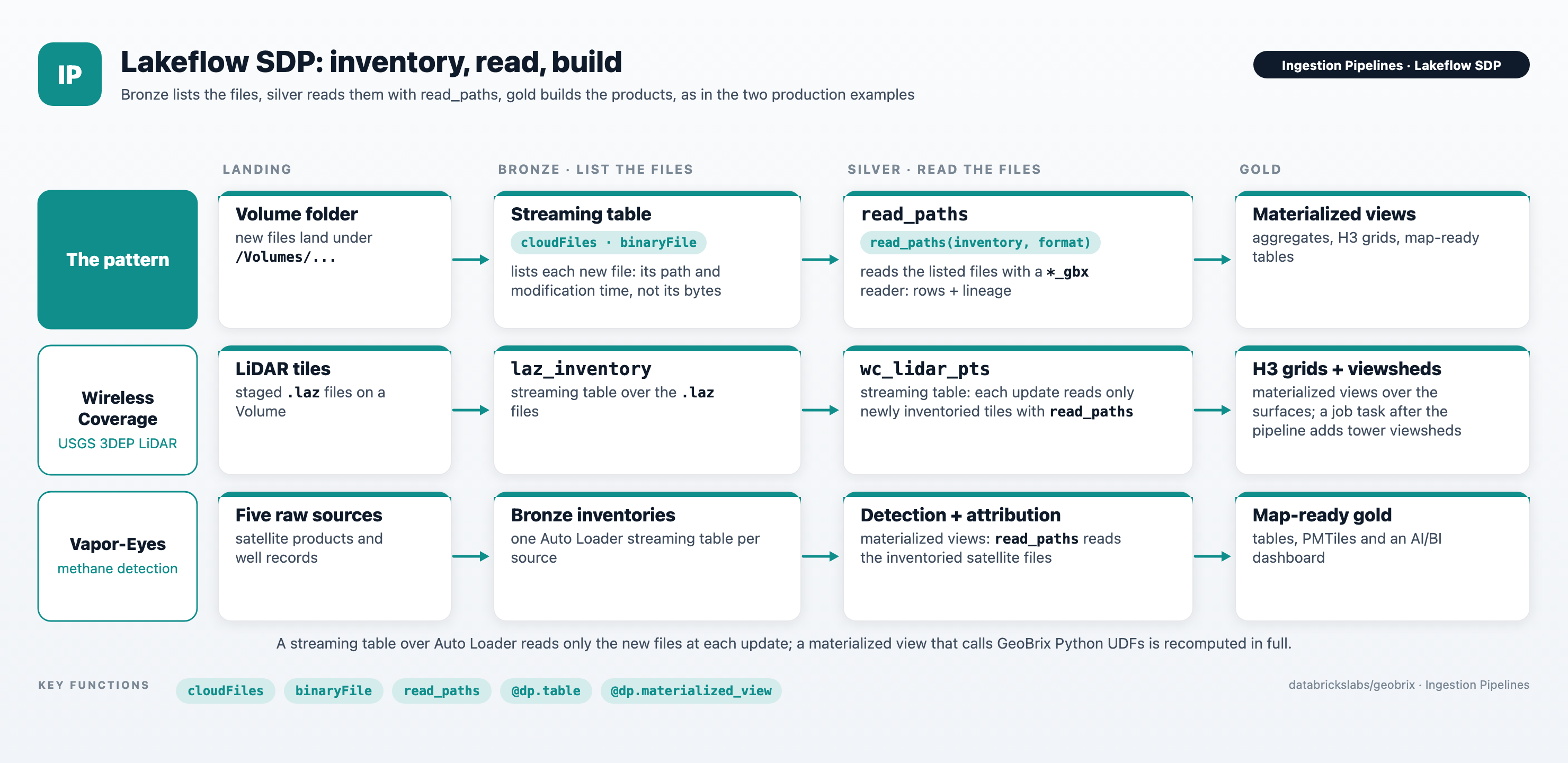
Two GeoBrix examples ship as complete Lakeflow SDP bundles. Each opens on its Lakeflow tab:
- Wireless Coverage: a production SDP
bundle. An Auto Loader
laz_inventorystreaming table inventories staged USGS 3DEP LiDAR.read_pathsreads the inventoried files. Materialized views build DSM, DTM and CHM surfaces and H3 grids from them. A job task after the pipeline computes the tower viewsheds. Its silver tablewc_lidar_ptsis a streaming table: each update reads only the newly inventoried tiles, withread_pathsover the bronze inventory stream. Shows streaming tables over Auto Loader,read_pathsin a streaming table, and an Asset Bundle. - Vapor-Eyes: an SDP and AI/BI Maps bundle. Five
raw sources land on a Volume and become a bronze streaming-table inventory. Materialized views
read the inventoried satellite files with
read_paths, do the silver detection and attribution and produce gold map-ready tables and PMTiles. Shows streaming tables over Auto Loader,read_pathsjoined back to its inventory, and an Asset Bundle with a dashboard.
Environment
Match the GeoBrix wheel to the channel
A pipeline runs on the Databricks Runtime of its channel, not on a Serverless environment version. Install the GeoBrix env wheel for that runtime:
| Channel | Runtime as of v0.6.0 (October 2026) | GeoBrix wheel |
|---|---|---|
CURRENT (default) | DBR 18 | geobrix-<version>+env5-py3-none-any.whl |
PREVIEW | DBR 19 | geobrix-<version>+env6-py3-none-any.whl |
Channels move to newer runtimes over time. Check the
current channel versions
when you create or update a pipeline, and change the wheel when the runtime changes. A DBR 19
runtime takes the +env6 wheel, whichever channel it is on (the other family's wheel refuses to
import). See Installation for the wheels and their extras.
The Vapor-Eyes and Wireless coverage examples run on the PREVIEW channel with the env6 wheel. Their bundles take the channel from the pipeline_channel variable.
Dependency lines
Add GeoBrix to the pipeline's environment as a dependency line. For a wheel staged on a Unity Catalog Volume:
geobrix[vizx]@file:///Volumes/<catalog>/<schema>/<volume>/<dir>/geobrix-<version>+env5-py3-none-any.whl
Or straight from the GitHub release, when the pipeline's compute can reach github.com:
geobrix[vizx]@https://github.com/databrickslabs/geobrix/releases/download/v<version>/geobrix-<version>+env5-py3-none-any.whl
- No spaces around
@. A pipeline installs each dependency line with an unquoted%pip install, so spaces split the requirement and the install fails. - All extras on one line, for example
geobrix[stac,vizx]@.... Each line is a separate%pip install, and extras split across lines can force pip to rebuild packages it already installed and fail the install. - Volume or GitHub. A Volume wheel works in every workspace; workspaces that restrict outbound network access can block GitHub. See Env wheel for downloading and staging the wheel.
Register GeoBrix in each dataset function
A pipeline runs each dataset function as its own flow. A gbx_* SQL name or a *_gbx reader
resolves only in the flow that registered it.
- Call
gbx.register(spark)at the top of each dataset function that uses agbx_*SQL name or a*_gbxreader. A registration in another function's body does not reach it. - Don't register at module import. The pipeline imports each source file once, outside every flow, so a registration there reaches no flow.
- The Python API registers on first use in each flow. A call such as
pmtiles_agg(...)registers its function in the flow that makes it. Later calls in that flow cost nothing.
from pyspark import pipelines as dp
from pyspark.sql import SparkSession

from databricks.labs import gbx


@dp.materialized_view
def wells_bng():
    spark = SparkSession.getActiveSession()
    gbx.register(spark)  # in this function, not at module import
    return spark.read.table("wells").selectExpr(
        "well_id", "gbx_bng_pointascell(geom_wkt, 3) AS bng_cell"
    )
Both example bundles register in every dataset function that uses GeoBrix.
Serverless pipelines
- Python level only. A Serverless pipeline can't load a JAR, so it
installs the GeoBrix wheel and nothing else.
read_paths,declare_ingestand the connector run at the Python level, so they run on Serverless and classic pipelines alike. - Fan out by repartitioning on a column. On Serverless, work spreads across tasks through
repartition(N, column).read_pathsanddeclare_ingestdo this for you when you setnum_partitions; without it a large raster is read by one task. See Parallelism. - Materialized views recompute. A materialized view whose query calls Python UDFs, as the
GeoBrix functions at the Python level are, is recomputed in full at each update. A streaming table
over Auto Loader, by contrast, processes only the new files. To re-run only some tables, refresh them
selectively, for example
databricks bundle run <pipeline> --refresh <table>,<table>. - Check product
st_*functions against the channel's runtime. Databricksst_*functions arrive with runtime releases, so a pipeline can lack one that a notebook on a newer runtime has. As of v0.6.0 (October 2026),st_makevalidwas not available on theCURRENTchannel. Where one is missing, use its GeoBrixgbx_st_*counterpart. See Databricks Spatial.
Building blocks GeoBrix uses
- Streaming tables over Auto Loader. A table whose query is an Auto Loader
(
cloudFiles) stream is a streaming table: each update reads only the files that arrived since the last one.declare_ingestdeclares its file-events table this way (its rows table, forappend), and both production examples use one as their bronze layer. foreach_batch_sink. A sink that runs your own batch code on each micro-batch.declare_ingestwrites its rows table through one (forscd2andreplace), so that table is a regular Delta table andreplacecan swap a file's rows in one atomicreplaceWhere. The same sink appends the micro-batch's bad records to<t>_bad_recordsbefore the rows.- AUTO CDC with SCD type 2.
create_auto_cdc_flow(..., stored_as_scd_type=2)keeps one row per version of each key, with__START_ATand__END_AT.declare_ingestkeys it on_source_pathand tracks history on_source_hash, which gives the<t>_file_versionstable. - No
spark.catalog.tableExistsinside a sink. Pipelines don't allow it there. Look the table up and treat "not found" asFalseinstead:
# spark.catalog.tableExists is not allowed inside a pipeline sink:
# look the table up and treat "not found" as False instead.
def table_exists(spark, name):
    try:
        spark.table(name).columns
        return True
    except Exception as e:
        if "TABLE_OR_VIEW_NOT_FOUND" not in str(e):
            raise
        return False
Deploy with Asset Bundles
A Databricks Asset Bundle keeps a
pipeline as code: its source files and its settings, deployed with databricks bundle deploy and
run with databricks bundle run. A minimal pipeline resource:
resources:
  pipelines:
    landing_ingest:
      name: landing_ingest
      serverless: true
      channel: CURRENT          # match the GeoBrix wheel below to this channel's runtime
      catalog: main
      schema: geo
      root_path: ./transformations
      libraries:
        - glob:
            include: transformations/**
      environment:
        dependencies:
          # the Volume wheel path followed by its extras, all on one line
          - /Volumes/main/geo/wheels/geobrix-<version>+env5-py3-none-any.whl[vizx]
- In a bundle, write the Volume wheel as its path followed by the extras, as above; the example bundles do the same.
serverless: trueis the simplest compute. For memory-heavy runs, switch to classic compute (serverless: falseand a cluster) for dedicated memory, and match the cluster's runtime to the GeoBrix extra.- The two production examples at the top of this page are complete bundles to start from. See
the README in each example's
lakeflowfolder for deploy and run steps.
See also
- Ingestion Pipelines: choosing a route.
- Auto Loader ingestion and Lakeflow connector: the two pipeline routes.
- Installation: every GeoBrix extra, and installing from a Volume or GitHub.
- Serverless & Memory: memory limits on Serverless.