Auto Loader ingestion
Since: v0.6.0
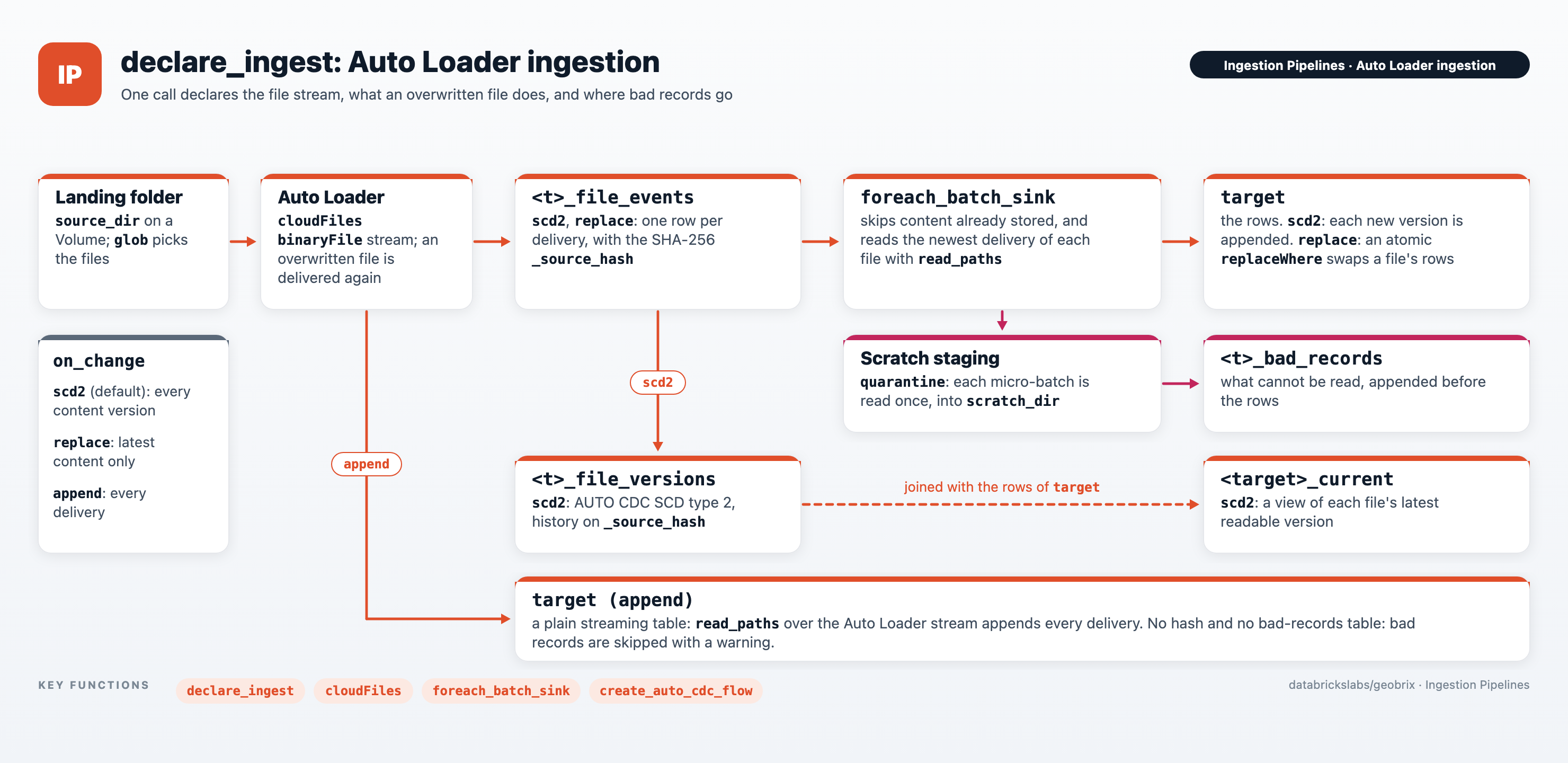
declare_ingest declares a complete ingestion flow in a Lakeflow pipeline. Auto Loader watches a
Volume folder, and the GeoBrix reader you name reads each new or changed file. The rows land
in a table. on_change decides what happens when a file is overwritten: keep every version
(scd2, the default), keep only the latest content (replace), or append every delivery
(append). Data that cannot be read is set aside in a bad-records table, and the rest is written
(on_error).
Set up the pipeline first (channel, GeoBrix extra, Serverless notes): see Lakeflow SDP.
Quick start
This is a complete pipeline source file. It keeps main.geo.boroughs in sync with the GeoJSON
files in a landing folder:
# Lakeflow pipeline source file (serverless)
from databricks.labs.gbx.ds.changes import declare_ingest

declare_ingest(
    "main.geo.boroughs",                       # rows table: catalog.schema.table
    "/Volumes/main/geo/landing/boroughs",      # folder Auto Loader watches
    "geojson_gbx",
    on_change="scd2",                          # default; or "replace" / "append"
    on_error="quarantine",                     # default; or "fail"
)
Stage at least one file in the folder before the first pipeline update: the table schema is
resolved from it when the pipeline is declared. After an update, main.geo.boroughs holds the
rows, main.geo.boroughs_current shows the rows of each file's latest readable content, and
main.geo.boroughs_file_versions records when each version of a file was current.
Reader options and parallelism go in the same call. Here a raster folder is cut into tile windows that are spread across tasks, and only the latest content of each file is kept:
# Lakeflow pipeline source file (serverless)
from databricks.labs.gbx.ds.changes import declare_ingest

declare_ingest(
    "main.geo.sentinel2_tiles",
    "/Volumes/main/geo/landing/sentinel2",
    "gtiff_gbx",
    options={"tileSize": "512"},   # reader options, as on the GeoTIFF reader page
    on_change="replace",           # keep only the latest content of each file
    num_partitions=64,             # spread the tile windows across 64 tasks
)
scd2is the default and keeps every version. The rows table grows with each content change of a file. Useon_change="replace"when only the latest content matters.- Stage one file before the first update. The schema is read from
schema_path(by default the first matching file insource_dir) when the pipeline is declared, at each update. - Unity Catalog Volume paths only.
source_dirandschema_pathare/Volumes/...paths; to ingest from cloud storage, create an external volume over it. See Paths. - Each format has a default file pattern, with lower- and upper-case extensions. GeoJSON is
matched by
.geojsononly (passglob="*.{geojson,json}"for.jsonfiles), a File Geodatabase is delivered as a.gdb.zipfile, andpmtiles_gbxneeds itssourceoption. See Default file patterns. - Set
num_partitionson Serverless. Without it a large raster or PMTiles archive is read by a single task. See Parallelism. - Use a channel that has the pipeline APIs.
declare_ingestneedspyspark.pipelineswithforeach_batch_sinkandcreate_auto_cdc_flow(theCURRENTchannel has them), and the GeoBrix extra for that channel's runtime. See Environment. - Overwrite files without preserving their modification time. A copy made with
cp -porrsync -tcan give new content an older time than the version it replaces (see Query the latest content). - Bad data is set aside, not fatal. By default (
on_error="quarantine") a file, a feature, a raster window or a run of LiDAR points that cannot be read goes to<t>_bad_records. The rest of the micro-batch is written. Each micro-batch is staged in a hidden folder underscratch_dir(defaultsource_dir), so the pipeline must be able to write there. Landing folders are often read-only to the pipeline, so setscratch_dirto a Volume folder it can write. See Unreadable data.
declare_ingest parameters
declare_ingest(target, source_dir, format, options=None, *,
               on_change="scd2", glob=None, num_partitions=None, schema_path=None,
               on_error="quarantine", scratch_dir=None)
| Parameter | Default | Description |
|---|---|---|
target | required | Rows table, a fully qualified catalog.schema.table name. The other objects are created in the same catalog and schema. |
source_dir | required | Volume folder Auto Loader watches (see Paths). |
format | required | Reader name from the formats table. |
options | None | Reader options, exactly as on that reader's page. |
on_change | "scd2" | What to do when a file is overwritten: "scd2", "replace" or "append". See Choosing on_change. |
glob | None | File-name filter for the folder, in Spark pathGlobFilter syntax, such as "zones_*.gpkg". By default, the format's default file pattern; a glob replaces that pattern. |
num_partitions | None | Spread the reads across this many tasks. See Parallelism. |
schema_path | source_dir | File or folder that defines the table schema; a folder's first file matching glob is used. It is read once when the pipeline is declared (at each update), not for every micro-batch. |
on_error | "quarantine" | What to do with data that cannot be read: "quarantine" sets it aside in <t>_bad_records and writes the rest; "fail" fails the update. See Unreadable data. |
scratch_dir | source_dir | Volume folder (/Volumes/..., shared by every node) where on_error="quarantine" stages each micro-batch, in a hidden .gbx_scratch folder that is removed when the micro-batch ends. The pipeline must be able to write it. Set it when the landing folder is read-only to the pipeline. |
Auto Loader delivers every file under source_dir on its own. The file pattern must therefore leave out
the other files of a multi-file dataset: a shapefile's sidecars, or the files inside an unzipped
.gdb folder. The format's default pattern does. A glob you set replaces it, so for shapefiles
end it in .shp. See Default file patterns.
Choosing on_change
Auto Loader runs with cloudFiles.allowOverwrites on in every mode, so a file that is overwritten in
place is delivered again. on_change decides what the table does with that second delivery.
scd2 (default) | replace | append | |
|---|---|---|---|
| Rows table | Append-only: one copy of a file's rows for each distinct content version | Latest content of each file only | Every delivery of every file |
| Re-delivery, content unchanged | Writes nothing | Writes nothing | Duplicates the rows |
| File modified | New rows are added; the earlier version's rows stay | That file's rows are replaced, one atomic replaceWhere per micro-batch | New rows are added; the earlier rows stay |
| History | <t>_file_versions records when each version was current | None | None |
Rows have _source_hash | Yes | Yes | No |
| Use when | You need the latest content and a record of what it used to be | Only the latest content matters | You want a log of every delivery |
Here <t> is the last part of target. scd2 and replace compare a SHA-256 hash of the file's
bytes (_source_hash) with what is already stored. A file that is re-delivered without a content
change is therefore recognized and skipped. append does not hash anything.
Each mode declares these objects in the catalog and schema of target:
| Object | scd2 | replace | append |
|---|---|---|---|
target: the rows | yes | yes | yes (streaming table) |
<t>_file_events: one row per delivery with _source_path, _source_mtime, _source_hash, _source_size | yes | yes | no |
<t>_file_versions: one row per content version of a file, with __START_AT and __END_AT | yes | no | no |
<target>_current: a view of the rows for each file's latest version | yes | no | no |
<t>_bad_records: one row per bad record, created when the first one is found | yes | yes | no |
In scd2 and replace the rows table is written by the pipeline's batch sink. It is a regular
Delta table, created on the first update and clustered by _source_path. It is not a dataset the
pipeline manages.
Query the latest content and past content
<target>_current returns the rows of each file's latest readable version: the newest version
whose content has rows in the table. It is a plain view that scans the rows table, so filter it by
_source_path to look up one file quickly. A delivery that could not be read is still recorded as the
file's newest version in <t>_file_versions. It does not hide the content that was read before
it (see Unreadable data). To read what was current at an earlier time, join the
rows to the versions table on both _source_path and _source_hash. Keep the version whose
interval contains the time:
-- latest content of every file
SELECT * FROM main.geo.boroughs_current;

-- what was current at a point in time
SELECT r.* FROM main.geo.boroughs r
JOIN main.geo.boroughs_file_versions v
  ON r._source_path = v._source_path AND r._source_hash = v._source_hash
WHERE v.__START_AT <= TIMESTAMP'2026-10-17 12:00:00'
  AND (v.__END_AT IS NULL OR v.__END_AT > TIMESTAMP'2026-10-17 12:00:00');
__START_AT and __END_AT are the file's modification times, so the time you ask for is when the
file's content was written, not when the pipeline ingested it. __END_AT is NULL for the
current version, and an interval includes its start and excludes its end. For a time when the
file's content could not be read, the query returns no rows for that file.
"Current" means the version with the newest modification time. A copy that keeps or backdates the
source's modification time (cp -p, rsync -t) can give an overwrite an older time than the
version it replaces. That content is then recorded as history and does not become current. Copy
without preserving times when you overwrite a file.
Unreadable data
on_error decides what a micro-batch does with data its reader cannot read:
on_error | What happens |
|---|---|
"quarantine" (default) | Each file is read on its own, and what cannot be read is a bad record: it is written to <t>_bad_records, then the rest of the micro-batch is written to the rows table. The update succeeds. |
"fail" | The first error fails the update, with an error that names the file. |
A bad record is the smallest part of a file its reader can set aside. It can be a whole file that cannot be opened, or whose columns differ from the table schema. It can be a feature whose geometry bytes are not readable, or whose text is not valid UTF-8. It can be a GeoJSONSeq line that is not JSON. It can also be a raster tile window, a run of LiDAR points, a PMTiles tile, or a NetCDF variable or slice. Rows read from a file before an error stay in the table. The Unreadable files reference lists what each format sets aside, and the damage no reader can detect.
A NULL or empty geometry is data, not a bad record. A feature without a location
("geometry": null in GeoJSON) or a POINT EMPTY is written like any other row. GDAL also returns
NULL for a geometry it cannot decode (an unknown geometry type, unreadable coordinates, a damaged
GeoPackage or shapefile record). Those rows are therefore written too. To watch for them, query the
geometry column with IS NULL (it is geom_0 for GeoJSON) and ST_IsEmpty. Curves and
surfaces (CircularString, CompoundCurve, CurvePolygon, MultiCurve, MultiSurface,
PolyhedralSurface, TIN, Triangle) are data too.
Errors of the environment are not bad data either. Out of memory, a missing module (such as a LAZ
decompression backend), and an I/O error of the Volume (retried first) fail the micro-batch. So does an image too large to read
whole in exif_gbx qc mode. Spark then retries the task, or the update fails
with that error. No bad record is written for them.
A LAZ file is set aside before it is decoded when its chunk table or LASzip record is implausible or cannot be decoded. The same holds when (point
formats with GPS time) its compressed points hold a run of 0xFF bytes. Other damage, inside the compressed points or in a chunk table that is wrong but
plausible, still reaches the native LAZ decoder (lazrs). It can crash the decoder and end the worker
process. A crash cannot be caught, so the file is not set aside: the task fails, Spark retries it,
and then the update fails. Remove the file or replace it with a readable copy to continue.
Query the bad records
<t>_bad_records is created in the catalog and schema of target when the first bad record is
found:
-- what was set aside, per file and kind
SELECT _source_path, error_class, count(*) AS records, max(quarantined_at) AS last_seen
FROM main.geo.boroughs_bad_records
GROUP BY _source_path, error_class
ORDER BY last_seen DESC;

-- the features set aside from one file, with their other columns
SELECT record_index, error_class, error_message, raw
FROM main.geo.boroughs_bad_records
WHERE _source_path = '/Volumes/main/geo/landing/boroughs/boroughs.geojson'
  AND record_index LIKE 'feature=%';
| Column | Type | Meaning |
|---|---|---|
_source_path | STRING | The file |
_source_mtime | TIMESTAMP | Its modification time, as delivered |
_source_hash | STRING | SHA-256 of the delivered file, as in <t>_file_events |
_source_size | BIGINT | Its size in bytes |
record_index | STRING | Where in the file: feature=17 (position in the file's read order), fid=1009 (a GeoPackage feature), line=11 (GeoJSONSeq), window=128,64,64,64 (column, row, width, height), points=2000-2999 or point=12 (LiDAR), tile=3/1/2 (z/x/y) or tiles=3/0/0..3/1/3 (PMTiles), variable=temp,time=1 (NetCDF). NULL for the whole file |
error_class | STRING | The reader's exception class (for example pyogrio.errors.DataSourceError), or the check that set the record aside (table below) |
error_message | STRING | The error and the errors that caused it, the warnings and log lines the reader gave while reading, and how many rows of the file were read before the error |
raw | STRING | What can be recovered, as JSON of at most 4096 characters (longer is cut and marked "truncated": true): a feature's other columns (text that is not UTF-8 is escaped, a binary value is shown as <binary, N bytes>), a GeoJSONSeq line, or a LiDAR point's x, y and z. Otherwise NULL |
quarantined_at | TIMESTAMP | When the micro-batch set it aside |
error_class | Set aside because |
|---|---|
UnreadableGeometry | The geometry bytes are not valid WKB (for example a polygon ring that is not closed) |
InvalidText | A text value is not valid UTF-8 |
RecordsNotRead | The file declares features, points or lines its reader did not return (a dropped .dbf record, an unreadable GeoPackage page, a truncated LAS file, a GeoJSONSeq line that is not JSON) |
PointOutOfBounds | LiDAR points outside the bounds the file's header declares, widened on every side by their largest extent (garbled point records, or garbage that damaged LAZ data decodes to); off with the lidar_gbx option checkHeaderBounds="false" |
ShortTile | A PMTiles tile is shorter than its directory entry declares (a truncated archive) |
NotJpeg | A .jpg / .jpeg file has no JPEG start marker, or header segments that do not lead to a frame header (nothing is decoded, so a very large image is still a JPEG; a missing end marker only gives a warning: a truncated scan, or a Motion Photo's video after the image) |
UnreadableFile | An empty file, or a LAS file whose point record length does not fit its data |
NothingReadable | No row of the delivery could be read: every record of it was set aside. One per delivery (record_index is NULL), next to the records that say why |
How bad records interact with the tables
- A file with bad records still has its version. Under
scd2the delivery is recorded in<t>_file_versionslike any other. When part of a file's new content was set aside, the rows that were read are written under the new hash. That version is current. When all of it was set aside, the version has no rows, so<target>_currentkeeps showing the file's last readable content, and<t>_bad_recordsexplains the empty version. Removing the bad file keeps it that way. The same holds for a file overwritten with content that has no rows (an emptied file):<target>_currentkeeps showing its previous rows, whilereplaceremoves them. replacekeeps the last readable rows too. A delivery that is partly readable replaces the file's earlier rows with the rows that were read. A delivery set aside entirely (aNothingReadablerecord) leaves the file's earlier rows in place.- The same bad bytes are not read twice. A re-delivery with the same content is skipped when it has rows in the table, or when it was set aside entirely. It would be set aside again. A re-delivery with new content is read.
- Each micro-batch is staged in
scratch_dir. The files are read once. The rows go to a hidden.gbx_scratchfolder underscratch_dir(defaultsource_dir), in a subfolder of its own for each target table. The bad records are collected there. Then the bad records are appended to<t>_bad_records, then the rows to the table, and the folder is removed. A bad record already in the table is not appended again. A micro-batch that fails between the two writes and is retried therefore neither loses nor repeats one. A staging folder left by a killed micro-batch is removed a day later, by the next micro-batch of the same table. Pipelines that share ascratch_dirnever touch each other's folders. When the pipeline cannot write toscratch_dir, the micro-batch fails with an error that says so. - To read a file that was set aside again, for example after fixing a reader option, delete
its
NothingReadablerows from<t>_bad_records(DELETE FROM ... WHERE _source_path = '...' AND error_class = 'NothingReadable'), then touch the file or deliver it again. Until then an identical delivery is skipped. A delivery that was partly read has rows under its_source_hash, so the same bytes delivered again are skipped as stored. To read it again, delete its rows for that hash from the table (DELETE FROM ... WHERE _source_path = '...' AND _source_hash = '...') before you touch or deliver it, or deliver changed content. appendhas no bad-records table. Its rows table is a plain streaming table, so bad records are skipped with a warning in the executor logs, and nothing is staged. Usescd2orreplaceto keep them.
With on_error="fail"
The update fails with the reader's error, which names the file. Nothing from that micro-batch is
written to the rows table, and the flow's progress is not saved. The next update reads the same
files again and fails the same way until the file is dealt with. To recover, remove the file or
replace it with a readable copy, then start an update. A file deleted before it is read is skipped
with a warning (see Files deleted before they are read).
A replacement is delivered again and handled like any overwritten file (see
Choosing on_change). The Lakeflow connector
always reads this way.
What a pipeline update does
- The newest delivery of each file wins (
scd2andreplace). When one micro-batch holds several deliveries of the same file, only the newest is read, because the bytes on disk are the newest content. Underscd2the older deliveries still appear in<t>_file_versions, but have no rows in the table. - A file modified after it was hashed is skipped (
scd2andreplace) until its newer delivery arrives, so a row's_source_hashdescribes the content it was read from. Before reading, each file must still have its delivered size and a modification time within one second of the delivered one. A file can still be stored under the earlier hash if it is overwritten in the instant between that check and the read. The same holds if it is rewritten with the same size within that second. Its next delivery is written as usual (and underscd2recorded as the current version). - A file deleted before it is read is skipped with a warning (all modes), and Auto Loader counts
it as processed. Deleting a file does not remove rows that were already written, with one rare
exception. Under
replace, a file deleted in the instant between that check and the read is still part of the micro-batch'sreplaceWhere. Its earlier rows are therefore removed, and no new rows are written for it.
See also
Two examples are complete Lakeflow SDP pipelines with an Auto Loader streaming-table bronze
layer. They list their files with a plain binaryFile Auto Loader stream and read the listed
files in silver with read_paths. Their files never change once landed, so they
don't use declare_ingest, and they show the pipeline setup around it:
- Wireless Coverage: an Auto Loader
laz_inventorystreaming table over staged USGS 3DEP LiDAR feeds DSM, DTM and CHM surfaces and H3 tower viewsheds. - Vapor-Eyes: five raw sources land on a Volume and become a bronze streaming-table inventory, then silver detection and attribution and gold map-ready tables and PMTiles.
- Lakeflow SDP: pipeline setup, Serverless notes and the building blocks
declare_ingestuses. read_pathsand reference: formats, file patterns, schema, paths and parallelism.- Lakeflow connector: the governed, append-only route.