Lakeflow connector
Since: v0.6.0
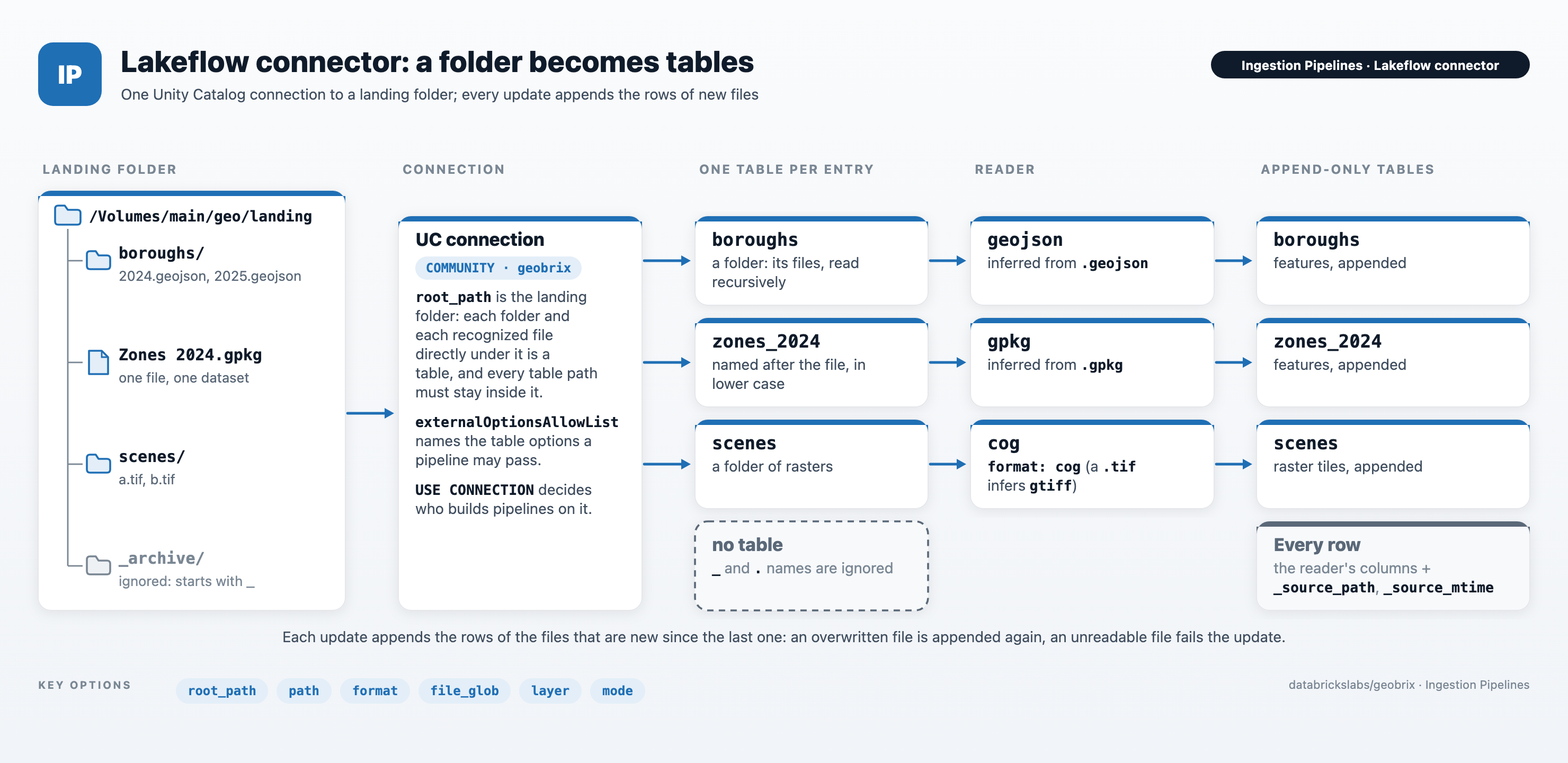
GeoBrix ships a Lakeflow Connect community connector, geobrix, for governed, low-code ingestion.
An admin creates one Unity Catalog connection to a landing folder on a Volume. After that, each
table is a name plus a few options. Each pipeline update appends the rows of the files that
are new since the last update. Rows carry the columns of the GeoBrix reader for their format, plus
the lineage columns _source_path and _source_mtime.
Pipeline setup that every route shares (the channel, the GeoBrix extra, Serverless notes) is on Lakeflow SDP. This page covers the connector itself.
- Append-only. A file overwritten in place gets a new modification time and is read again,
so its rows are appended a second time. To keep each version of a file (
scd2) or only its latest content (replace), use Auto Loader ingestion. - Three wheels. The pipeline installs GeoBrix, the connector and the Lakeflow community-connectors framework. The framework and the connector are not on PyPI: build them once (step 1).
- No spaces around
@in the dependency lines, and match the GeoBrix wheel to the pipeline channel's runtime (the+env5wheel for DBR 18,+env6for DBR 19). See Environment. - The connection governs access. Its
root_pathconfines every table to that Volume prefix, andUSE CONNECTIONcontrols who can build pipelines on it. Volume grants still apply. - The schema comes from the table's first file, so stage one file before you create the table.
- A folder that mixes file kinds needs
format. - Each update lists the table's folder to find new files. That is fine for thousands of files. For very large or fast-growing landing folders, use Auto Loader ingestion, where Auto Loader keeps track of the files.
- An unreadable file fails the update for most formats: the connector does not set bad data aside. Remove the file or replace it with a readable copy, then run the update again. See Unreadable files. To keep bad records in a table instead, use Auto Loader ingestion.
Formats
The reader for a table is its format table option. Otherwise it is inferred from the file
extension when every file in the dataset has the same one. format takes the same reader names as
read_paths: the _gbx suffix is optional and case is ignored,
so gpkg, GPKG and gpkg_gbx are the same reader.
format | Reader | Extensions |
|---|---|---|
vector | Vector | Any vector extension below (generic reader) |
gpkg | GeoPackage | .gpkg |
geojson | GeoJSON | .geojson. For GeoJSON files named .json, set format: geojson and file_glob: *.{geojson,json}. |
geojsonl | GeoJSONL | .geojsonl, .geojsons |
shapefile | Shapefile | .shp, .shz, .shp.zip |
file_gdb | File Geodatabase | .gdb, .gdb.zip |
lidar | LiDAR | .las, .laz |
exif | EXIF/GPS | .jpg, .jpeg |
raster | Raster | .tif, .tiff. Another raster file, such as .jp2, is read only when path or file_glob names it and format is raster. |
gtiff | GeoTIFF | .tif, .tiff |
cog | COG | .tif, .tiff, read with the COG reader. By extension a .tif is a gtiff table, so set format: cog. |
netcdf | NetCDF | .nc. The mode option picks what a file becomes: raster (default), one GeoTIFF tile per grid variable; vector, one point feature per observation or grid cell. |
pmtiles | PMTiles | .pmtiles: one row per tile stored in the archive (z, x, y, bytes). Rendering tiles from GeoTIFFs is not a connector table; use read_paths or declare_ingest with source="raster". |
Extensions match in any case (.TIF is .tif). The file reader (it lists files)
is not a connector format.
Set up
1. Install three wheels
The pipeline's environment installs three wheels; the compute that queries the resulting tables needs no GeoBrix install. Build the framework and connector wheels once, on any machine with Python 3.12:
# The framework and the connector are not on PyPI: build both wheels once
git clone https://github.com/databrickslabs/geobrix.git
pip wheel --no-deps -w wheels ./geobrix/connectors/lakeflow
pip wheel --no-deps -w wheels \
  "lakeflow-community-connectors @ git+https://github.com/databrickslabs/lakeflow-community-connectors@70d16606fb2a7c32e9965af0c9c9452a0172008e"
# then upload wheels/*.whl and the GeoBrix wheel to one Volume folder
Keep the three wheels in a Volume folder of their own and list them as the pipeline's dependencies, one per line:
geobrix@file:///Volumes/<catalog>/<schema>/<volume>/<dir>/geobrix-<version>+env5-py3-none-any.whl
/Volumes/<catalog>/<schema>/<volume>/<dir>/lakeflow_community_connectors-<version>-py3-none-any.whl
/Volumes/<catalog>/<schema>/<volume>/<dir>/geobrix_lakeflow_connectors-<version>-py3-none-any.whl
Write the GeoBrix line without spaces around @, with the extra for the pipeline channel's
runtime (Environment). The connector needs GeoBrix 0.6.0 or later.
2. Create the connection
Create a Unity Catalog connection of type COMMUNITY (once) with these options:
| Option | Required | Meaning |
|---|---|---|
sourceName | yes | geobrix |
externalOptionsAllowList | yes | path,format,layer,where,bbox,chunk_size,file_glob,mode |
root_path | no | Volume prefix, such as /Volumes/main/geo/landing. Enables discovery (every folder, and every file with a recognized extension, directly under it is a table) and confines every table path to it. |
The allowlist names the table options a pipeline may pass to the connector. The
pipeline framework's own options, such as tableName, don't need to be on it.
Databricks describes two ways to create the connection of a community connector. One is the Create
connection step of the Add data flow (community connectors,
and custom connectors for one that
is not in the catalog). The other is the create_connection command of the
Community Connector CLI.
The CLI checks the options against the connector's connector_spec.yaml (GeoBrix's is in
connectors/lakeflow/sources/geobrix) and sets the allowlist for you.
Grant USE CONNECTION on it to the people who build pipelines on it.
3. Add the pipeline source file
Create a serverless pipeline whose source is this file, with the three wheels as the
environment's dependencies. Set connection_name and list one entry per table in
pipeline_spec:
# Lakeflow pipeline source file for the GeoBrix connector.
#
# Add this file to a serverless pipeline (libraries -> file) whose environment
# installs the three wheels listed in the connector README, then edit the spec.
from databricks.labs.community_connector.pipeline import ingest
from databricks.labs.community_connector.sources.geobrix import GeoBrixDataSource

# Inject the UC connection's options (sourceName, root_path, allowlist) into reads.
spark.conf.set(
    "spark.databricks.unityCatalog.connectionDfOptionInjection.enabled", "true"
)
spark.dataSource.register(GeoBrixDataSource)

pipeline_spec = {
    "connection_name": "<connection_name>",
    "objects": [
        # A dataset discovered under the connection's root_path (file or folder name).
        {
            "table": {
                "source_table": "<dataset>",
                "destination_table": "<table>",
                "table_configuration": {"scd_type": "APPEND_ONLY", "format": "geojson"},
            }
        },
        # An explicit path (relative to root_path, or absolute inside it) plus a layer.
        {
            "table": {
                "source_table": "<name>",
                "destination_table": "<table>",
                "table_configuration": {
                    "scd_type": "APPEND_ONLY",
                    "format": "gpkg",
                    "path": "<dir>/<file>.gpkg",
                    "layer": "<layer>",
                },
            }
        },
    ],
}
ingest(spark, pipeline_spec)
The file registers GeoBrixDataSource, the connector's PySpark data source. The framework serves
its tables through GeoBrixLakeflowConnect, the connector's implementation of the framework's
LakeflowConnect interface (table discovery, schemas and offsets). It needs no registration of
its own.
Each pipeline update creates or appends to one streaming table per entry. source_table names a
dataset discovered under root_path, or any name when the entry sets path; the other keys of
table_configuration are the table options.
A pipeline source file, as above, is the tested route for deploying the connector. The Add data page
and managed ingestion pipelines (an ingestion_definition with source_type: COMMUNITY) are the
other routes for community connectors, where they are available in your workspace.
If a managed ingestion pipeline fails at startup, see Troubleshooting.
Table options
| Option | Meaning |
|---|---|
path | File or folder, relative to root_path or absolute. A folder is one dataset. Optional when the table name matches an entry under root_path. |
format | A reader from the formats table. Default: inferred from the file extension. |
layer | Vector only. Layer name for multi-layer sources (default: the first layer). |
where | Vector only. OGR SQL filter, such as borough = 'Queens'. |
bbox | Vector only. xmin,ymin,xmax,ymax in the layer's CRS. |
chunk_size | Vector only. Features per Arrow batch (default 10000). |
file_glob | File-name pattern for a folder's files, such as zones_*.gpkg (see Discovery). |
mode | lidar, exif and netcdf only. Reader mode: points (default) or metadata for LiDAR, metadata (default) or qc for EXIF, raster (default) or vector for NetCDF. |
"Vector" means the vector, gpkg, geojson, geojsonl, shapefile and file_gdb readers.
path, format and file_glob apply to every table. Any other option fails when set on a table whose reader does not take
it. The error names the option and the readers it applies to.
Raster (raster, gtiff, cog) and pmtiles tables take none of them.
Discovery
- With
root_path, every folder, and every file with a recognized extension, directly under it is a table. Each table is named after the entry without its extension (lower case, other characters replaced by_). Withoutroot_path, each table setspathto an absolute path. - A folder is one dataset, and its files are read recursively.
pathis relative toroot_path, or absolute inside it. A path outsideroot_pathfails.- Folders and files whose names start with
_or.are ignored, as Spark's file sources ignore them: use_archive/or_staging/to keep files out of a table. file_globpicks files by name, with the same syntax as theglobofdeclare_ingest. The syntax is a SparkpathGlobFilter(Hadoop glob) pattern, case-sensitive, where{a,b}matches either alternative and a backslash escapes a pattern character (\*matches a literal*). Withformatset,file_globalone picks the folder's files, so for shapefiles end it in.shp(zones_*.shp):zones_*would also pick each shapefile's.dbf,.shxand.prjsidecars. Withoutformat, it narrows the files that have a recognized extension.
How updates work
- Incremental by file. Each update records the newest modification time it has read, and the
files at that time. The next update reads the files that are newer (or at that time but not yet
read). A file replaced in place gets a new modification time and is read again. A copy that
keeps the source's modification time (
cp -p,rsync -t) may not be seen as new. - One Spark partition per file, read as Arrow batches.
- The schema comes from the table's first file (in path order). Every later file must have the same columns; see Schema.
- Most unreadable files fail the update. The connector reads as
read_pathsdoes withon_error="fail"; see Unreadable files for each format. When an update fails, its progress is not saved, so the next update reads the same files again.
Troubleshooting
A managed ingestion pipeline fails with PYTHON_REPL_CREATION_FAILED
A managed ingestion pipeline (created from the Add data page, or as an ingestion_definition with
source_type: COMMUNITY, where those are available) can fail at startup with
PYTHON_REPL_CREATION_FAILED, caused by chown: invalid user: spark-<uuid>. This is a platform
bootstrap failure: it happens while the managed runtime creates the pipeline's Python REPL, before
any connector code runs. It is not a problem with the connector, its authentication, the table
schema or permissions, so changing those does not help.
- Retry the update once.
- If it fails again, deploy the connector with a pipeline source file, the tested route on this page, and contact Databricks support.
Don't count on the retry: the error has repeated on both the PREVIEW and CURRENT channels in a
workspace where pipelines with a source file ran.
See also
- Ingestion Pipelines: choosing a route.
- Lakeflow SDP: the pipeline environment and Serverless notes.
read_pathsand reference: formats, schema, paths and unreadable files.- The connector's README
and
connector_spec.yaml.