Ingestion Pipelines
Keep tables in sync with landing folders: each update reads only new and changed files, tracks what changed, and sets bad records aside.
New files land in a Unity Catalog Volume folder: vector datasets, LiDAR point clouds, drone photos, rasters, NetCDF files or PMTiles archives. GeoBrix turns that folder into a table that keeps up with it. All three routes are pure Python at the Python level (no JAR, no init script) and run on Serverless.
Choose a route
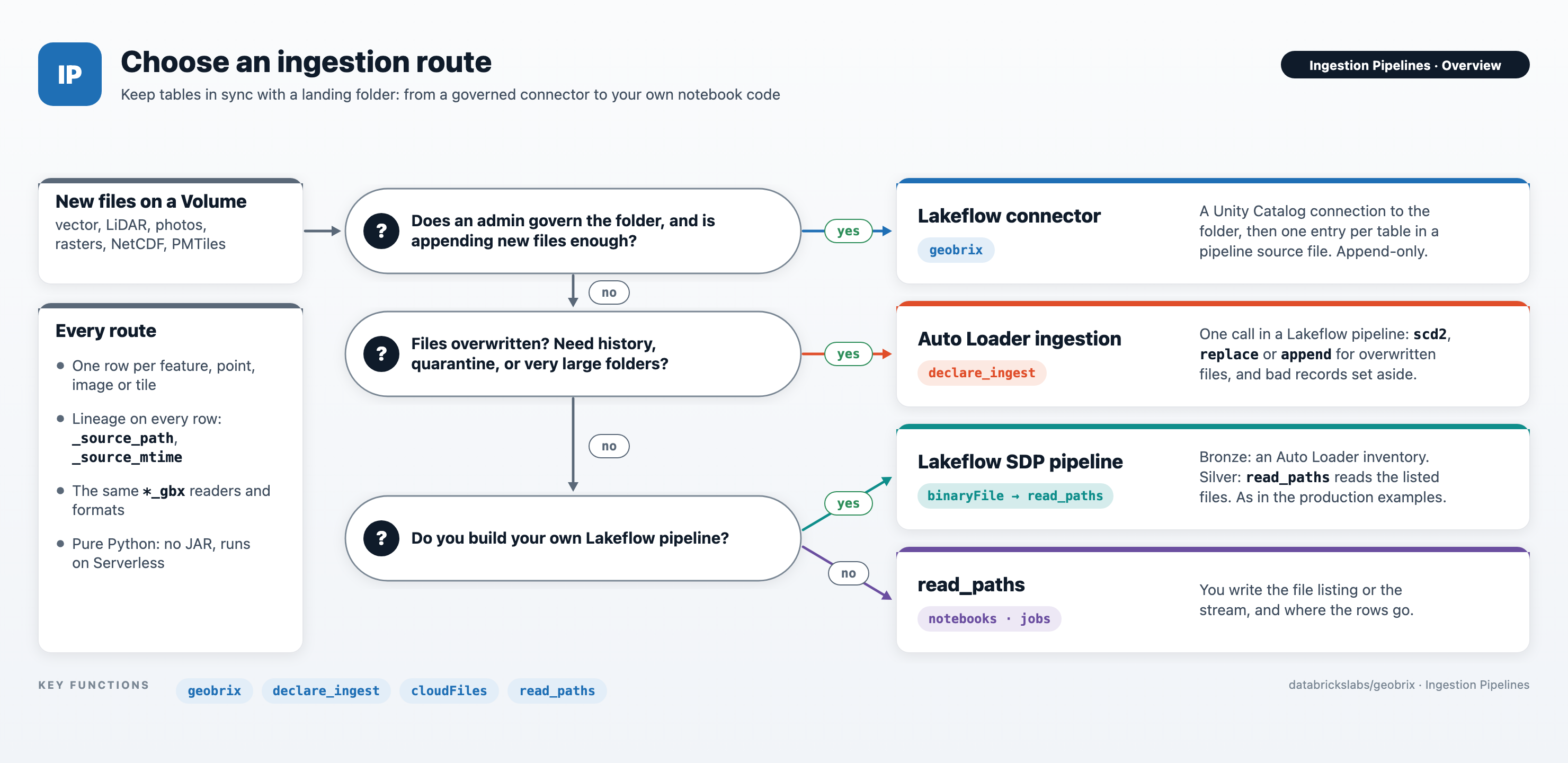
| Route | Use it when | Effort |
|---|---|---|
Lakeflow connector (geobrix) | An admin governs the folder, and appending new files is enough. | Install three wheels and create the connection once; then one entry per table in a pipeline source file. |
Auto Loader ingestion (declare_ingest) | Files get overwritten, you need history or quarantine, or folders are very large. | A few lines of Python in a Lakeflow pipeline source file. |
read_paths | Notebooks and jobs where you own the flow. | You write the file listing or stream, and where the rows go. |
The connector and Auto Loader ingestion differ like this:
| Lakeflow connector | Auto Loader ingestion | |
|---|---|---|
| Where you set it up | A connection, then a pipeline source file that lists the tables | A pipeline source file that calls declare_ingest |
| Access control | Unity Catalog connection (root_path, USE CONNECTION), plus Volume grants | Volume grants |
| Overwritten files | Re-read and appended | scd2, replace or append |
| File version history | No | Yes, with scd2 |
| Data that cannot be read | Fails the update | Set aside in <t>_bad_records (or fails the update, with on_error="fail") |
| Finding new files | Lists the table's folder at each update | Auto Loader keeps track of delivered files |
Start with Lakeflow SDP: how GeoBrix runs in a Lakeflow pipeline, which GeoBrix extra each pipeline channel needs, and two production pipelines to start from.
What every route gives you
- One row per feature, point, image or tile, with the columns of the GeoBrix reader for that format.
- Lineage on every row:
_source_pathand_source_mtimename the file each row came from and its modification time. - Only new or changed files are read on each update (for
read_paths, when you give it an Auto Loader stream).
Formats: GeoPackage, GeoJSON, GeoJSONSeq, Shapefile, File Geodatabase, LiDAR (LAS/LAZ), EXIF photo metadata, GeoTIFF and COG rasters, NetCDF and PMTiles. See the supported formats reference.
Two examples are complete Lakeflow SDP pipelines with an Auto Loader streaming-table bronze
layer. They list their files with a plain binaryFile Auto Loader stream and read the listed
files in silver with read_paths. Their files never change once landed, so they
don't use declare_ingest or the connector, and they show the pipeline setup around them:
- Wireless Coverage: an Auto Loader
laz_inventorystreaming table over staged USGS 3DEP LiDAR feeds DSM, DTM and CHM surfaces and H3 tower viewsheds (repo folderexamples/notebooks/wireless-coverage/lakeflow). - Vapor-Eyes: five raw sources land on a Volume and
become a bronze streaming-table inventory. Then come silver detection and attribution and gold
map-ready tables, PMTiles and an AI/BI dashboard (repo folder
examples/notebooks/vapor-eyes/lakeflow).
Pages in this section
- Lakeflow connector: formats, setup, table options and discovery.
- Lakeflow SDP: the pipeline environment, Serverless notes, the SDP building blocks GeoBrix uses and Asset Bundles.
- Auto Loader ingestion:
declare_ingest,on_change, querying current and past content, and the bad records it sets aside. read_pathsand reference:read_paths, and the reference every route shares (formats, file patterns, schema, paths, unreadable files, parallelism).