Zarr Stores: Concepts and Store Kinds
Since: v0.6.0 · (Python level; no JAR needed)
Zarr stores N-dimensional arrays as many small objects in object storage. That makes it the format of choice for large weather, climate and earth-observation cubes. Plain Zarr has no transactions. Two jobs that write to one store can lose each other's updates, and a reader can see a half-written store.
GeoBrix adds the missing layer:
- Read and sample Zarr stores of any origin.
- Register an existing store in place, without copying it.
- Write transactionally. Every write is all-or-nothing, and concurrent writers do not corrupt each other.
- Keep every version readable for the store's
retainperiod (7 days by default). Tag a version to keep it for as long as you like.
This page is the place to start. It explains the four kinds of store and how a store is kept as files and rows. The examples run against a small sample cube, and the documentation tests run every block of code.
The Weather Features with Zarr notebook runs these ideas on a small weather cube. It registers the cube in place and samples it at 100 sites. It writes a derived variable back as a new version, maps it as raster tiles, and tags the version for training.
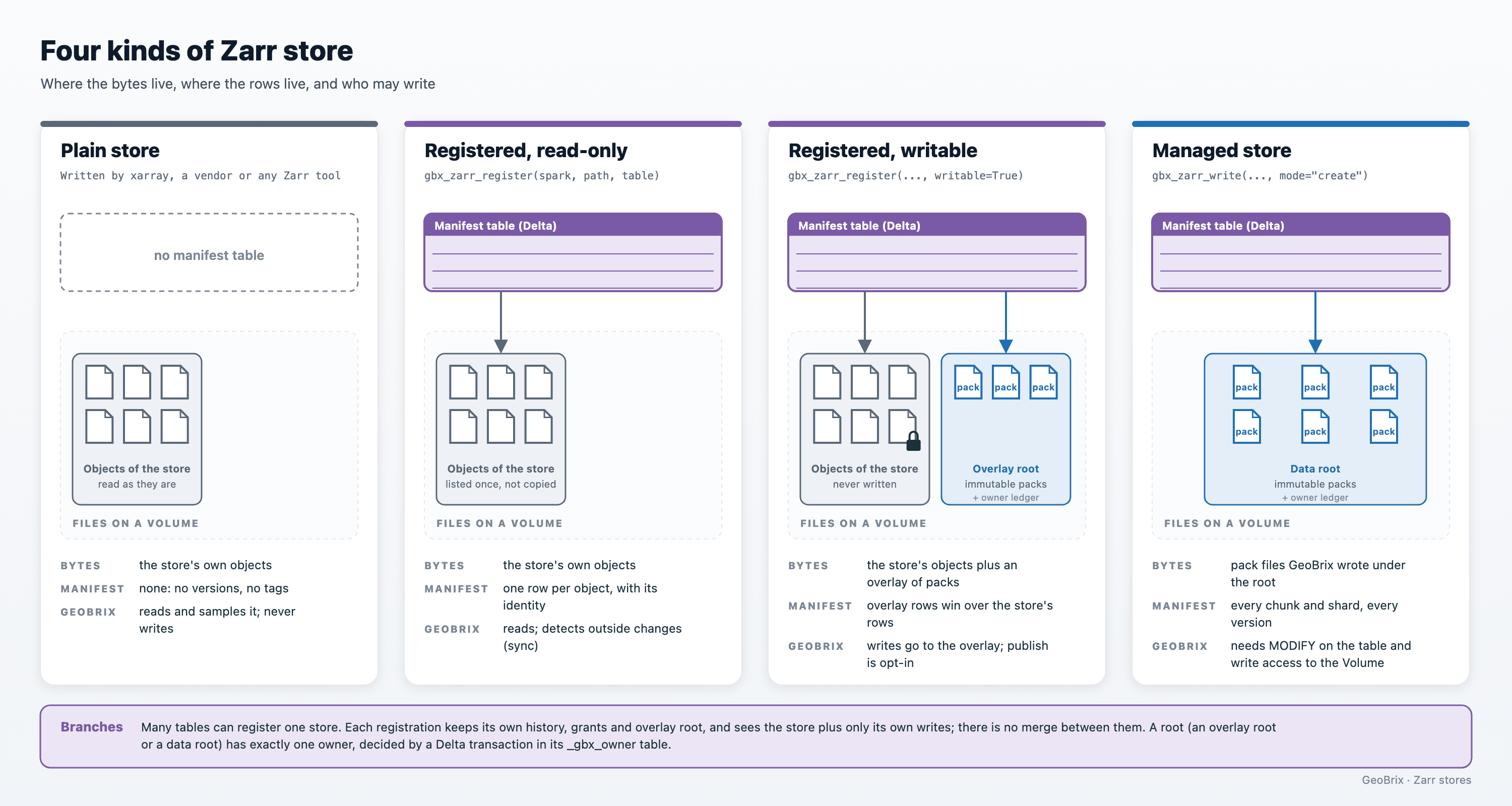
Store kinds at a glance
A store is plain, registered (read-only or writable) or managed. Store kinds explains each one.
Which page do you need?
| You want to | Go to |
|---|---|
| Look up a function, its parameters and its errors | Zarr Function Reference |
| Read a cube, or sample it at points | Zarr Reader |
| Write blocks to a store | Zarr Writer |
| Point a table at a store you already have, and keep it in sync | Registering and syncing |
| Know what happens when several jobs write at once | Transactions and concurrent writers |
| Read an older version, name one, or take one out | Versions, time travel and tags |
| Free storage, or make reads faster after many small writes | Lifecycle and retention |
| See what a store costs, and what is not supported | Performance and limits |
Why Zarr
| Zarr | GeoTIFF / COG | NetCDF / HDF5 | GRIB2 | Delta table, one row per cell | |
|---|---|---|---|---|---|
| Shape | Any number of dimensions | Bands of a 2-D grid | Any number of dimensions | A sequence of 2-D fields | Rows and columns; the grid is lost |
| Layout | One object per chunk, or per shard of chunks | One file; a COG is tiled inside | One file, chunked inside | One file of messages | Parquet files |
| Reading a slice from object storage | Fetches only the chunks the slice touches | A COG fetches the tiles it needs | Possible with range-read tooling; many readers copy the whole file | Needs an index of the messages | Scans and filters rows |
| Several writers at once | Safe only for different chunks, and only if none changes the metadata | One file, one writer | One file, one writer | One file, one writer | Yes (Delta transactions) |
| All-or-nothing writes | No | No | No | No | Yes |
| Versions and time travel | No | No | No | No | Yes |
| Best for | Cubes read and written at scale | Imagery and single surfaces | Files from data providers | Weather model output | Tabular analytics on cells |
Zarr's strength is the layout. A job reads only the chunks it needs, and many jobs read different chunks at once. Its weakness is that the layout has no commit. GeoBrix keeps the layout and adds the commit. A store then gets the guarantees of the last column without turning an array into rows.
What GeoBrix adds
- Register in place. Point a table at an existing store; nothing is copied.
- Three ways to read. Read N-dimensional blocks, a long table with a column per dimension, or
GeoBrix raster tiles. With tiles, every
rst_*function works on a cube without converting it to GeoTIFF. Select by label or by position. See the Zarr Reader. - Sample. Read the time series at points, with the same geometry inputs as
rst_sample(sampling at points). - Write back transactionally. Create, append, update and overwrite, with history, time travel, tags, restore, export and lifecycle management. See the Zarr Writer.
- Concurrent writers. Writers that touch different chunks both land. Writers that only change the store's shape or coordinates are rebased automatically. Writers that meet on one chunk get a clear error.
What you need
Install the env6 wheel with its [zarr] extra. Zarr runs on Databricks Runtime 19 and Serverless
environment 6, at the Python level, so there is no JAR to install.
%pip install "geobrix[zarr] @ file:///Volumes/<catalog>/<schema>/<volume>/geobrix-<version>+env6-py3-none-any.whl"
The examples use three names:
cubeis the path of a Zarr store.tableis the Unity Catalog name of a store's manifest table.rootis a directory on a Volume that GeoBrix writes a store's files to.
The cube path below exists once the sample cube has been generated into your sample-data Volume (next).
Until then, point cube at any Zarr store.
# The sample cube, a name for the store's manifest table, and a Volume directory for its files.
cube = "/Volumes/main/geobrix_samples/geobrix-examples/global/era5-weather/era5_like_v3.zarr"
table = "main.weather.era5"
root = "/Volumes/main/weather/stores/era5"
The sample cube is two days of made-up hourly weather on a one-degree global grid: time (48 steps) by
latitude (181) by longitude (360). Its variables are t2m (2 m temperature), u10 and v10
(10 m wind) and msl (mean sea level pressure). It is generated, not downloaded, and takes seconds:
from databricks.labs.gbx.sample.zarr_era5 import write_era5_cube

written = write_era5_cube(out_dir)
It writes the cube twice: era5_like_v3.zarr (Zarr v3 with sharding) and era5_like_v2.zarr
(Zarr v2).
Read and sample a cube
A selection reads as a table, one row per cell, with a column per dimension and per variable:
from databricks.labs.gbx.zarr import gbx_zarr_read

europe = gbx_zarr_read(
    spark,
    cube,
    variables=["t2m"],
    sel={
        "time": slice("2023-01-01T00:00", "2023-01-01T02:00"),
        "latitude": slice(
            60, 40
        ),  # labels, both ends included; latitude runs north to south
        "longitude": slice(0, 30),
    },
    output="table",
)
europe.orderBy("time", "latitude", "longitude").show(3)
+-------------------+--------+---------+-----+
|               time|latitude|longitude|  t2m|
+-------------------+--------+---------+-----+
|2023-01-01 00:00:00|    40.0|      0.0|299.5|
|2023-01-01 00:00:00|    40.0|      1.0|299.5|
|2023-01-01 00:00:00|    40.0|      2.0|299.5|
+-------------------+--------+---------+-----+
only showing top 3 rows
Label slices include both ends and follow the axis order, which is why latitude runs from 60 down to 40. Points are sampled the same way, at the nearest cell:
from databricks.labs.gbx.zarr import gbx_zarr_sample

points = spark.createDataFrame(
    [("paris", "POINT(2.0 48.0)"), ("london", "POINT(0.0 51.0)")], ["name", "geom"]
)
series = gbx_zarr_sample(
    spark,
    points,
    table,
    variables=["t2m"],
    sel={"time": slice("2023-01-01T00:00", "2023-01-01T02:00")},
)
series.orderBy("name", "time").show(truncate=False)
+------+---------------+-------------------+------+
|name  |geom           |time               |t2m   |
+------+---------------+-------------------+------+
|london|POINT(0.0 51.0)|2023-01-01 00:00:00|297.5 |
|london|POINT(0.0 51.0)|2023-01-01 01:00:00|298.5 |
|london|POINT(0.0 51.0)|2023-01-01 02:00:00|299.5 |
|paris |POINT(2.0 48.0)|2023-01-01 00:00:00|298.25|
|paris |POINT(2.0 48.0)|2023-01-01 01:00:00|299.25|
|paris |POINT(2.0 48.0)|2023-01-01 02:00:00|300.25|
+------+---------------+-------------------+------+
Store kinds
A Zarr store GeoBrix works with is one of four kinds. They differ in where the bytes live, whether a manifest table exists, and who may write. The diagram in Store kinds at a glance shows the four side by side.
| Kind | Created by | Where the bytes live | Versions and transactions | Who may write |
|---|---|---|---|---|
| Plain store | Anyone: xarray, a vendor, any Zarr tool, or gbx_zarr_write(..., transactional=False) | The store's own objects | None. GeoBrix reads the current bytes. | Anyone, one writer at a time. GeoBrix writes one only with the opt-in |
| Registered, read-only | gbx_zarr_register(spark, path, table) | The store's own objects, not copied | Yes, in the manifest table | Nobody through GeoBrix |
| Registered, writable | gbx_zarr_register(spark, path, table, writable=True, overlay_root=...) | The store's own objects, plus an overlay of new pack files | Yes | Anyone with MODIFY on the table and write access to the overlay root's Volume; the store itself is never written |
| Managed | gbx_zarr_write(..., mode="create") | Pack files GeoBrix wrote under the store's root | Yes | Anyone with MODIFY on the table and write access to the root's Volume |
A plain store has no manifest, so no versions and no guard against a second writer. GeoBrix writes one
only when you ask: transactional=False creates or appends to it,
and no table exists for it.
Use a managed store when GeoBrix creates the data. Use a registered store when the data already exists and other tools keep using it. Registering and syncing covers the registered kinds.
How a store is made of files and rows
Every byte GeoBrix writes goes into a new pack file that is never modified again. Pack files sit
under data/<array>/<write_id>/part-*.zpack in the store's root.
A manifest is a Delta table with:
- one row per chunk or shard, and per array and group document, that says which file, offset and length hold it;
- one
commitrow for every write.
A version of the store is a version of that Delta table, and one Delta transaction is one store transaction. Because files are immutable and rows are versioned, a reader that pins a version sees a consistent snapshot no matter what writers do meanwhile.
A shard row points at a whole shard. A chunk row points at one chunk inside a pack file. Appends and
updates add chunk rows, and gbx_zarr_optimize folds them back into shard rows; see
chunk rows and shard rows.
Create a managed store
A managed store is made by writing blocks. This example writes the first 12 hours of two variables, together with the coordinates that label them:
from databricks.labs.gbx.zarr import gbx_zarr_read, gbx_zarr_write

first = gbx_zarr_read(
    spark,
    cube,
    variables=["t2m", "msl", "time", "latitude", "longitude"],
    sel={"time": slice("2023-01-01T00:00", "2023-01-01T11:00")},
)
# "create" makes a managed store: `table` is its manifest, `root` holds its files.
version = gbx_zarr_write(first, table, mode="create", root=root)
The new array layout defaults to chunks of about 4 MiB decoded, grouped into shards of up to 128 MiB.
Its codecs are bytes, zstd (level 3) and crc32c. chunks takes a preset or a size per dimension:
"maps"for large spatial tiles;"series"for long time series at small tiles;"balanced"for both.
The next step is usually Transactions, which covers appends, updates and concurrent writers.
File modes
file_mode decides how the manifest refers to a store's files, and so who deletes superseded files.
It matches the file_mode of gbx_file_write.
file_mode | The manifest's file column | Who deletes superseded files | Where it runs |
|---|---|---|---|
fuse (default) | Path strings, relative to the store's root | GeoBrix gbx_zarr_vacuum | Everywhere, Serverless included |
external | FILE EXTERNAL references, governed with the table | GeoBrix gbx_zarr_vacuum | Compute that supports FILE values, in a workspace with the File type preview (preview) |
managed | FILE MANAGED values | The table | Not available in this release |
auto | external on compute that supports FILE values (Serverless included, in a workspace with the File type preview), otherwise fuse; it never fails |
The default is fuse, so a store made on FILE-capable compute still reads on every compute. Pass
file_mode="auto" or "external" to keep FILE references.
managed is not available because Delta's VACUUM does not reclaim the bytes of a managed file, so a
managed store would only grow. A registered store is never managed: managed ingest would copy the
store.
A FILE store needs FILE-capable compute. A store whose files are FILE values (external) must be
written, maintained and read on compute that supports them. Other compute refuses up front with a Fix:
that tells you what to do. You have three options:
- Use a Databricks Runtime 19 dedicated cluster (single user, with
fileReferenceCreationMode=MANAGED) in a workspace with the preview. - Copy the data out with
gbx_zarr_export(method="copy"), and register the copy withfile_mode="fuse". - Create stores that other compute also uses with
file_mode="fuse".
Reads of a store return the same cells in every mode.
from databricks.labs.gbx.zarr import gbx_zarr_read, gbx_zarr_write

first = gbx_zarr_read(
    spark,
    cube,
    variables=["t2m", "time", "latitude", "longitude"],
    sel={"time": slice("2023-01-01T00:00", "2023-01-01T11:00")},
)
# "fuse" (the default): the manifest keeps plain path strings. It works on every compute.
gbx_zarr_write(first, table, mode="create", root=root, file_mode="fuse")
Asking for managed fails before anything is written:
from databricks.labs.gbx.zarr import (
    ZarrUnsupported,
    gbx_zarr_read,
    gbx_zarr_write,
)

first = gbx_zarr_read(
    spark,
    cube,
    variables=["t2m", "time", "latitude", "longitude"],
    sel={"time": slice("2023-01-01T00:00", "2023-01-01T11:00")},
)
try:
    gbx_zarr_write(first, table, mode="create", root=root, file_mode="managed")
except ZarrUnsupported as err:
    print(err)
file_mode="managed" is not available in this release: Delta VACUUM does not reclaim the bytes of a managed file (nor does a deletion-vector delete or REORG PURGE), so a managed store would only grow Fix: use file_mode="fuse" (the default), "auto" or "external"
Next Steps
- Registering and syncing: use a store you already have, without copying it.
- Transactions and concurrent writers: append, update and write from several jobs.
- Zarr Function Reference: every option, return value and error.
- Virtual Tiles: the tiles a Zarr read returns.
- Limitations