Lakebase (OLTP)
Lakebase brings PostgreSQL-compatible OLTP capabilities to the Databricks Lakehouse, enabling transactional workloads alongside analytics.
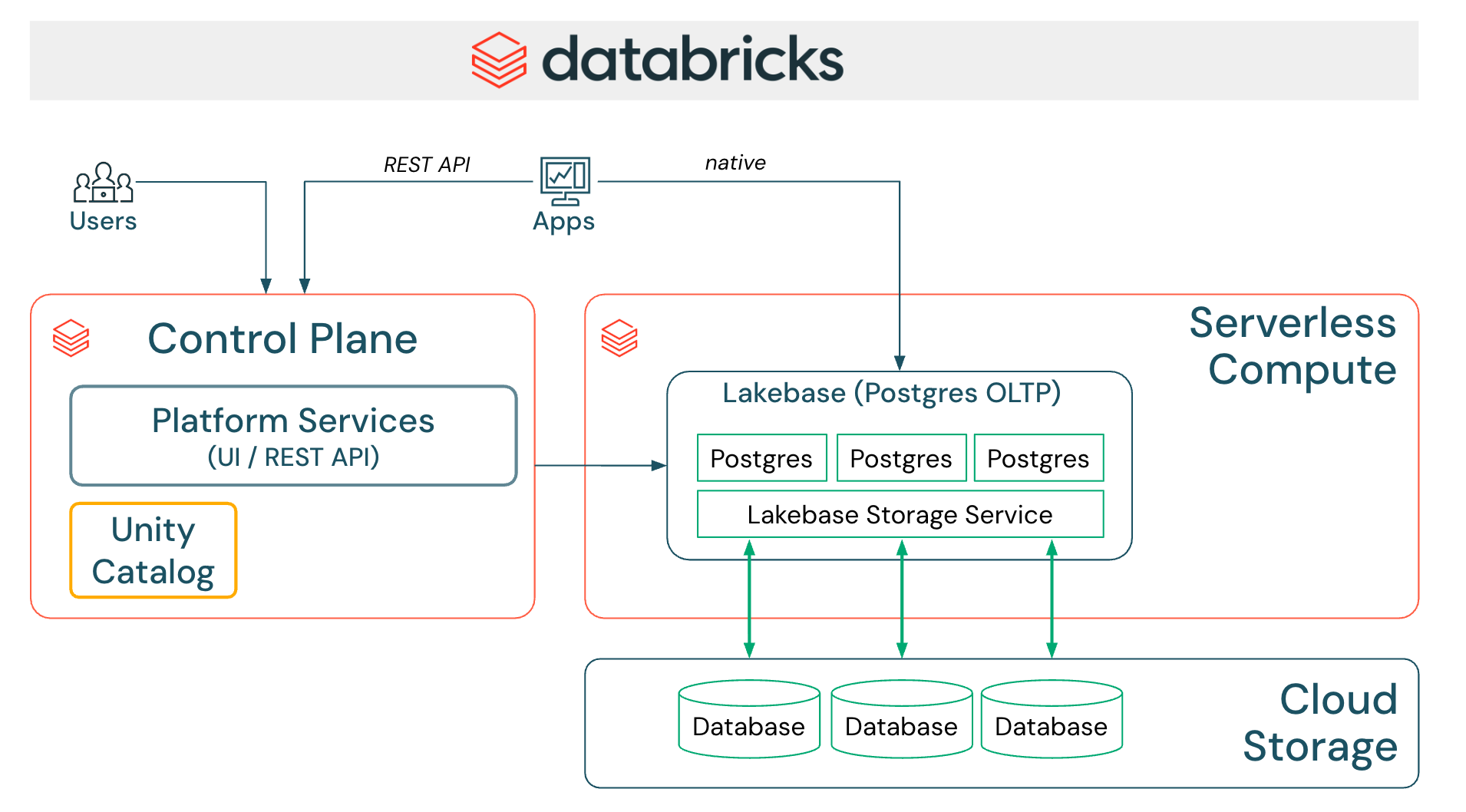
Documentation: Lakebase
Deployment models
Databricks Lakebase supports Lakebase Autoscaling as the current deployment model, with autoscaling compute, scale-to-zero, branching, and instant restore.
Lakebase Autoscaling is the required deployment type for new integrations and for partner-managed provisioning and REST-based access.
Lakebase Autoscaling supports:
- Lakebase Management APIs (
/api/2.0/postgres/*) - Lakebase Data API (REST)
- SQL connectors (JDBC, psql, psycopg, SQLAlchemy)
Lakebase v1 (Provisioned) is no longer available for creating new instances. Databricks will migrate existing provisioned instances to Lakebase Autoscaling in the near term. New partner integrations should target Lakebase Autoscaling only.
Integration validation requirements
For partner integrations that provision or manage Lakebase Autoscaling, or access data in Lakebase, ensure you meet the following requirements:
-
Lakebase Autoscaling provisioning and administration: Partners that provision or manage Lakebase Autoscaling instances must use the Lakebase Management APIs.
-
Use a supported Lakebase access method: See Options to query Lakebase below.
-
Implement User-Agent telemetry: Set the HTTP
User-Agentheader for Management/Data APIs, orapplication_namefor SQL connectors. See Lakebase Integrations. -
Authentication methods:
- OAuth-based authentication is mandatory
- OAuth authentication without manual user intervention is required
- Postgres native role-based authentication may be supported as a secondary option, if needed
-
Implement Named Connector for Lakebase: See Named connector requirements below.
-
Provide partner documentation: Documentation must clearly describe how joint customers configure and use the Lakebase integration, including whether Lakebase provisioning is required and which access method is used (Data API vs. SQL connectors).
Options to query Lakebase
Partner applications can connect to and query Lakebase using two primary options:
-
Lakebase Data API (HTTP/REST + RPC): Available only for Lakebase Autoscaling and recommended for integrations. This option is ideal for web applications, microservices, serverless functions, mobile apps, and third-party integrations that can operate through REST endpoints and RPC calls (invoking Postgres functions) generated from the Lakebase schema(s). It treats Lakebase as a Databricks-native operational store exposed over HTTPS, rather than as a generic PostgreSQL server.
-
SQL connectors over Postgres (TCP): JDBC, psql, psycopg2/3, or SQLAlchemy can be used with Lakebase Autoscaling when full SQL semantics or advanced workflows are required (for example, schema initialization, migrations, or complex SQL queries).
All UI-based integrations (whether using the Lakebase Data API or SQL connectors) should be exposed as a Lakebase Named Connector, as described in the Named connector requirements section.
For User-Agent telemetry configuration, see Lakebase Integrations.
Authentication methods
OAuth authentication (mandatory)
Lakebase requires OAuth-based authentication for all production integrations. Since PostgreSQL does not natively support OAuth, Lakebase uses a Bring Your Own Token (BYOT) model, where the partner application obtains and refreshes Databricks OAuth tokens and supplies them as the PostgreSQL password during connection setup.
OAuth-based Lakebase roles must be created and configured for the relevant Databricks identities before they can connect.
The ISV partner application must:
- Obtain a short-lived Lakebase database credential using the Databricks SDK or Databricks CLI
- Pass the returned token to the PostgreSQL connector when opening connections
- Refresh and rotate tokens so the application always uses valid credentials
Resources:
- Supported OAuth flows and generating Lakebase database credentials
- Lakebase OAuth authentication requirements and limitations
- Create and manage Lakebase Postgres roles
Direct API usage
Databricks SDKs and the Databricks CLI expose generate-database-credential, which uses the documented generatedatabasecredential workspace Postgres API.
Partners may invoke this API directly if they prefer not to use the SDK or CLI. However, the recommended approach is to use the Databricks SDK, as it abstracts the underlying API and handles potential changes over time.
Native Postgres password authentication (optional)
Lakebase also supports Native Postgres password authentication, but partners should use it only as a secondary method alongside OAuth, not as the only authentication option.
Named connector requirements
A Lakebase Named Connector is a dedicated, first-class connector configuration in the Partner product, explicitly labeled and designed for Databricks Lakebase.
Instead of reusing a generic PostgreSQL connector, partners should expose a separate Lakebase connector option that:
- Clearly identifies Databricks Lakebase as the target system
- Applies Lakebase-specific connection behavior (for example, OAuth token handling and JDBC startup parameters)
- Ensures accurate User-Agent telemetry for Databricks reporting and validation
Having a named connector allows partners to safely introduce Lakebase-specific logic without impacting existing PostgreSQL integrations.
Please create a Partner SA Request to request Lakebase logos for the Named connector.
Why a Lakebase Named Connector?
OAuth flows
Postgres doesn't natively support OAuth, and thus, the Lakebase connector flow will differ from a regular PostgreSQL connection due to OAuth requirements.
The partner product UI must request the end user to provide details for either:
- Client Credentials flow (M2M / service principal): For client ID and secret
- Interactive flow (U2M / User): For OAuth app details
JDBC configuration for telemetry
To ensure application_name (UserAgent) is captured correctly in downstream telemetry, the connector should include:
PGProperty.ASSUME_MIN_SERVER_VERSION.set(props, "9.1");
This configuration is specific to Databricks Lakebase and might not be needed when connecting to generic PostgreSQL databases. Including it in the Lakebase Named Connector ensures accurate telemetry for Lakebase connections without affecting integrations with other Postgres-compatible systems.
Lakebase operational topics
Differentiating Lakebase from standard PostgreSQL
If the partner application needs to differentiate Lakebase from standard PostgreSQL in an effort to choose a different code path for Lakebase, these are the options:
Option 1: Check shared libraries
Run SHOW shared_preload_libraries and check for neon and databricks_auth in the output.
Option 2: Query server configuration
This PostgreSQL query checks server configuration parameters; if it returns rows, the instance is Lakebase:
SELECT name, setting, short_desc
FROM pg_settings
WHERE name ILIKE '%databricks%';
-- OR name ILIKE '%neon%';
Option 3: Check hostname patterns
AWS:   instance-XXXXXXXX.database.cloud.databricks.com
Azure: instance-XXXXXXX.database.azuredatabricks.net
Sync Lakehouse to Lakebase
There is a SYNC TABLE capability that can move data from the Lakehouse into Lakebase (Postgres) tables for OLTP-serving workloads.
Key points:
- A Primary Key is required to identify unique rows in the target Lakebase table
- After syncing, the system creates a corresponding foreign catalog in the Lakehouse referencing the Lakebase destination
- Synced objects appear as foreign tables in the Lakehouse and can be queried like any other foreign source
- Synced data relies on Lakeflow Spark Declarative Pipelines—partners can automate pipeline creation and management via the Databricks API or SDK
- Foreign catalogs created through sync are fully integrated into the Lakehouse governance model, enabling unified access control, lineage tracking, and auditing
Sync Lakebase to Lakehouse
To expose Lakebase data in the Lakehouse, these are the options:
-
Register Lakebase in Unity Catalog: Registers the Lakebase Postgres database in Unity Catalog so schemas and tables appear as governed objects and inherit standard permissions, lineage, and auditing (best for unified governance, cross-source queries, and metadata-level access).
-
Lakehouse Sync: Enables continuous, low-latency replication of Lakebase Postgres tables into Unity Catalog-managed Delta tables by capturing row-level changes and writing them as SCD Type 2 history (best for analytics workloads that need a historical, analytic copy of OLTP data in the Lakehouse).
Documentation: SYNC TABLE
Use cases
- Application Backends - Power transactional applications with Lakehouse data
- Operational Analytics - Combine OLTP and OLAP in a single platform
- Data Apps - Build interactive data applications with real-time updates
Example patterns built on these use cases
-
Agent Workloads - Persist agent and multi-agent state in Lakebase to support reliable, low-latency AI agents.
-
Lakehouse Operational Insights - Store operational metadata and aggregated insights in Lakebase so "data about your data" stays within the customer's Databricks environment.
-
Domain OLTP Engines - Run domain-specific transactional engines (e.g., FHIR servers, financial ledgers, or logistics engines) directly on Lakebase, so operational records and analytics share the same Lakehouse data without additional ETL.
What's next
- Connect to Lakebase: Learn about connection methods, authentication, and client tools. See Connect to your database.
- Configure User-Agent telemetry: Set up telemetry for Lakebase integrations. See Lakebase Integrations.
- Review integration requirements: See Integration Requirements for foundational guidance.
- Explore data transformation: See Data Transformation patterns.