Access and authentication
Partner integrations require secure connectivity and proper authentication to access Databricks resources. This page covers the networking architecture, OAuth authentication methods, and best practices for production implementations.
Networking
Across all Cloud Service Providers (CSPs), the Databricks platform is architected with a control plane and a compute plane. This section explains how Databricks organizes control planes, compute planes, and workspaces so you can design secure connectivity and authentication flows from your application.
There are two compute planes:
- Serverless compute plane and storage - hosted by Databricks as a fully managed service within Databricks' AWS/Azure/GCP account
- Classic compute plane and storage - deployed within a customer's AWS/Azure/GCP account but managed by Databricks' control plane.
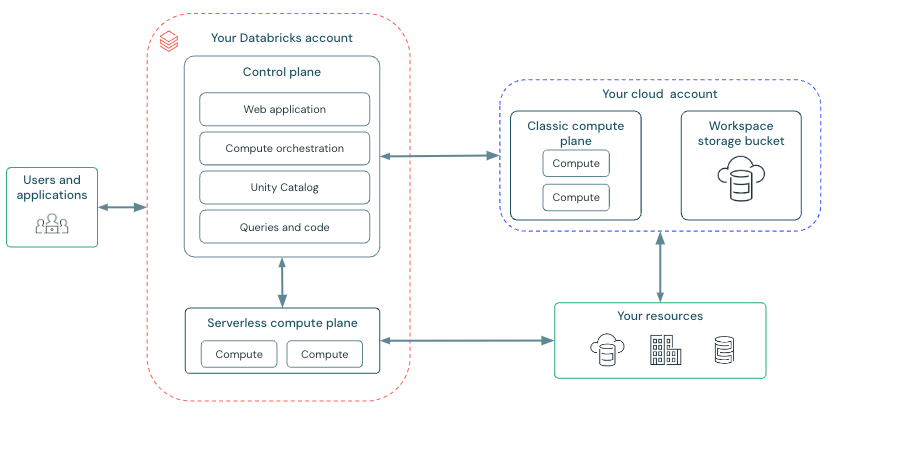
The control plane is deployed to Databricks' front-end VPC. And the control plane's web app supports two core Databricks services:
-
Databricks account console - account-level administrative UI where account admins configure and manage resources, SSO, OAuth, identities, audit logging, and policies across the entire Databricks account. There is a unique account console URL for each cloud:
-
Databricks workspace consoles - a workspace is a container for resources, including compute endpoints (e.g., clusters, warehouses, lakebase instances), notebooks, jobs, pipelines, repos, and secrets.
Multiple workspaces can be instantiated from the account console, and each workspace has a unique, per-tenant (per-workspace) URL that can be customer-defined.
The workspace URL is commonly (but not always) formatted as follows:
- AWS:
https://<instance-name>.cloud.databricks.com - Azure:
https://adb-<workspace-id>.<random-number>.azuredatabricks.net - GCP:
https://<workspace-id>.<number>.gcp.databricks.com
An account may also enable an account-level custom URL that consolidates all workspaces under one branded domain. Enabling it does not change or disable these per-workspace URLs, which remain valid and directly reachable. For how custom URLs affect API host selection, OAuth token issuance, and auto-redirect, see Custom URLs.
SCIM API access: Workspace admins can manage identities at both the workspace and account levels, calling SCIM endpoints through the
{workspace-domain}. Using the SCIM API, workspace admins can list, create, update, and manage users, service principals, and groups, including promoting account-level identities into a workspace. For additional details, refer to the Databricks documentation on managing users using the API, managing service principals in the account using the API, and API examples for managing groups. When a custom URL is enabled, these SCIM calls can also target the custom URL by appending the?o=<workspaceId>workspace selector to the standard path.Workspace users and service principals with only User privileges have read-only SCIM access. They can list and retrieve users, service principals, and groups at both the workspace and account level when calling SCIM endpoints through the
{workspace-domain}. - AWS:
Full details around Databricks network architecture can be found in Databricks public documentation.
Documentation: AWS | Azure | GCP
Authentication and authorization to Databricks
Thorough guidance around authentication and authorization to Databricks APIs, connectors, drivers, and SDKs can be found in Databricks public documentation for AWS, Azure, and GCP. In addition, please refer to the integration requirements, which outline how Databricks terminology maps to common industry terms.
Authentication best practices
A well-architected integration leverages Account-wide token federation for a User Interactive Flow to provide seamless SSO, and Workload identity federation for a Client Credentials Flow to provide secretless machine identities for authorization when interacting with Databricks. In addition, it's important to take into consideration how Databricks supports token federation and workload identity federation:
Account-wide token federation
- Databricks inherits the access token TTL from the IdP.
- Databricks does not issue a refresh token, and you must refresh the token at the IdP before expiry.
Workload identity federation
- Databricks inherits the "exp" claim from the IdP token.
- The token TTL defaults to 1 hour but is configurable between 1 and 24 hours, should the IdP support it.
For a deeper explanation, consult the Databricks documentation on Authenticate access to Databricks using OAuth token federation.
Other supported authentication methods
The following authentication methods are supported for scenarios where token federation or workload identity federation isn't feasible. Each has specific tradeoffs to consider.
Databricks also supports using:
- Account-wide Token Federation for a Client Credentials flow
- Databricks built-in OIDC endpoint for a User Interactive flow and a Client Credentials flow
- Personal Access Token when used as an additional option to OAuth
Account-wide Token Federation for a Client Credentials flow
Both Account-wide Token Federation and Workload Identity Federation are supported for a Client Credential flow, but Workload Identity Federation is recommended because it enables per-workload isolation with a 1:1 mapping between each external workload identity and a Databricks Service Principal. This 1:1 mapping typically provides tighter security boundaries, simpler rotation, and more precise access control compared to the global nature of account-wide federation.
Databricks built-in OIDC endpoint
Databricks provides a built-in OIDC-compliant authorization service when federation isn't feasible. Databricks' authorization service can be used to obtain short-lived access tokens for both users and service principals in a consistent way across all supported clouds. Additionally, long-lived refresh tokens can be obtained for U2M-based flows.
For a deeper explanation and implementation guidance, consult the following Databricks documentation:
- Authorizing user access to Databricks with OAuth
- Authorizing service principal access to Databricks with OAuth
For step-by-step partner implementation guides, see:
- OAuth U2M implementation guide for user-interactive flows
- OAuth M2M implementation guide for machine-to-machine flows
- OAuth reference for endpoints, driver support, and sample code
Token time-to-live details
For secret, access token, and refresh token time-to-live details, consult the following Databricks documentation:
- M2M-based flows - Reference the secrets lifetime and access token lifetime in the Authorizing service principal access to Databricks with OAuth documentation.
- U2M-based flows - Reference the access token time-to-live and refresh token time-to-live in the Enabling partner OAuth applications documentation, and OAuth session time-to-live options in the Single-use refresh token documentation.
AI coding assistant skills that generate PWAF-compliant Databricks connectors.
Learn more · Skills on GitHub
Authentication method comparison
| Method | Status | Use Case | Considerations | Documentation |
|---|---|---|---|---|
| Workload Identity Federation | Recommended | M2M / Service Principal | Per-workload isolation, 1:1 SP mapping, tightest security | OAuth Token Federation |
| Account-wide Token Federation (U2M) | Recommended | User interactive | Seamless SSO, IdP manages token refresh | OAuth Token Federation |
| Account-wide Token Federation (M2M) | Supported | M2M / Service Principal | Broad account-level trust, less isolation than WIF | OAuth Token Federation |
| Databricks OIDC (U2M) | Supported | User interactive | When federation not feasible, short-lived tokens with refresh | OAuth U2M |
| Databricks OIDC (M2M) | Supported | M2M / Service Principal | When federation not feasible, consistent across clouds | OAuth M2M |
| Personal Access Tokens | Limited | Additional option only | Long-lived, harder to govern, not sufficient alone for validation | PATs |
What's next
- Understand custom URLs and how they affect API host selection and OAuth token issuance
- Learn about metadata and access control patterns
- Review the integration requirements for OAuth guidance
- Explore telemetry and attribution for usage tracking