GBX Common Functions
Every lightweight reader and writer is built on one shared file-access base
(databricks.labs.gbx.ds.file_gbx). This page catalogs the common functions that
base exposes, and draws the two boundaries that decide which one you reach for:
FUSE vs FILE and generic vs format-specific.
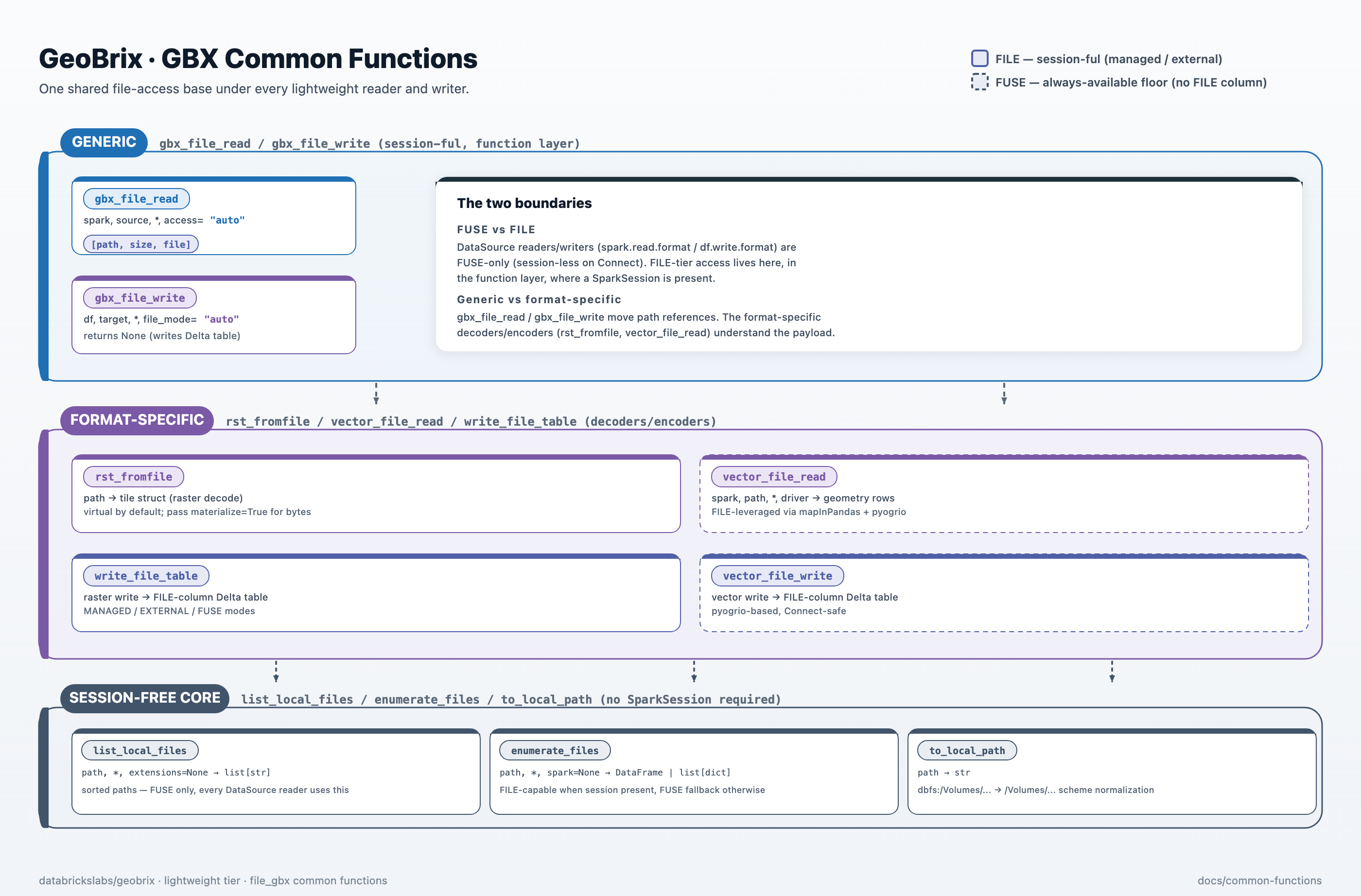
Generic functions (session-ful, function layer)
These functions require a SparkSession and operate at the function layer (driver code).
They are not callable from inside a session-less DataSource reader or writer on Spark Connect.
| Function | Signature | Returns | Use when |
|---|---|---|---|
gbx_file_read | gbx_file_read(spark, source, *, source_type="auto", access="auto", recursive=True, include_hidden=False, extensions=None, path_glob_filter=None) | DataFrame [path, size, file] — path is the /Volumes/... string; file is a FILE reference when the runtime supports FILE, else null | You want FILE/FUSE references from a Volume path or a FILE-column table, format-agnostic. |
gbx_file_write | gbx_file_write(df, target, *, file_mode="auto", filespace=None, layout="order", overwrite=False, file_col="tile_file", spark=None) | None (writes a Delta table) | You want to land a DataFrame into a Delta table with an optional FILE column (MANAGED / EXTERNAL / FUSE). |
gbx_file_read returns path and FILE references — never bytes. To decode the rasters at
each path into tile structs, compose with rst_fromfile (the canonical raster pattern):
from databricks.labs.gbx.ds.file_gbx import gbx_file_read
from databricks.labs.gbx.pyrx.functions import rst_fromfile

files = gbx_file_read(spark, path or SAMPLE_RASTER_DIR, extensions=(".tif",))
# files has columns: path (STRING), size (BIGINT), file (FILE ref or null)
tiles = files.select("path", rst_fromfile(files["path"]).alias("tile"))
n = tiles.count()
assert n > 0, "expected at least one decoded tile"
access / source_type options
| Parameter | Values | Behavior |
|---|---|---|
access | "auto" (default) | Silently uses the best available tier: FILE refs when capable, null file on FUSE. Never raises. |
access | "external" | Requires a FILE-capable runtime (read_files / list_files tier). Raises ValueError on FUSE-only runtimes. |
access | "managed" | Valid only for a FILE-column table source. Raises ValueError for any Volume path/directory (MANAGED refs are minted on write, not enumerated on read). |
source_type | "auto" (default) | Classifies the source automatically: a path/URI → "location", otherwise → "table". |
file_mode / layout options for gbx_file_write
| Parameter | Values | Behavior |
|---|---|---|
file_mode | "auto" (default) | FILE-capable runtime + filespace → "managed"; FILE-capable + no filespace → "external"; FUSE-only → "fuse". |
file_mode | "managed" | Explicit FILE MANAGED via create_file. Requires filespace. Raises on FUSE-only runtimes. |
file_mode | "external" | Explicit FILE EXTERNAL via try_to_file. Raises on FUSE-only runtimes. |
file_mode | "fuse" | Plain Delta write, no FILE column regardless of runtime. |
layout | "order" (default) | ORDER BY path at write time — scan-friendly. |
layout | "cluster" | CLUSTER BY path in the DDL (FILE-mode tables only); run OPTIMIZE <table> afterward for durable clustering. |
layout | "plain" | No ordering — fastest write, scan order determined by the cluster. |
Session-free core (safe inside DataSource readers/writers)
These functions require no SparkSession to function — their minimum viable mode is
FUSE (os.walk / stat), which is always available. list_local_files is FUSE-only.
enumerate_files accepts an optional spark= and issues Spark SQL (read_files /
list_files) when a FILE-capable session is present, degrading to a FUSE list when not —
it is not session-free in the strict sense but degrades gracefully. All are
Connect-safe: no sparkContext, .rdd, _jvm, or conf.set.
list_local_files is the single shared enumeration routine every DataSource reader
consumes internally. enumerate_files and the path helpers are used at the function
layer, not inside DataSource readers.
| Function | Signature | Returns | Role |
|---|---|---|---|
list_local_files | list_local_files(path, *, recursive=True, include_hidden=False, extensions=None, path_glob_filter=None) | list[str] (sorted paths) | Directory enumeration — the single shared routine every DataSource reader uses. FUSE only; no session required. |
enumerate_files | enumerate_files(path, *, recursive=True, include_hidden=False, extensions=None, path_glob_filter=None, spark=None) | DataFrame [path, size, file] or list[dict] | Issues Spark SQL when a FILE-capable session is present; falls back to a FUSE list of dicts otherwise. Used at the function layer, not inside DataSource readers. |
to_local_path | to_local_path(path) -> str | FUSE path string | Normalizes a URI-scheme path (dbfs:/Volumes/...) to a bare FUSE path (/Volumes/...). |
to_spark_uri | to_spark_uri(path) -> str | URI string | Inverse: bare FUSE path to dbfs:/Volumes/... for Spark SQL contexts. |
By default, files whose names start with _ or . (Spark/Hadoop metadata files such as
_SUCCESS, _committed_*, .crc) are skipped. Pass include_hidden=True to include them.
A positive selection filter — either extensions (a tuple of suffixes, e.g. (".tif", ".nc"))
or path_glob_filter (an fnmatch-style glob, e.g. "*.tif") — narrows which files are returned.
The two are mutually exclusive.
from databricks.labs.gbx.ds.file_gbx import list_local_files

paths = list_local_files(path, extensions=(".tif",))
assert paths == sorted(paths)
The two boundaries
FUSE vs FILE. df.write.format(...) / spark.read.format(...) DataSources are
FUSE-only — on Spark Connect they run session-less, so no FILE-tier SQL is available.
FILE-tier read and write live in the function layer (gbx_file_read / gbx_file_write
and the per-format entries), where a SparkSession is present.
Generic vs format-specific. gbx_file_read / gbx_file_write move path references and
FILE handles. The format-specific decoders/encoders (rst_fromfile, vector_file_read,
write_file_table) sit on top and understand the payload.
No-gating rule
access / file_mode = "auto" silently uses the best available tier. An explicit
"managed" / "external" on a runtime without FILE raises a clear, actionable error that
names the DBR version requirement and the auto-fallback option — never a silent downgrade.
See Shared file-access base for tier detection details and the access-flow diagram.