DQX MCP Server
DQX MCP Server is an MCP (Model Context Protocol) server that exposes DQX data quality tools for AI agents. It runs as a Databricks App inside your workspace with on-behalf-of (OBO) authentication — every operation respects the calling user's Unity Catalog permissions.
The MCP server is the recommended integration point for:
- AI agents (Agent Bricks, Genie Code) that need to profile tables, generate rules, and run quality checks programmatically.
- IDE-based workflows (Cursor, Claude Code) where you want DQX tools available as MCP tools.
- Any MCP-compatible client that needs data quality capabilities without writing DQX code directly.
For interactive, browser-based rule management, see DQX Studio. For code-level integration into pipelines or notebooks, see the Programmatic approach.
Who this guide is for
There are two reading paths:
- Platform admins set up and operate the server: Install and deploy → Configuration → Troubleshooting → Upgrade and uninstall.
- Users — Genie Code users, data engineers, power users — consume it once it's deployed: Connect an MCP client → Usage → Example prompts. In Genie Code you just need the app shared with you and then enable it in settings; other clients (Cursor, Claude Code) use the server's
/mcpURL — ask your admin.
Install and deploy
Deploying the MCP server (prerequisites, the one-time runner service principal, and the make mcp-deploy steps) lives on the installation page: DQX MCP Server installation.
Once it's deployed, the rest of this guide covers configuration, connecting a client, and usage.
Quickstart Usage
- Genie Code: once the DQX MCP Server is shared with you (you're in its
users_group), add it from Customizations → MCP servers → Add Server — no URL needed. - Cursor / Claude Code: add a remote MCP server with the URL
https://<app-url>/mcp.
- Enable the DQX tools in your client, and refresh its tools list after each server upgrade.
- Ask in plain English, e.g. "Profile
<catalog>.<schema>.<table>and tell me which rows fail data quality checks." (see Example prompts)
Connect an MCP client
The app exposes a standard MCP endpoint over Streamable HTTP at https://<app-url>/mcp. Genie Code (inside Databricks) is the recommended client — it authenticates to the app for you. External IDE clients such as Cursor and Claude Code point at the same URL and complete the Databricks OAuth login; follow each tool's own MCP documentation to add a remote server.
The Databricks Apps front-door authenticates the caller with OAuth and forwards the user's token to the server (on-behalf-of). A personal access token (PAT) is rejected by the OBO front-door. Genie Code supplies an OAuth token automatically; external clients complete the Databricks OAuth login flow on first use. Every tool then runs as you, so it only sees data your Unity Catalog grants allow.
Genie Code (recommended)
Genie Code runs inside your Databricks workspace and authenticates to the app automatically. Because the DQX server is a Databricks App, you don't need its URL — once the app is shared with you (your account is in its users_group; the deploy grants CAN_USE to that group, default account users), you add it from Customizations → MCP servers in Genie Code. See the Databricks guide Add MCP servers to Genie Code for the exact steps.
To add it:
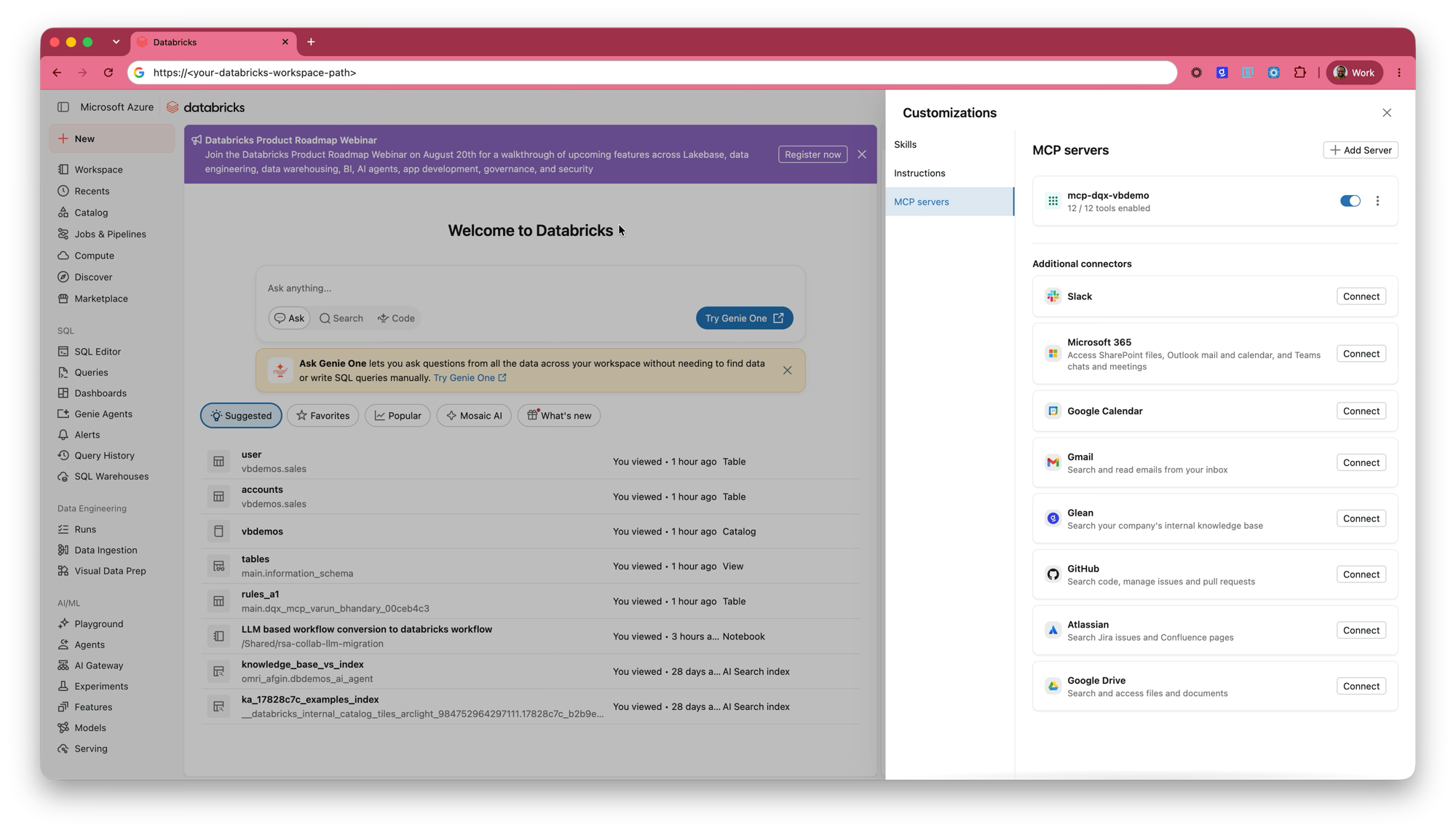
- Open Customizations in Genie Code and select MCP servers.
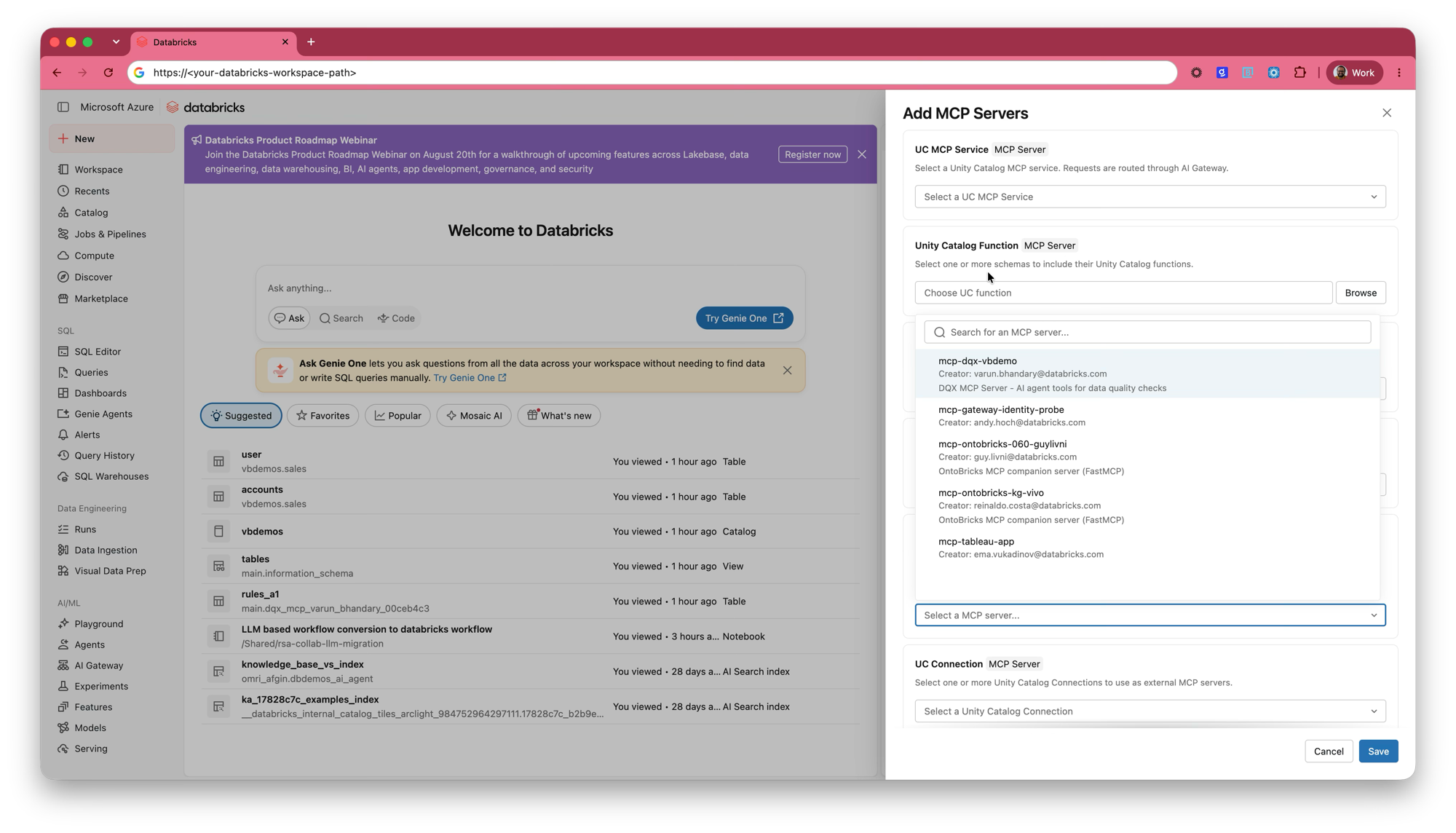
- Click Add Server. The Add MCP Servers panel lists several server types — the DQX server is a Databricks App, so use the Databricks App section's Select an MCP server... picker (not UC MCP Service, Unity Catalog Function, or UC Connection, which are for other server kinds).
- Search for your deployment by name (the default is
mcp-dqx; a customname_prefixchanges it). The picker shows each server's creator and description, so you can confirm you have the right one. - Save. The server then appears under MCP servers with a toggle and a tool count, e.g. 12 / 12 tools enabled.
Video walkthrough
The full setup, from enabling the server in Genie Code to running checks on a table. The video is narrated, so turn sound on:
The video covers the same ground as the screenshots below, so you only need one or the other.
Prefer screenshots? Step-by-step with images
Open Customizations → MCP servers and click Add Server.
In the Add MCP Servers panel, use the Databricks App picker and search for your deployment by name — the list shows each server's creator and description. Then Save.
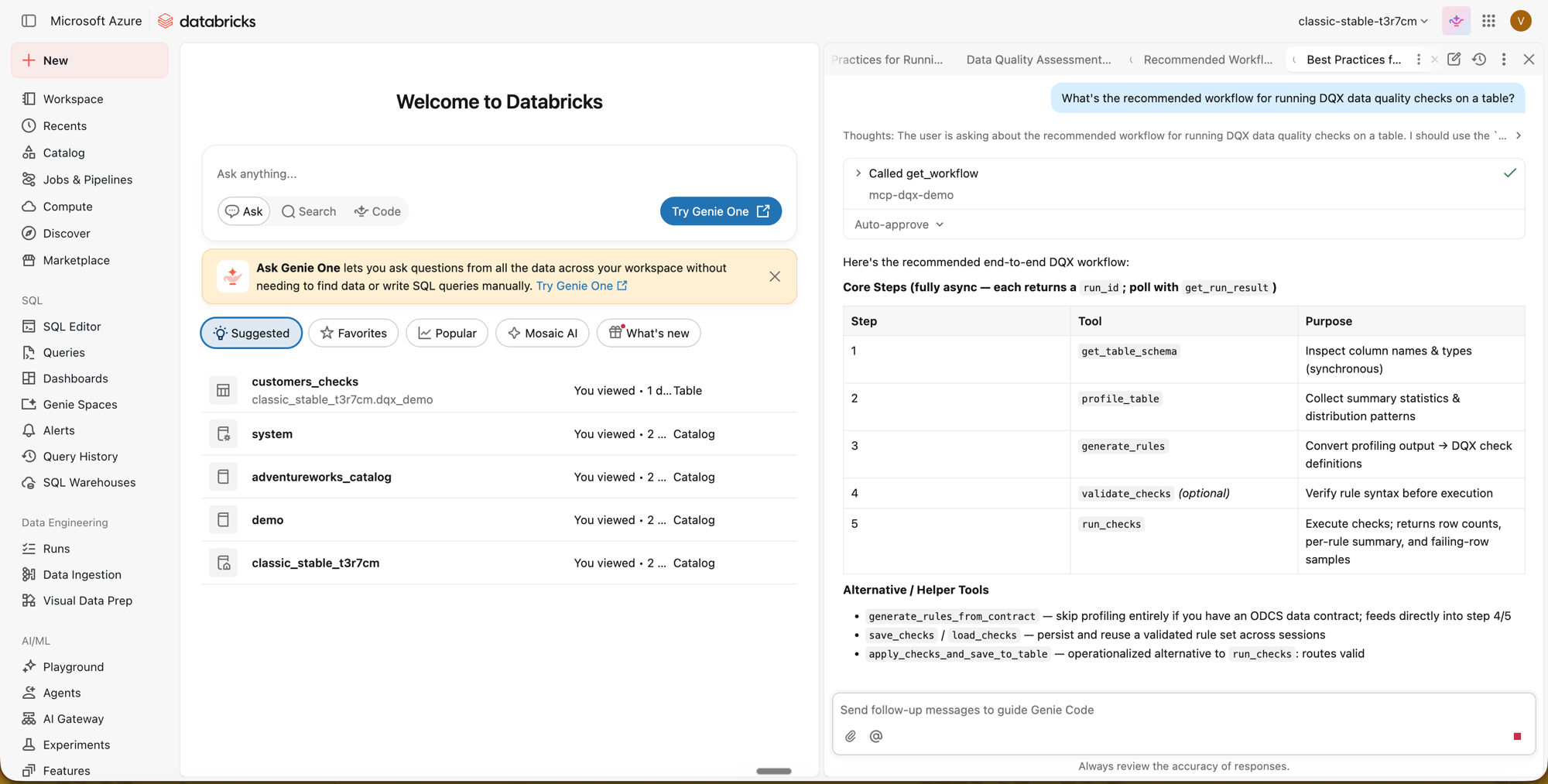
The server now appears under MCP servers with a toggle and its tool count. You can enable or disable individual tools from its ⋮ menu; after the server is upgraded to a new version, refresh the tools list so the client picks up any added or changed tools.
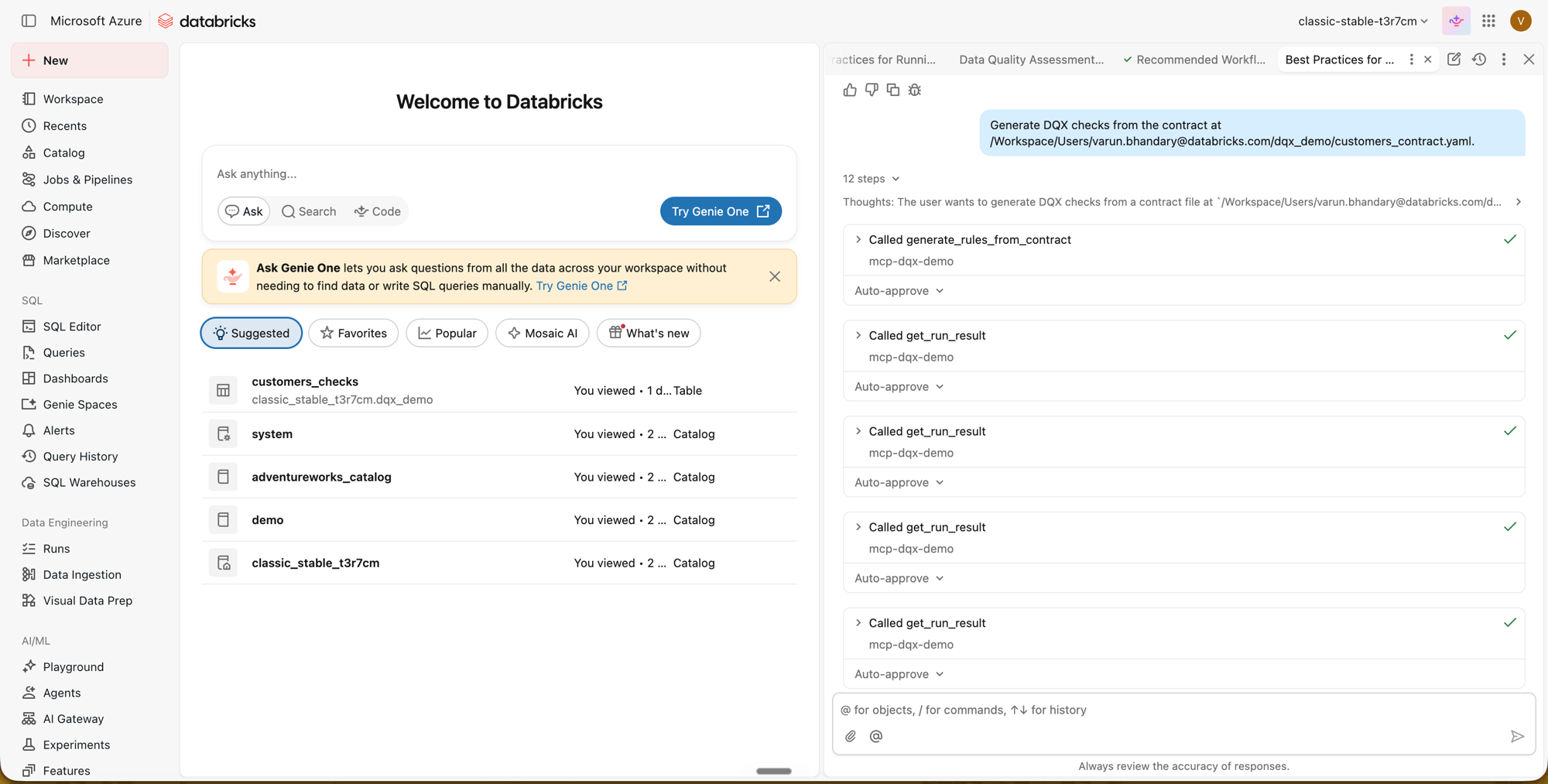
Approving tool actions. The Actions setting sets the approval mode for new conversations (you can also override it per conversation). With Ask first, you approve each tool before it runs; with Auto-approve, tools run automatically (Databricks blocks potentially risky actions). The DQX workflow polls get_run_result repeatedly while jobs run, so Auto-approve avoids repeated approval prompts for those status checks. See the Databricks guide Approve tool actions.
Repeated get_run_result calls are expected. Most DQX tools run asynchronously: a tool returns a run_id, and the client calls get_run_result until the run is complete. It is normal to see several get_run_result calls for a single operation while the job runs.
Once the run completes, these steps collapse into a single summary badge with the result:
Two things worth knowing whichever you follow:
- Approval mode. The Actions setting controls whether each tool call needs approval. DQX polls
get_run_resultrepeatedly while a job runs, so Auto-approve avoids a prompt per status check. - Repeated
get_run_resultcalls are normal. Tools return arun_idand the client polls until the run finishes; several calls for one operation is expected, not a fault.
Cursor
Add a remote (HTTP) MCP server pointing at https://<app-url>/mcp, following Cursor's MCP documentation. On first use Cursor runs the Databricks OAuth login for the app (a PAT will not work — see the note above).
Claude Code
Add a remote (HTTP) MCP server pointing at https://<app-url>/mcp, following Claude Code's MCP documentation. Authenticate to the app via the Databricks OAuth login on first use.
Usage
Example prompts
These are natural-language prompts you can give any connected agent. Replace <catalog>.<schema>.<table> with your own fully qualified table.
| Tool | Example prompt |
|---|---|
get_workflow | "What's the recommended workflow for running DQX data quality checks on a table?" |
get_table_schema | "What columns does <catalog>.<schema>.<table> have?" |
profile_table | "Profile <catalog>.<schema>.<table> using all rows (pass options {"sample_fraction": 1.0}) and show the column statistics." |
generate_rules | "From that profile, generate DQX rules with error criticality." |
list_available_checks | "What built-in DQX check functions can I use in rules?" |
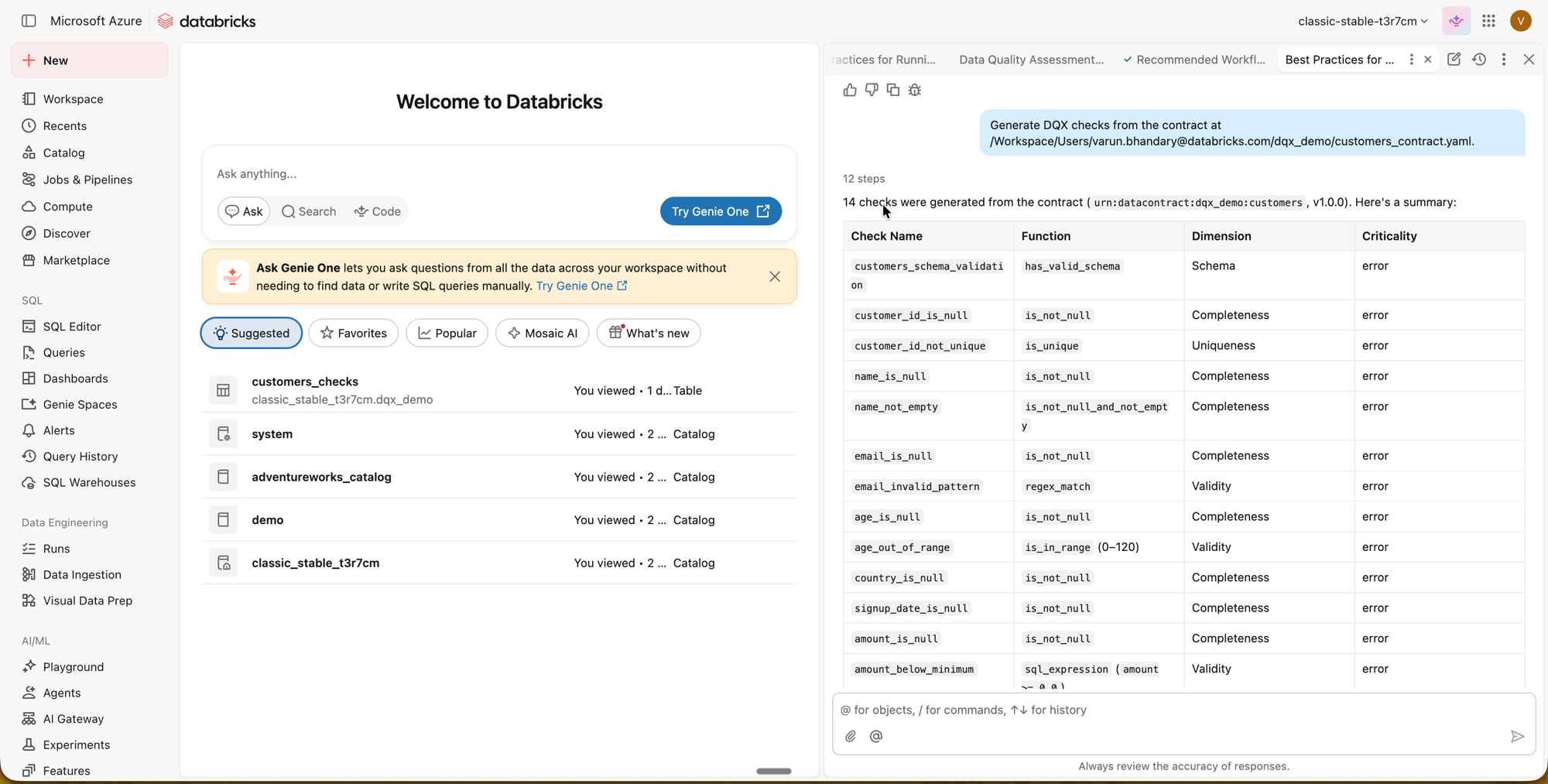
generate_rules_from_contract | "Generate DQX checks from the data contract at /Volumes/<catalog>/<schema>/<volume>/contract.yaml." |
validate_checks | "Validate these checks before I run them." |
run_checks | "Run those checks against <catalog>.<schema>.<table> and show which rows fail and why." |
save_checks | "Save those checks as customers_checks so I can reuse them later." |
load_checks | "Load the data quality rules we saved earlier from <catalog>.dqx_mcp_<you>.customers_checks and run them on today's data." |
apply_checks_and_save_to_table | "Apply the checks to <catalog>.<schema>.<table>, writing valid rows to customers_clean and invalid rows to customers_quarantine." |
get_run_result | "Get the result for run_id <id>." |
profile_table samples the data by default (good for large tables, but on a tiny table it can miss issues). Pass {"sample_fraction": 1.0} in the tool's options to profile every row.
Recommended workflow
You don't run these tools by hand — you ask in plain English (see Example prompts) and the assistant orchestrates them. Behind a request, it calls get_workflow to discover the recommended sequence and then runs roughly:
get_table_schema— Understand the table structure (returns result directly)profile_table— Profile data to discover patterns (returnsrun_id)get_run_result(run_id)— Retrieve profiling resultsgenerate_rules— Convert the profile into check rules (returnsrun_id)get_run_result(run_id)— Retrieve generated rulesvalidate_checks— Validate rules before execution (optional, returnsrun_id)get_run_result(run_id)— Retrieve validation statusrun_checks— Execute rules and get a sample of results (returnsrun_id)get_run_result(run_id)— Retrieve check results
Each long-running tool returns a run_id immediately; the client then polls get_run_result(run_id) until status is completed or failed. Several get_run_result calls per run are expected while a job runs — see Troubleshooting.
Alternative entry points:
- If an ODCS data contract already exists, use
generate_rules_from_contractinstead of profiling +generate_rules— it derives checks deterministically from the contract's schema and quality expectations. - To reuse rules across sessions,
save_checksto persist them andload_checksto retrieve them later. - To operationalize (write results to Delta instead of returning a sample), use
apply_checks_and_save_to_tableinstead ofrun_checks. - For scheduled pipelines, treat the MCP server as the interactive/exploratory path: use it to design and
save_checksa validated rule set, then run that rule set in production with the programmatic approach.
Run the whole workflow in one prompt
You don't need to name the tools — the assistant selects them from a plain-English goal. The request below is the kind of thing an analyst onboarding a new table would actually ask, and it naturally drives the full chain: schema inspection, profiling, rule generation (from both the data and a contract), validation, running checks, persisting the rules, reloading them the way a pipeline would, and writing clean/quarantine tables. It assumes the sample table from Try it with sample data; swap in your own table, contract path, and output tables.
I've just been handed the table <catalog>.<schema>.customers and I need to get a handle on
its data quality before the team starts using it — I'm fairly new to DQX. Can you:

- take a look at the table and tell me what kinds of quality checks DQX could enforce on it;
- scan the whole table (don't just sample it) and find where the data is actually dirty;
- set up a sensible set of rules to catch those problems — we also have a data contract for
  this table at /Volumes/<catalog>/<schema>/<volume>/customers_contract.yaml, so use that
  too if it helps;
- run the rules and show me which records fail and why;
- once the rules look right, save them so I can reuse them later;
- then, the way our nightly pipeline would, load those saved rules back and use them to
  produce a clean table and a separate quarantine table of the rejected rows;
- and finally, summarise in plain English how bad the data is and what I should fix first.
This reuse framing is also the point of load_checks: the MCP server is stateless, so saved checks live only where you persisted them — your private <catalog>.dqx_mcp_<you> schema. A fresh session (or a scheduled pipeline) starts with no checks in context — load_checks pulls a previously-saved set back (by its fully-qualified name) so run_checks / apply_checks_and_save_to_table can use it without re-profiling. The save_checks result reports the fully-qualified location to load from.
save_checks and apply_checks_and_save_to_table write to your own private per-user schema (<catalog>.dqx_mcp_<you>), which the runner creates and grants to you — no target grants needed. See Write access for the persisting tools.
Try it with sample data
To follow the example above end to end, create a small table with deliberate data-quality issues (NULL/duplicate id, empty name, invalid email, out-of-range age, negative amount). Run this in a SQL editor or notebook against a catalog/schema you can write to:
CREATE SCHEMA IF NOT EXISTS <catalog>.<schema>;

CREATE OR REPLACE TABLE <catalog>.<schema>.customers (
  customer_id INT, name STRING, email STRING, age INT,
  country STRING, signup_date DATE, amount DOUBLE
);

INSERT INTO <catalog>.<schema>.customers VALUES
 (1,    'Alice',   'alice@example.com',   34,  'US', DATE'2023-01-15', 120.50),
 (2,    'Bob',     'bob@example.com',     41,  'UK', DATE'2023-02-20',  88.00),
 (3,    'Charlie', 'charlie@example.com', 29,  'DE', DATE'2023-03-10',  45.25),
 (4,    NULL,      'dora@example.com',    52,  'US', DATE'2023-04-01', 200.00),  -- null name
 (5,    'Eve',     'not-an-email',        38,  'FR', DATE'2023-05-05',  60.00),  -- bad email
 (7,    'Grace',   'grace@example.com',   -3,  'IN', DATE'2023-07-08',  30.00),  -- negative age
 (8,    'Heidi',   'heidi@example.com',   210, 'US', DATE'2023-08-19',  95.00),  -- impossible age
 (9,    'Ivan',    'ivan@example.com',    33,  NULL, DATE'2023-09-22', -15.00),  -- null country, negative amount
 (3,    'Charlie', 'charlie@example.com', 29,  'DE', DATE'2023-03-10',  45.25),  -- duplicate id
 (NULL, 'Peggy',   'peggy@example.com',   39,  'US', DATE'2024-01-05', 180.00);  -- null id
Optionally, to try generate_rules_from_contract, save an ODCS data contract describing this table to a UC volume or workspace path and reference it in the prompt.
Available tools
| Tool | Description | Execution | Returns |
|---|---|---|---|
get_workflow | Get the recommended tool-call sequence | In-process | Workflow JSON |
get_table_schema | Get column names, types, and comments | Direct SQL via OBO | Result directly |
profile_table | Profile data patterns (nulls, ranges, distributions) | OBO view + runner job | run_id |
generate_rules | Generate DQX check rules from a profile | Runner job | run_id |
generate_rules_from_contract | Generate DQX checks from an ODCS data contract | Runner job | run_id |
list_available_checks | List the built-in check functions | Runner job | run_id |
validate_checks | Validate check definitions for correctness | Runner job | run_id |
run_checks | Execute checks and return a sample of results | OBO view + runner job | run_id |
save_checks | Persist checks to a table in your private per-user schema † | Runner job | run_id |
load_checks | Load previously saved checks (table read via OBO view; file read pre-checked) | OBO + runner job | run_id |
apply_checks_and_save_to_table | Apply checks and write valid / quarantine rows to Delta † | OBO view + runner job | run_id |
get_run_result | Fetch the result (or running/failed/not_found status) of a submitted run | Reads the result file from the UC volume | Result or status |
† These tools write to your own private, per-user MCP schema (dqx_mcp_<you>) — you pass a bare output table name, not a destination — and the runner grants you access to what it creates. See Write access for the persisting tools.
Architecture
Async pattern: Long-running tools (profiling, rule generation, validation, running/applying checks, save/load) submit a Databricks job and return a run_id immediately — this avoids HTTP timeouts in clients like Genie Code. The runner is a python_wheel_task (a proper, unit-testable package, mirroring the Studio task runner); its wheel lives in a bundle-managed UC volume (<catalog>.dqx_mcp_tmp.dqx_artifacts) that grants the runner SP READ VOLUME natively, and the app publishes the wheel there at startup so the serverless environment can install it from that path. It writes its JSON result to a UC volume (<catalog>.dqx_mcp_tmp.mcp_results) keyed by run id; the client then calls get_run_result(run_id), and the app reads that file back via the Files API (no SQL warehouse needed). If the job is still running, get_run_result returns {"status": "running"}; if the run_id is invalid/expired it returns {"status": "not_found"}.
Two service principals (why): the app's auto-created SP is app-scoped and cannot be a job's run_as identity, so the runner job runs as a separate, least-privilege workspace service principal (runner_service_principal_id). The app SP runs the app process (submits the job, polls status, reads result files, sweeps stale views/files); the runner SP runs the job (reads through views, applies checks, writes outputs, drops its own view). The job never runs as the deploying human.
UC governance: Tools that read a source table (profile_table, run_checks, apply_checks_and_save_to_table) create a temporary definer's-rights view using the user's OBO token — so the runner reads as the calling user, and if the user can't read the source, view creation fails. For the non-view paths (checks/contract files, and writes to output/checks tables), the app runs an OBO pre-check as the caller before submitting: it confirms the caller can read the file, and that the caller may write the destination (owns an existing table, or can create in the target schema). So the runner SP can never touch something the caller couldn't. Each temp view is dropped by the runner job itself (a periodic sweeper reaps orphans as a backstop), so cleanup does not depend on the client polling. The SQL warehouse used for these reads is auto-discovered at runtime from the caller's available warehouses — no configuration needed.
Configuration
Security and governance
- Reads run as the calling user.
get_table_schema, and the temporary views behindprofile_table/run_checks/apply_checks_and_save_to_table, use the user's OBO token — Unity Catalog is enforced, so a user only ever sees data they are already granted. - The job runs as a least-privilege runner SP, never a human. The app SP submits the job; the job itself runs as the dedicated
runner_service_principal_id. Source reads still execute as the caller through the definer's-rights views. - File reads are gated by an OBO pre-check; writes go to your own private schema. Before submitting, the app verifies — using your UC permissions — that you can read any checks/contract file. The persisting tools (
save_checks/apply_checks_and_save_to_table) don't take a caller-supplied destination at all: outputs land in your own private, per-user MCP schema (dqx_mcp_<you>), which the runner SP owns and grants only to you (ALL PRIVILEGES+MANAGEon the tables,USE SCHEMAon the schema). This removes cross-user data leaks and name collisions, and the SP only ever writes where it is guaranteed to have permission. - CORS is scoped to your workspace. The app only reflects credentialed browser origins from
DATABRICKS_HOST(plus anyDQX_MCP_EXTRA_CORS_ORIGINS) — not the whole multi-tenant*.databricksapps.comdomain. - App access is gated. Only members of
users_group(defaultaccount users) receiveCAN_USEon the app, and the Databricks Apps front-door requires an OAuth login (PATs are rejected).
Monitoring
databricks apps get mcp-dqx --profile <profile>      # status (compute + app state, URL)
databricks apps logs mcp-dqx --profile <profile>     # tail app logs
databricks apps stop mcp-dqx --profile <profile>     # stop the app (e.g. to pause cost)
The runner job's per-operation runs are visible under Workflows → Jobs → mcp-dqx-runner, which is where tool failures (a failed run_id) show their full stack trace.
Cost and concurrency: the app runs continuously while deployed (stop it with databricks apps stop to pause that cost); the runner jobs are serverless and bill per run, and support up to 10 concurrent runs.
Write access for the persisting tools
The two tools that persist data — save_checks and apply_checks_and_save_to_table — do not take a caller-supplied destination. You pass a bare table name (e.g. customers_clean), and the runner service principal writes it into your own private, per-user MCP schema:
<catalog>.dqx_mcp_<you>.<name>
<catalog> is the configured MCP catalog (the catalog_name deploy var), and dqx_mcp_<you> is a schema unique to your identity that the runner creates on demand and owns. Because the SP owns the schema it writes to, no per-target grants are needed — the runner SP's CREATE SCHEMA grant on the catalog is the only prerequisite, applied by the deploy.
The runner grants you USE SCHEMA on your schema and ALL PRIVILEGES + MANAGE on the tables it creates, so you can read, modify, and drop/alter the outputs from your own pipelines outside the MCP. Isolation: each caller is granted access only to their own schema, so users can't see or collide with each other's outputs. Ownership stays with the SP so repeat overwrite runs keep working and don't depend on a grant you could revoke.
If you only ever use the read/analyze tools (profile, generate, validate, run), nothing is persisted and no schema is created.
Troubleshooting
| Symptom | Likely cause | Fix |
|---|---|---|
bundle deploy: databricks: command not found | CLI missing / too old | Install Databricks CLI 0.279.0+ (databricks --version). |
bundle deploy warns "Deployment engine "direct" … does not match the existing state (engine "terraform")" | Stale local bundle state from an earlier deploy of a revision that used Terraform | Delete the cached state and redeploy: rm -rf mcp-server/.databricks/bundle/<target> (usually dev). The bundle uses the direct engine; the stale state silently overrides it. |
| Deploy fails creating the app | Apps not enabled, or you lack app-create permission | Ask an admin to enable Apps / grant app-create (see Prerequisites). |
Deploy: CREATE SCHEMA or GRANT denied | Missing catalog permissions | You must own the catalog or hold MANAGE on it — the deploy creates a schema in it and grants on it (see Prerequisites). |
Deploy: SCHEMA_ALREADY_EXISTS on dqx_mcp_tmp | A schema of that name already exists in the catalog; the bundle creates it rather than adopting it | Deploy with --var tmp_schema_name=<another-name>, or drop the existing schema if it is not needed. |
| Deploy fails binding the runner SP: "Cannot bind the service principal provided in 'run_as' field … must have 'servicePrincipal.user' role" | The deploying identity lacks the User role on the runner SP. Workspace-admin membership does not grant this implicitly. | Add yourself as User on the SP (Settings → Identity and access → Service principals → that SP → Permissions), then re-run the deploy — it is idempotent (see Create the runner service principal). |
| A deploy failed partway and the schema/volumes exist but have no grants | With the direct engine the UC objects are created before the grants, and each grants block depends on the runner job — so a job-creation failure leaves the objects in place with nothing applied (databricks grants get schema … returns {}) | Fix the underlying failure and re-run the deploy. It adopts the existing objects and applies the grants; no manual cleanup is needed. |
Every data tool's run_id returns failed with a library-install error | The app never published the runner wheel | Check databricks apps logs mcp-dqx for Could not publish the runner wheel; usually the app's service principal is missing USE CATALOG. Apply it and restart the app (bundle run mcp-dqx). Verify with databricks fs ls dbfs:/Volumes/<catalog>/dqx_mcp_tmp/dqx_artifacts. |
| Library-install error naming a wheel version you don't recognise | Runner version drift — runner_wheel_filename was not bumped with runner/pyproject.toml | The app logs Runner wheel version drift. Bump the runner_wheel_filename bundle variable to match and redeploy. |
bundle deploy: "User is not authorized to use this service principal" | Deployer lacks the User role on the runner SP | Grant yourself User on runner_service_principal_id (see Runner service principal). |
MCP client gets 401 on /mcp | Using a PAT, or not authenticated | Connect with OAuth — Genie Code does this automatically; external clients run the Databricks OAuth login. PATs are rejected by the OBO front-door. |
| A file read fails with "Invalid scope, required scopes: workspace" | OBO token predates a scope change, or the app lacks workspace.workspace | Reconnect the MCP server (re-authorize) to mint a fresh token; confirm the app declares the workspace.workspace scope. |
| A read tool fails "cannot read table" | Your UC grants don't allow it (OBO is enforced) | Grant yourself SELECT on the source table. |
save_checks / apply_checks_and_save_to_table rejected with "Invalid output name" | You passed a dotted/path destination instead of a bare table name | Pass a bare name (e.g. customers_clean) — outputs go to your private per-user schema, not a catalog.schema.table you choose (see Write access). |
save_checks / apply_checks_and_save_to_table run_id returns failed with a CREATE SCHEMA permission error | The runner SP lacks CREATE SCHEMA on the catalog (deployed without RUNNER_SP, so the grant was skipped) | Re-run the grant with the runner SP set: make mcp-grant-prereqs PROFILE=<p> CATALOG=<c> RUNNER_SP=<app-id> (see Write access). |
save_checks / apply_checks_and_save_to_table run_id returns failed with "does not have CREATE TABLE and USE SCHEMA on Schema <catalog>.dqx_mcp_<you>" — and the runner SP does hold CREATE SCHEMA | Your per-user output schema already exists and is owned by a different runner SP — its name is derived from your identity, so it is stable across deployments, and CREATE SCHEMA IF NOT EXISTS succeeds without transferring ownership. Typically happens after re-deploying with a new runner SP. | Grant the current runner SP access to the existing schema, or transfer ownership to it:GRANT USE SCHEMA, CREATE TABLE, MODIFY, SELECT ON SCHEMA <catalog>.dqx_mcp_<you> TO ``<runner-sp-application-id>``;Alternatively drop the old schema if you do not need its contents. |
get_run_result returns not_found | The run_id is invalid, expired, or from another job | Re-check the run_id returned by the original submit call. |
A tool's run_id returns failed | The runner job errored | Read the error field (the failed task's message is surfaced), or open Workflows → Jobs → mcp-dqx-runner. |
get_run_result keeps returning running | Job still executing (serverless cold start ≈ 1 min) | Poll again after a short pause. |