SDP-META Databricks App — User Guide
The SDP-META Databricks App is a browser-based GUI for onboarding, deploying, and operating Lakeflow Spark Declarative Pipelines without using the CLI or hand-editing YAML. This page is the per-panel reference. For deploy / local-dev / auth, see the databricks_app/README on GitHub.
- macOS / Linux / WSL:
bash scripts/deploy_app.sh --profile <cli-profile> --app <app-name> --path /Workspace/Users/<you>/<app-folder>stages the full repo and deploys in one command. See databricks_app/README. - Windows (native PowerShell):
.\scripts\deploy_app.ps1 -DatabricksProfile <cli-profile> -App <app-name> -Path /Workspace/Users/<you>/<app-folder>— same flow usingrobocopy, no Git Bash / WSL required. Details in WINDOWS_DEPLOY.md. - No CLI at all (Apps UI + Git folder): create a Databricks Git folder pointing at this repo and aim the App at
<git-folder>/databricks_app/. Walkthrough in UI_GIT_DEPLOY.md.
Contents
- The flow
- First-time setup
- Top bar
- Step 1 — Onboarding
- Step 2 — DataflowSpecs
- Step 3 — Deployment
- Monitor
- Metadata
- Demos
- App SP permissions
- Troubleshooting
The flow
Pipeline    Onboarding  →  DataflowSpecs  →  Deployment
            Step 1          Step 2             Step 3

Explore     Demos

Operate     Monitor         Metadata
Happy path is left-to-right. Each step auto-fills the next, so catalog / schema / table names are typed exactly once. Manual edits are never overwritten — only empty fields are filled.
First-time setup
| # | Action | Where |
|---|---|---|
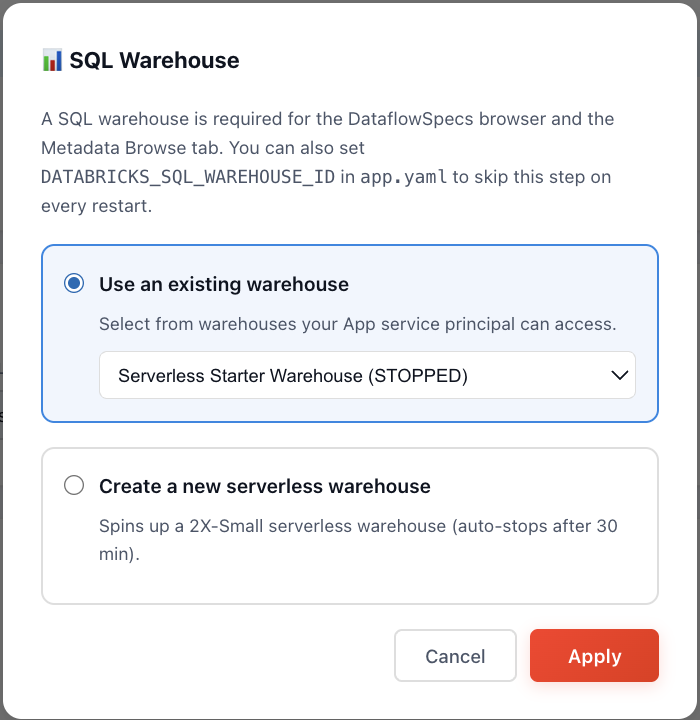
| 1 | Configure a SQL warehouse (use existing, or create a 2X-Small serverless one) | Top-bar Warehouse chip |
| 2 | Verify the App SP has USE_CATALOG + CREATE_SCHEMA on your catalog | Demos → Test App access |
| 3 | Pick your onboarding mode | Onboarding → mode radio |
To persist the warehouse across redeploys, copy its ID from the success
message into databricks_app/app.yaml:
env:
  - name: DATABRICKS_SQL_WAREHOUSE_ID
    value: "<warehouse-id>"
Top bar
| Element | Action |
|---|---|
| Docs | Opens docs site (new tab) |
| GitHub | Opens repo (new tab) |
| Warehouse chip | Configure / inspect SQL warehouse. Green = running, amber = stopped, grey = unset |
Clicking the Warehouse chip opens the picker, which lists every warehouse the App SP can see and lets you set the active one for the session (or persist it via DATABRICKS_SQL_WAREHOUSE_ID in app.yaml):
Step 1 — Onboarding
Output: bronze + silver *_dataflowspec rows in UC + a UC volume holding
copied JSON/DDL supporting files.
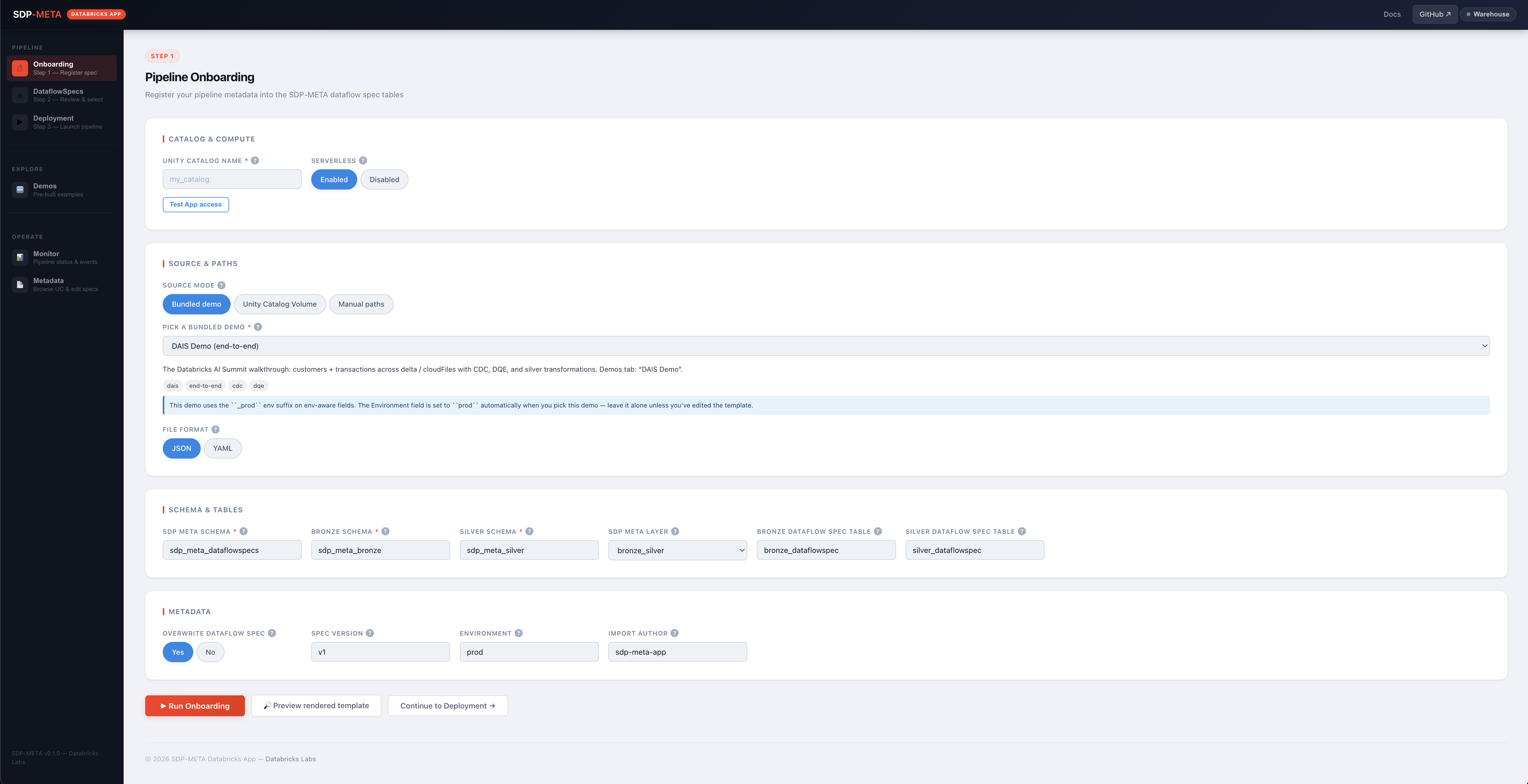
Mode picker
| Mode | Path source |
|---|---|
| Bundled demo | Dropdown of curated specs under demo/ |
| UC Volume | /Volumes/<cat>/<sch>/<vol>/<file> |
| Manual | Free-form path (repo-relative, workspace, or absolute) |
Bundled demo dropdown
Curated to only contain specs that onboard out-of-the-box with the default form values. Every entry below works on the first click; the picker hides any spec that would need external infrastructure (Event Hubs, Kafka, custom UC source tables) or multi-step orchestration.
| Demo | What it shows | Notes |
|---|---|---|
| Cars (default) | CSV → bronze cars + silver cars_usa | Simplest; start here |
| Multi-Source CDC | 3 regional Auto Loader sources (US / EU / APAC) → 3 bronze CDC tables | Best metadata-driven showcase |
| Silver Fanout | 1 CSV → bronze cars → 4 silver tables (cars_usa, _germany, _uk, _japan) | Single onboarding pass ¹ |
| Cloud Files | Streaming JSON → bronze + silver with row-filter UDF and DQE | Auto-merges the A2 customers_delta producer |
| DAIS Demo | Customers + transactions, CDC + DQE + silver transformations | Auto-sets Environment = prod ² |
¹ Fanout consumer rows omit source_details — the bronze pass skips them so the silver pass picks them up.
² The template uses _prod field suffixes.
Form fields
| Field | Req? | Notes |
|---|---|---|
| Unity Catalog enabled | ✓ | Always on (the App is UC-only); toggle is legacy |
| Unity Catalog name | ✓ | Identifier-validated |
| Onboarding file path | ✓ | Auto-populated by the mode picker |
| SDP-META schema | ✓ | Holds DataflowSpec tables (created if missing) |
| Bronze / Silver schema | ✓ | Created if missing |
| Layer | ✓ | 1 = bronze only · 2 = bronze + silver |
| Environment | ✓ | Must match the <field>_<env> suffix in the template, or every row is silently skipped |
| Bronze / Silver table | Defaults to bronze_dataflowspec / silver_dataflowspec | |
| Local directory | Where supporting JSON / DDL live (default <repo>/demo/) | |
| Overwrite | Replaces existing DataflowSpec rows | |
| Serverless | Submit job to serverless cluster |
Preview button (recommended)
Dry-run. No side effects. Surfaces:
- Rendered template (post
{uc_volume_path}/{uc_catalog_name}/{bronze_schema}/{silver_schema}substitution) - Env-suffix mismatch warnings (catches the #1 silent-failure mode)
- Per-file existence check for every DQE/DDL/transformation path
Submit
POST /onboarding → mints a job token → spawns sdp-meta onboard_ui →
frontend streams logs. On success, a View DataflowSpecs → CTA navigates
to Step 2 with values pre-filled and the query already run.
Step 2 — DataflowSpecs
Output: lets you read back the rows onboarding wrote and pick a
data_flow_group to deploy.
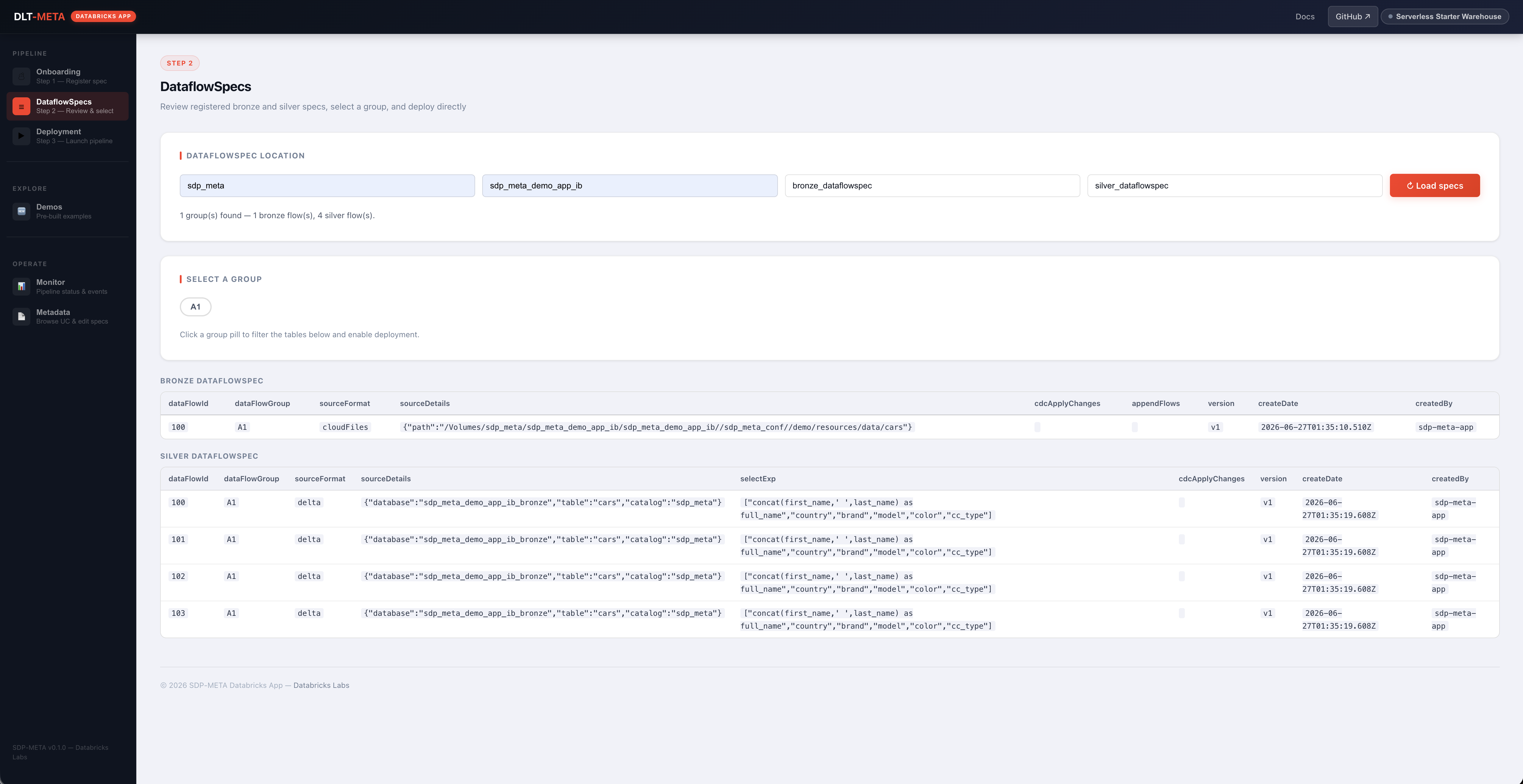
| Element | Behavior |
|---|---|
| 4 input fields (catalog / schema / bronze table / silver table) | Auto-filled when arriving from Onboarding |
| Load DataflowSpecs | GET /api/dataflowspecs — runs SELECT * in parallel against both tables |
| Group pills | Click to filter both tables to one data_flow_group |
| Bronze / Silver grid | Full DataflowSpec rows (scroll horizontally) |
| Deploy this group → CTA | Appears once a group is selected. Navigates to Deployment with everything pre-filled including the group(s) |
Common errors: TABLE_OR_VIEW_NOT_FOUND (run onboarding first), no warehouse
configured (top-bar chip).
Step 3 — Deployment
Output: a Lakeflow Spark Declarative Pipeline tagged sdp_meta=<version>.
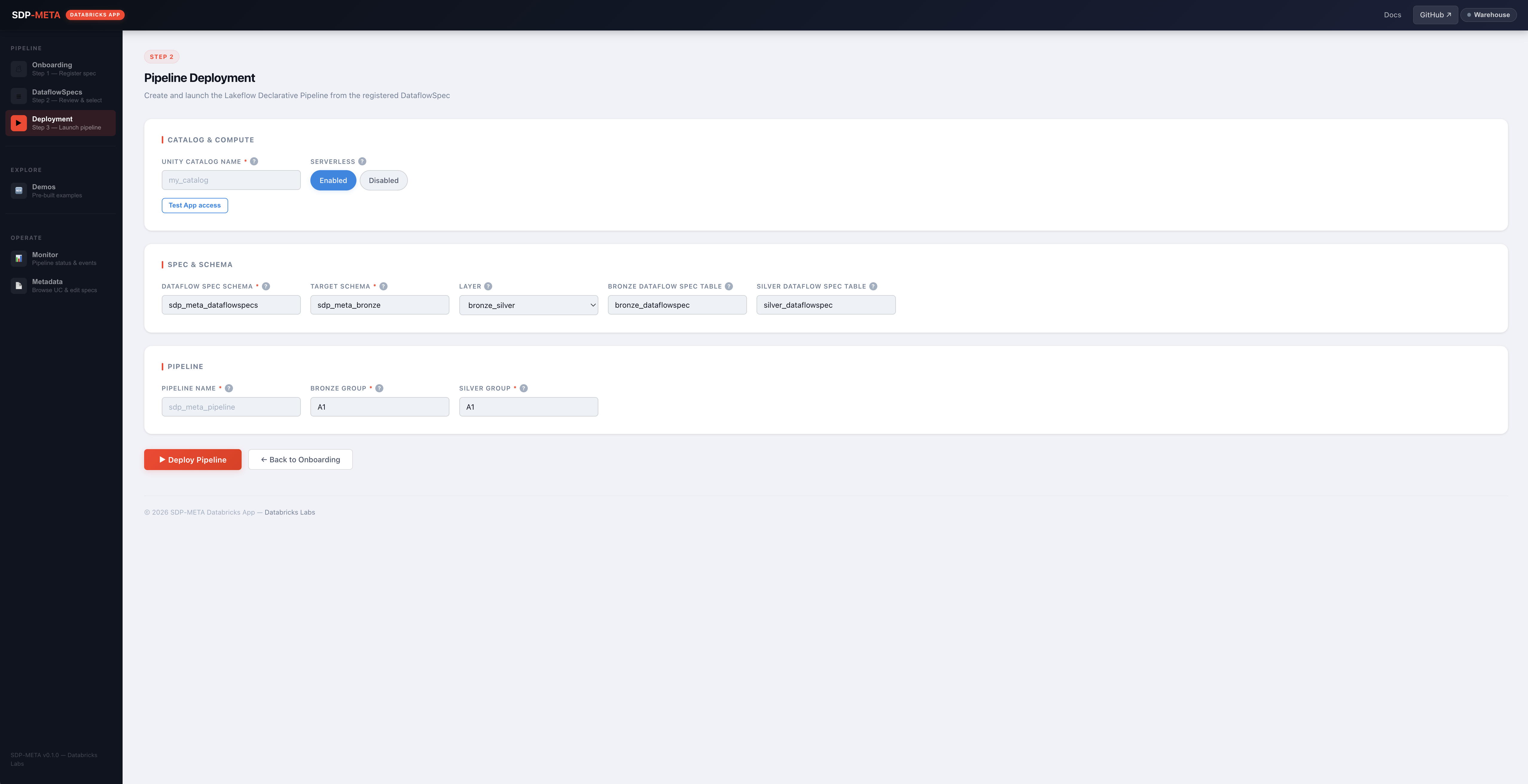
Fields
| Field | Notes |
|---|---|
| Pipeline name | Required |
| Unity Catalog name | Required (UC mode) |
| DataFlow Spec schema | Schema containing bronze/silver *_dataflowspec |
| Bronze / Silver DataflowSpec table | Defaults match Step 1 |
| Layer | bronze_silver (default — ingest + transform in one pipeline) / bronze / silver. Drives which group(s) are required |
| Bronze group | Required when layer ∈ {bronze, bronze_silver} |
| Silver group | Required when layer ∈ {silver, bronze_silver} |
| Target schema | Auto-syncs from layer when blank |
| Serverless | Submit as serverless pipeline |
Submit
Same machinery as Onboarding: token + log streaming. On success, the modal includes the workspace URL of the new pipeline.
Monitor
Output: all SDP-META pipelines in the workspace, with start/stop + events + click-through to the Databricks UI.
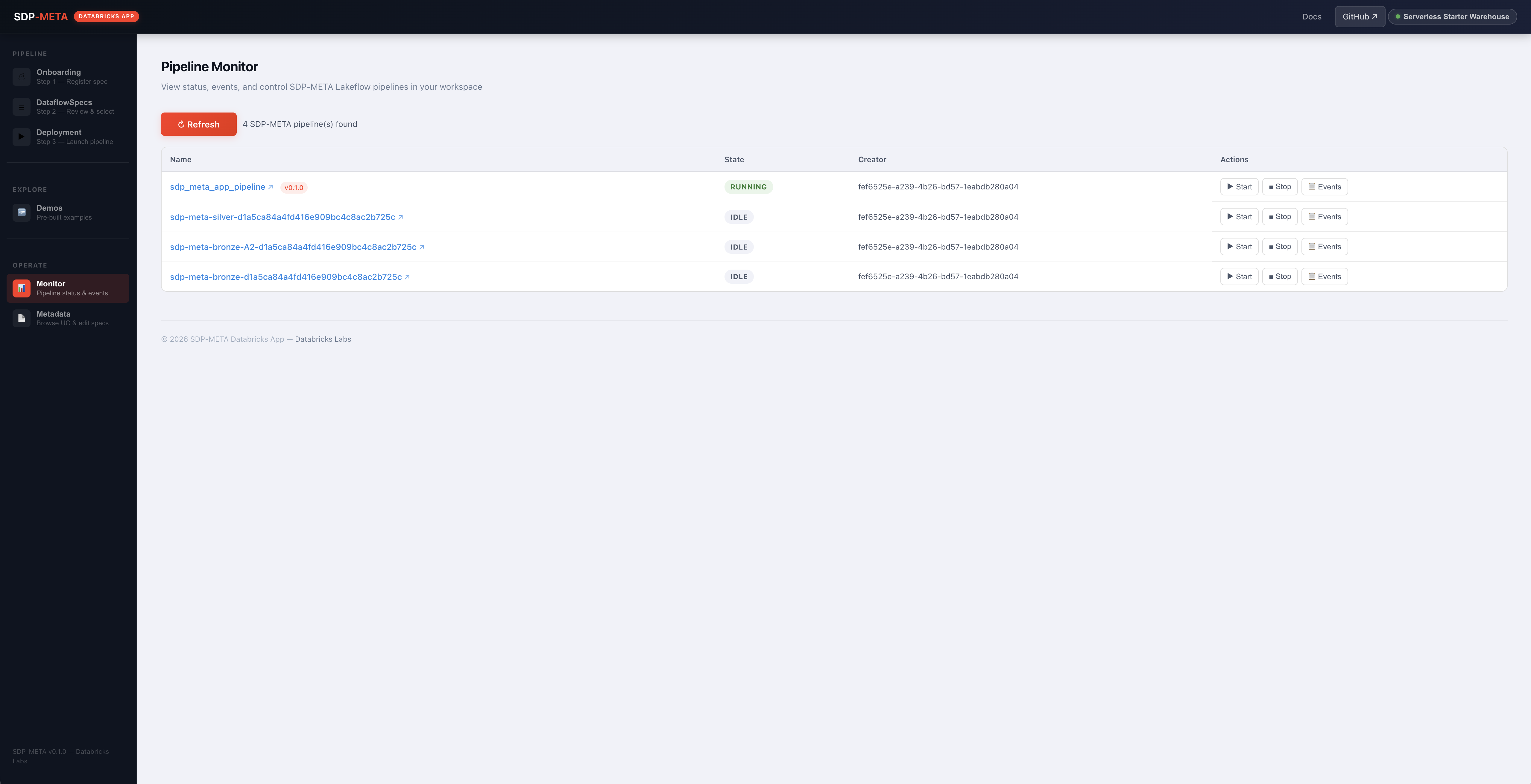
Filter
A pipeline is shown if either:
- Tag
sdp_meta=<any-non-empty-value>(includes legacysdp_meta=true) configurationcontains any ofbronze.dataflowspecTable,silver.dataflowspecTable,bronze.group,silver.group
Columns
| Column | Content |
|---|---|
| Name | External link (↗) to <host>/pipelines/<id> + version chip (e.g. v0.1.0) |
| State | IDLE / RUNNING / FAILED / STOPPED badge |
| Creator | Owning principal |
| Actions | Start / Stop / Events (in-app drawer with last 50 events) |
Falls back to the in-app events drawer on the name click if the workspace host can't be resolved.
Metadata
Two tools share this panel.
UC browse
Cascading dropdowns: Catalog → Schema → Table. Picking a table runs
SELECT * ... LIMIT N (max 1000) with an optional WHERE clause via the
Statement Execution API.
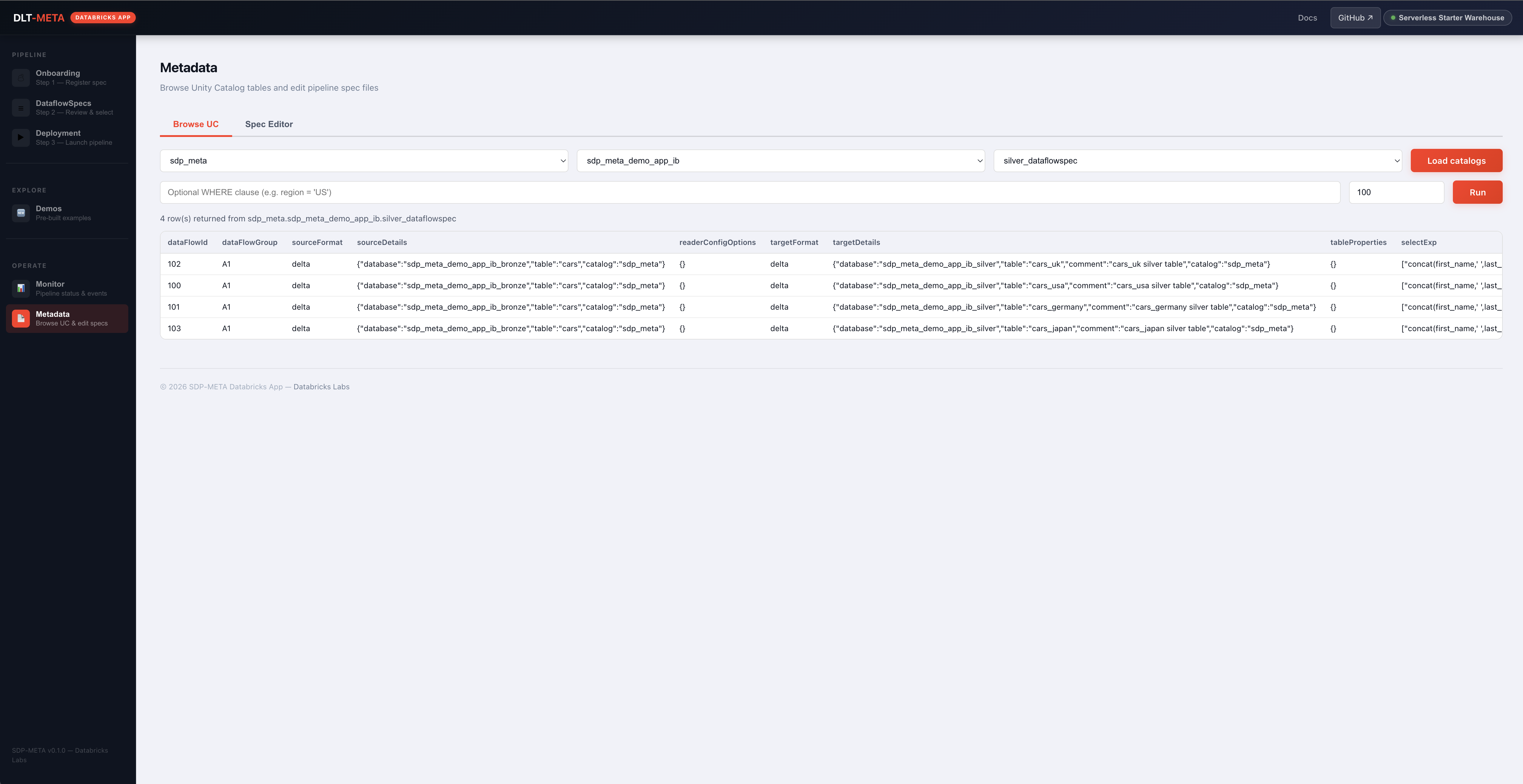
Spec editor
| Action | Endpoint | Notes |
|---|---|---|
| List workspace path | GET /api/metadata/workspace-ls | |
| Load file | GET /api/metadata/workspace-file | JSON / YAML auto-detected |
| Save file | POST /api/metadata/workspace-file | Parse-validates before writing |
| Validate | POST /api/metadata/parse-spec | 3-layer (see below) |
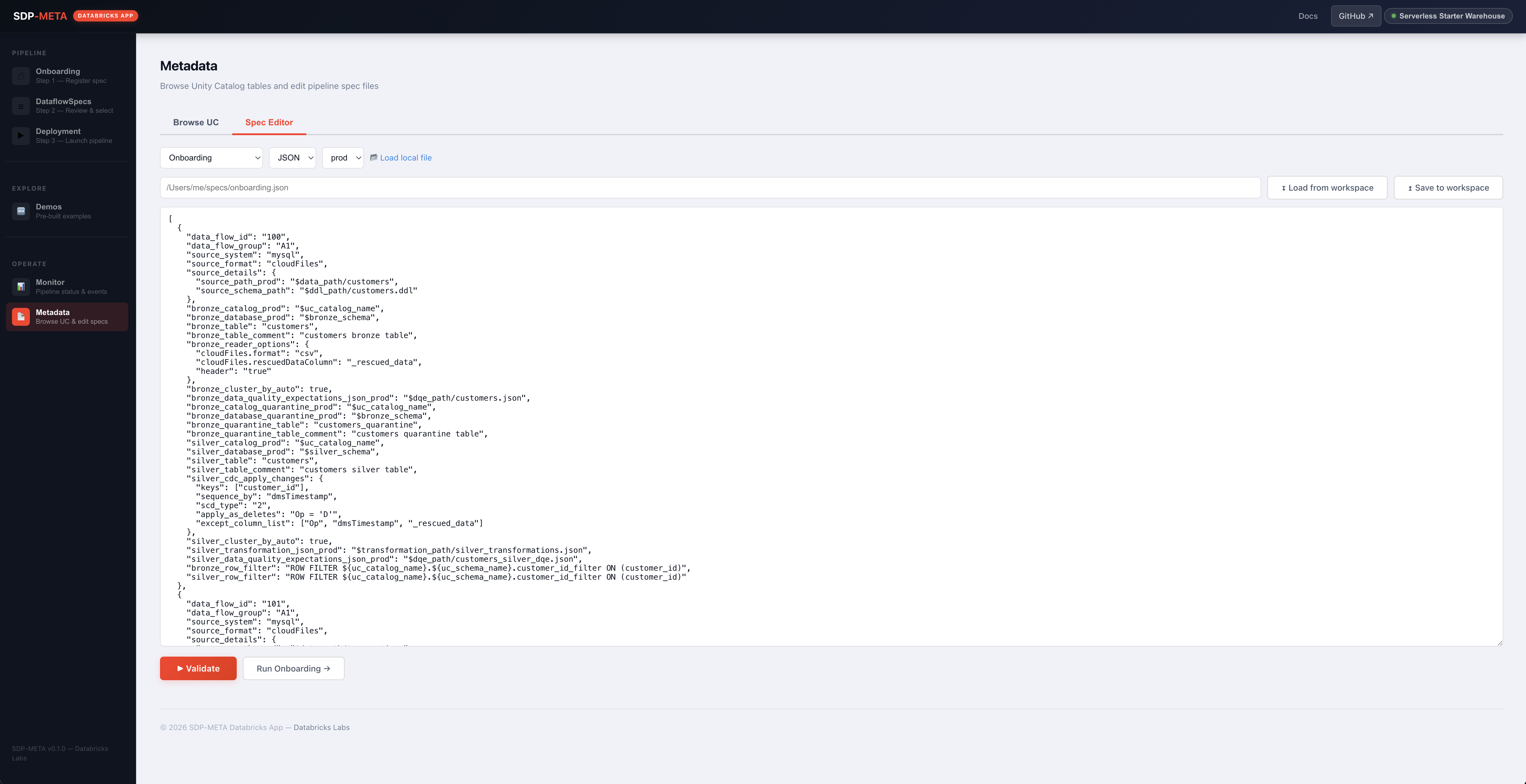
Three-layer validation
| Layer | Catches | Runs when |
|---|---|---|
| 1 — Syntax | JSON / YAML parse | Always |
| 2 — Semantics | UC identifiers, source format, CDC scd_type, DQE actions, silver transformation shape | sdp-meta wheel installed (always in App container) |
| 3 — File refs | DQE / DDL / transformation paths | Surfaced as warnings only — Spark required to verify |
Supported spec_type: onboarding, dqe, silver_transform.
Demos
Click Test App access first — every demo subprocess re-runs the preflight and a missing grant returns the GRANT SQL you need.
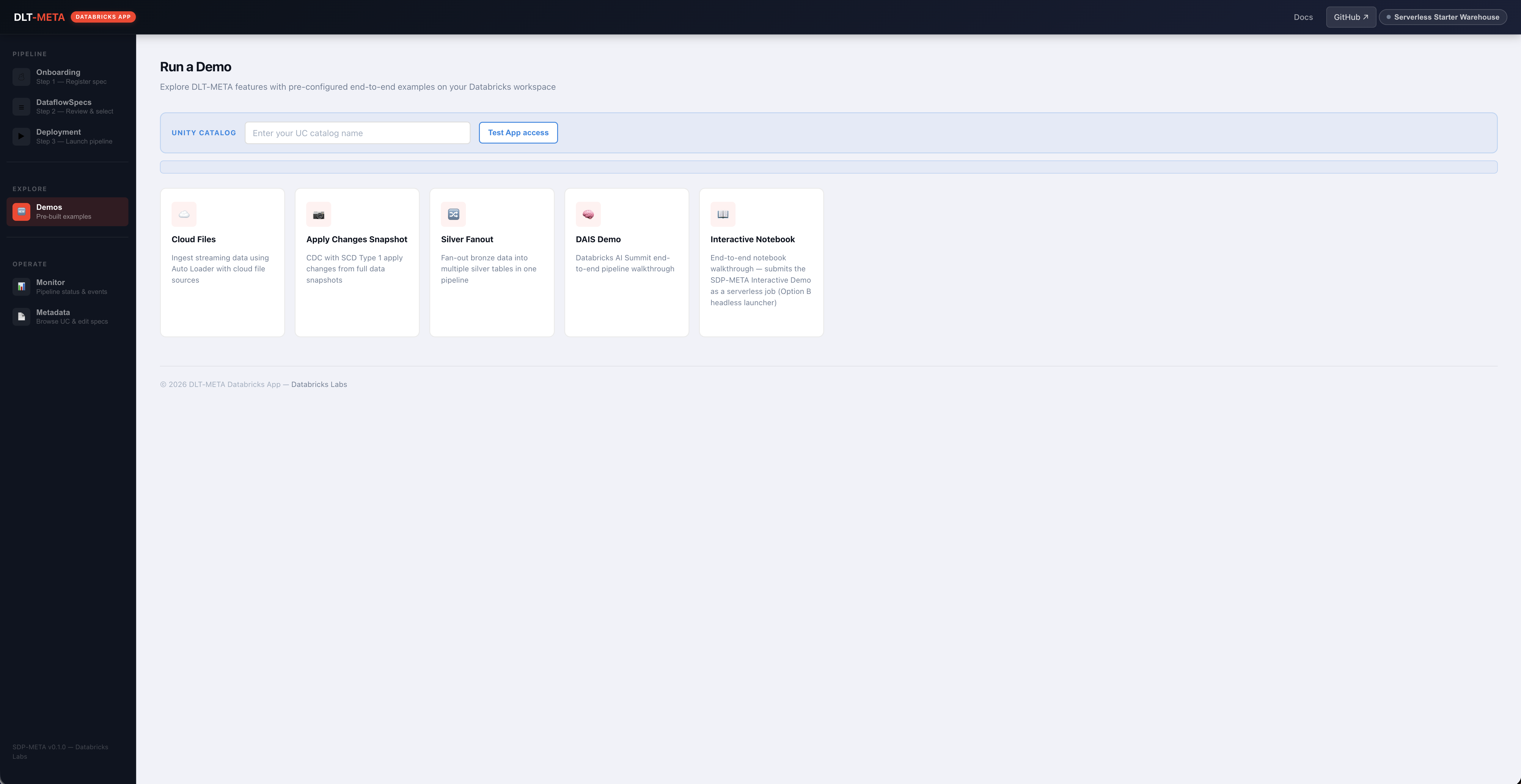
| Demo | What it runs |
|---|---|
| Cloud Files | Auto Loader + a row_filter UDF |
| Apply Changes Snapshot | CDC SCD Type 1 from snapshots |
| Silver Fanout | One bronze → many silver |
| DAIS Demo | DAIS end-to-end walkthrough |
| Interactive Demo | Submits SDP_META_INTERACTIVE_DEMO notebook as a 1-step job; pip installs databricks-labs-sdp-meta from PyPI on every launch |
DLT Sink (Kafka/Event-Hubs wiring not available to the App SP) and DABs (Terraform not in the container). Both still work from a local CLI.
App SP permissions
Full grant list, SP naming convention, and ready-to-paste SQL template live in databricks_app/README → App service principal permissions.
In-app check: Demos → Test App access calls
GET /check-uc-grants?uc_name=<cat> and returns the exact GRANT SQL
when a grant is missing (the SP can't grant privileges to itself).
Troubleshooting
| Symptom | Cause | Fix |
|---|---|---|
| Onboarding succeeds but DataflowSpec tables are empty | environment field doesn't match the template's <field>_<env> suffix | Click Preview — env_warning names the right suffix |
TABLE_OR_VIEW_NOT_FOUND on DataflowSpecs load | Onboarding not yet run for this catalog/schema | Run onboarding |
| "No SQL warehouse configured" | Step 1 of first-time setup not done | Top-bar Warehouse chip |
| Monitor shows zero pipelines after deploy | Pipeline created outside the App lacks the sdp_meta tag | Use sdp-meta deploy_ui — it tags automatically |
| Monitor name click opens events drawer instead of new tab | Backend couldn't resolve ws.config.host | Local only — set DATABRICKS_HOST or ~/.databrickscfg.host |
| "Demo notebook source not found" (Interactive Demo) | App deployed with raw databricks sync instead of scripts/deploy_app.sh / deploy_app.ps1 | Redeploy with the script |
App crashes on first Windows deploy: bad interpreter: /bin/bash\r or \r: command not found | Windows git's default core.autocrlf=true checked out start.sh with CRLF and the Linux App container can't execute it | Use scripts/deploy_app.ps1 (auto-strips CRLF) or run git add --renormalize . && git commit after pulling the repo's .gitattributes. Details: WINDOWS_DEPLOY.md → Troubleshooting |
| Demo modal shows "Grant required" panel | App SP missing UC grants | Copy/paste GRANT SQL, run as catalog owner, retry |
| "Required fields missing" 400 | Form bypassed client-side check | Fill the named fields |
| "Could not render template after substitution" on Preview | Substitution value broke YAML indentation / had unescaped quotes | Sanitize the catalog / schema / volume name |
| Job log stream stops | Subprocess died | GET /api/job/<token>/logs returns {done:true} on exit; check App stdout for traceback |
See also
- databricks_app/README on GitHub — deploy, local dev, auth
- databricks_app/WINDOWS_DEPLOY.md — native PowerShell deploy script + Windows-specific troubleshooting
- databricks_app/UI_GIT_DEPLOY.md — click-only Apps UI + Git folder deploy (no CLI)
- Getting Started — overall onboarding workflow
- CLI reference — same flows from the terminal